Hive OS update drivers for AMD and Nvidia graphics cards
The operating system Hive OS, popular among miners, is built on the basis of Linux, therefore, it includes drivers for this operating system, which must be updated from time to time. For mining on video cards, updating the drivers may be relevant, because newer versions of miners may not support old versions of drivers, stability of work or even hashrate in mining increases. Owners of new graphics cards will definitely need a driver update, for example, Nvidia RTX 3000 series graphics cards and AMD RX 6000 series graphics cards, which were released recently. Moreover, updating the HiveOS itself via the Web interface does not mean that the drivers for video cards will also be updated.
In our case, HiveOS version 0.6-182@201214 is installed (for December 14, 2020) with the available version for December 24. The driver for Nvidia video cards costs version 440.31 for November 4, 2019, i.e. the driver in Hive OS has not been updated for over a year.
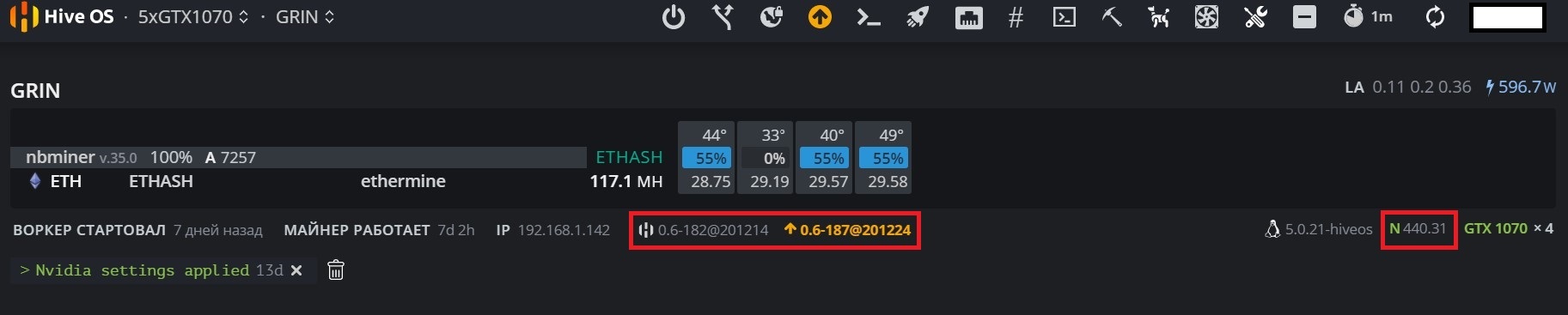
Let’s update Hive OS to the latest version and make sure that the driver for the video cards remains unchanged. Only the NBminer miner version has changed from 35.0 to 35.2

Updating the graphics card driver in Hive OS
1 Updating AMD and Nvidia drivers
The easiest and most reliable way is to overwrite the Hive OS image on a USB flash drive with new drivers for AMD and Nvidia video cards. The latest stable image of Hive OS can be found on the official website in the Downloads section
How to write an image of the operating system to a USB flash drive can be read in this material
But this method has one significant drawback — it is a rare update. So at the moment, the version hiveos-0.6.172@201105 for November 5, 2020 is available for downloading the image. Those. the assembly proposed for writing an image to a USB flash drive contains drivers at least two months old.
Therefore, we will consider the second option for those who want to have the latest drivers in their rig or who do not have direct access to the mining rig in order to overwrite the image to the Flash drive.
2 Updating Nvidia driver in HiveOS operating system
HiveOS has a built-in driver update feature for Nvidia graphics cards. To use it, you need to go to the Web interface for managing the mining rig and launch Teleconsole
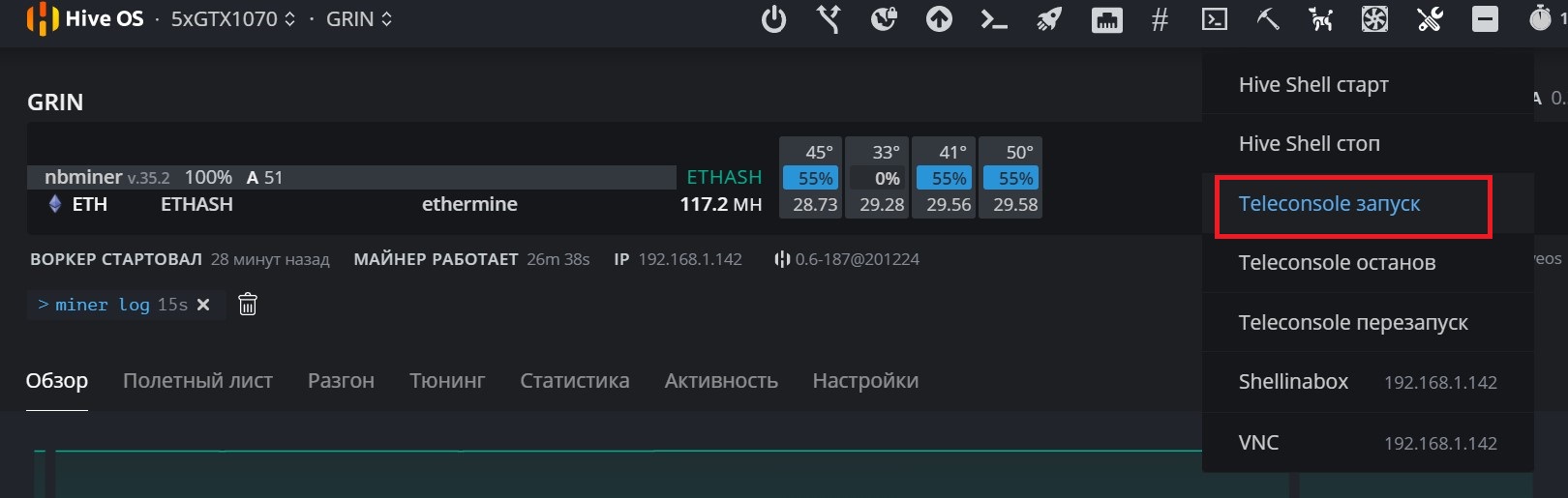
We are waiting for the Teleconsole setup process to finish, then click on Teleconsole in the line of executed commands

In the window that opens, click on the created link
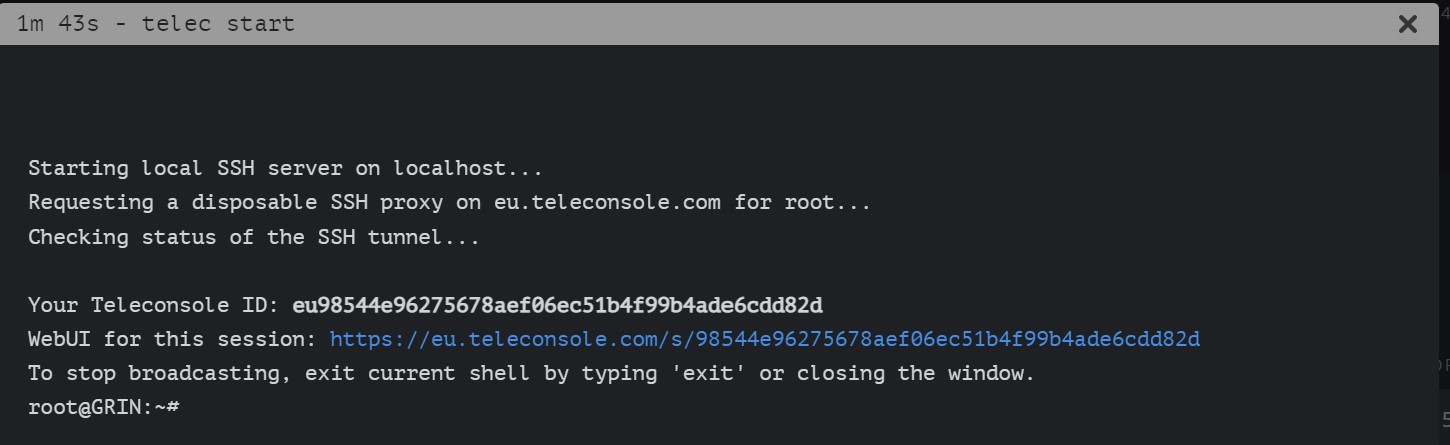
A separate window opens, wait for the «root@NameRig» command line to load and enter the command
| nvidia-driver-update —list |
The list of available driver versions is loaded:
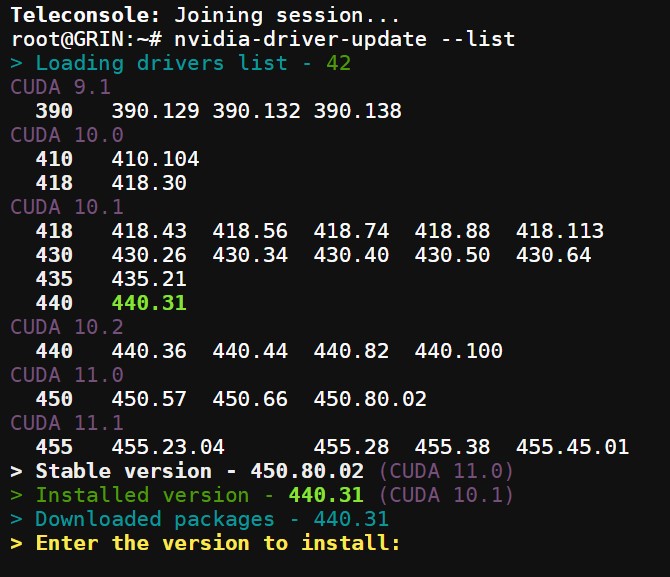
Here you can select any available version of the Nvidia driver to update, then press Enter and the video drivers will start updating
If the driver version you need is not in the list, then you can specify in the command the URL for downloading and installing the required driver version, for example, http://download.hiveos.farm/drivers/NVIDIA-Linux-x86_64-392.61.run
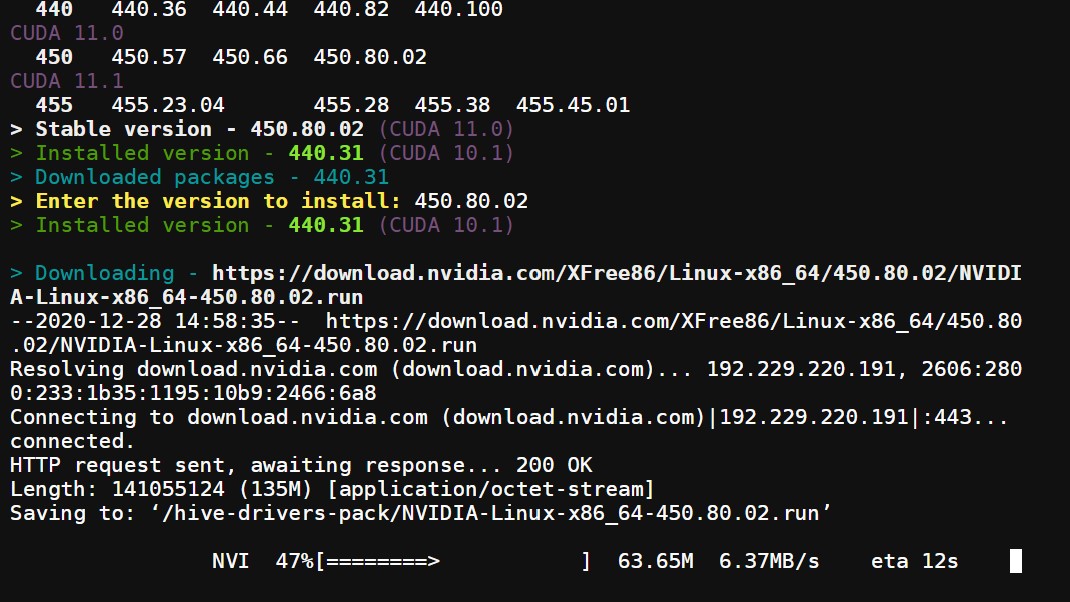
Next, you are asked to remove the previous drivers or not. Type the command Yes and press Enter
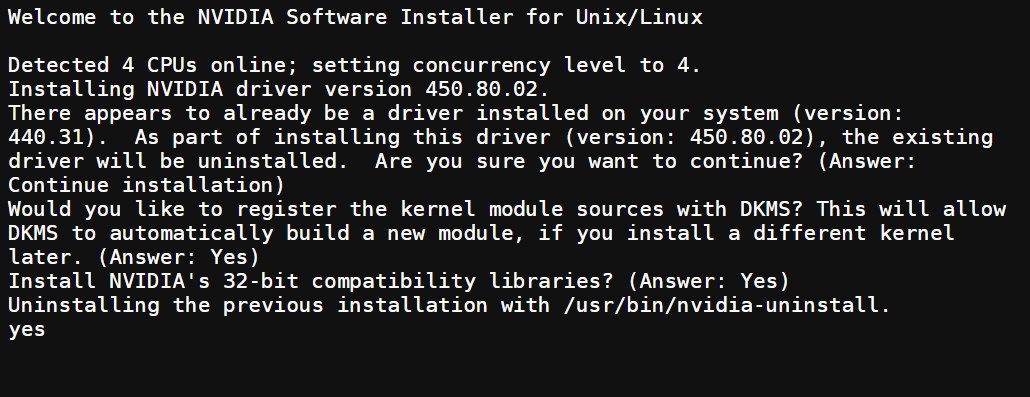
Wait until the new drivers are installed until the «ROOT @» command line appears
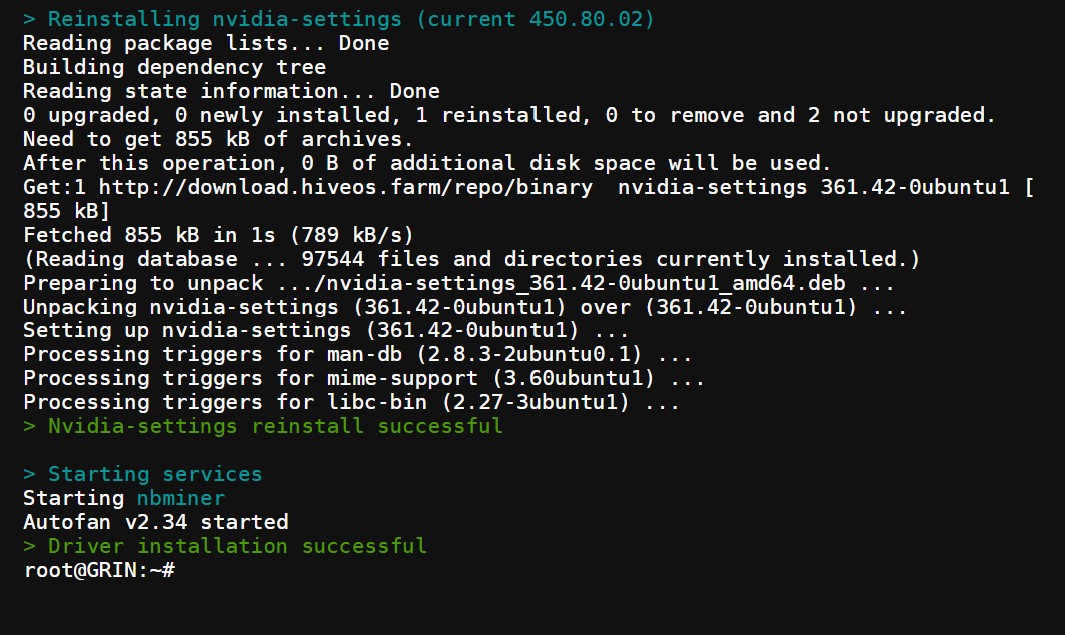
Type EXIT to end your mining rig console session.
Now your mining rig will work with the new driver version

3 Updating AMD driver in HiveOS
First, just like updating Nvidia drivers, you need to run Teleconsole
In the command line, specify the command to download the AMD Installer
| wget https://raw.githubusercontent.com/CryptoLuigi/AMD_installer/master/amd_install.sh |
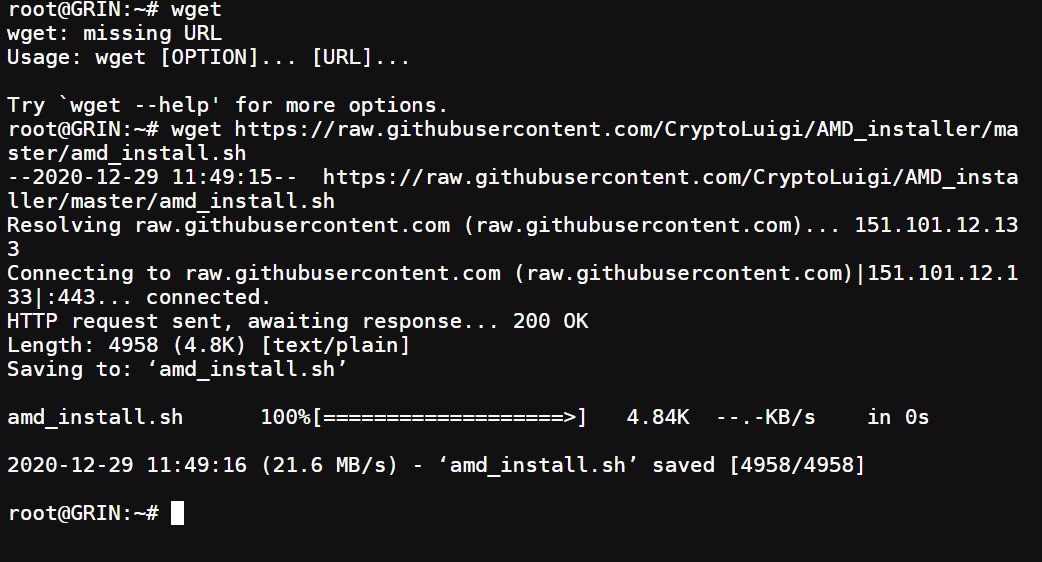
Next, you need to allow access to run the program using the command:
| chmod +x ./amd_install.sh |
Only after that you can run the command itself to update the AMD video drivers in HiveOS
| ./amd_install.sh |
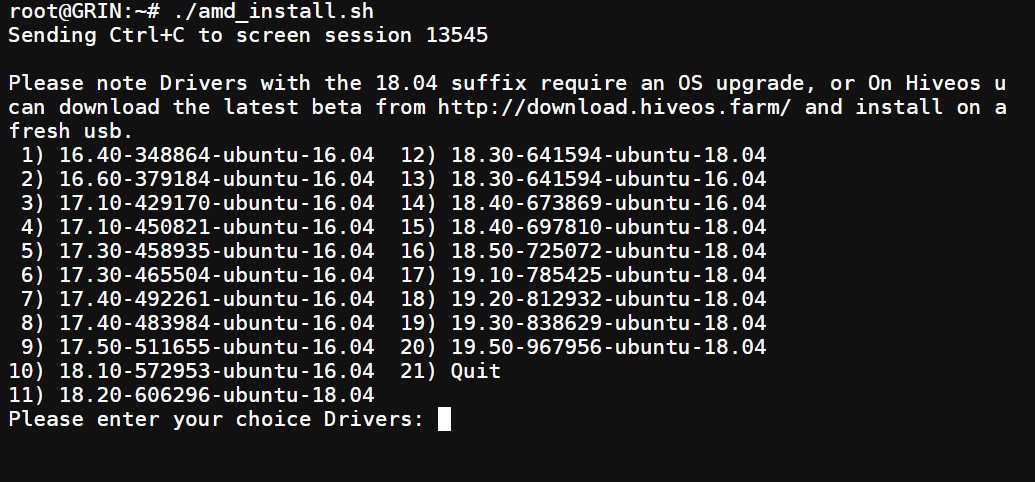
From the list provided, specify the serial number of the driver, for example, 20 and press Enter
After installing the new AMD driver, use the Exit command to exit the console.
Conclusion: when using HiveOS as an operating system for mining rigs, periodically update the drivers for AMD and Nvidia video cards so that the equipment works more stable and efficiently, especially if you are the owner of new models of video cards.
Subscribe to our Telegram channel @cryptoage_com, be the first to know the news about cryptocurrencys.
Chat with crypto enthusiasts and miners in Telegram @CryptoChat
The best exchanges to buy and exchange cryptocurrencies, tokens:
The largest and most famous cryptocurrency exchange in the world. Reliability and functionality at the highest level.
One of the oldest crypto exchanges in the world. Founded in 2013. Ranks 3rd in terms of trading volume. Maximum possible functionality and reliability.
New, but already popular exchange due to favorable promotions, low commissions and the rapid addition of new cryptocurrencies.
Hive OS обновление драйверов для видеокарт AMD и Nvidia
Популярная среди майнеров операционная система Hive OS построена на основе Linux, поэтому включает в себя драйвера для этой операционной системы, которое время от времени необходимо обновлять. Для майнинга на видеокартах обновление драйверов может быть актуально, т.к. новые версии майнеров могут не поддерживать старые версии драйверов, увеличивается стабильность работы или даже хешрейт в майнинге. Так же обновление драйверов обязательно понадобится владельцам новых видеокарт, например, видеокарт Nvidia RTX 3000 серии и видеокарт AMD RX 6000 серии, которые вышли совсем недавно. Причем обновление самой HiveOS через Web интерфейс не означает, что драйвера для видеокарт так же обновятся.
В нашем случае установлен HiveOS версии 0.6-182@201214 (за 14 декабря 2020 года) при доступной версии за 24 декабря. Драйвер для видеокарт Nvidia стоит версии 440.31 за 4 ноября 2019 года, т.е. драйвер в Hive OS не обновлялся более года.
Обновим Hive OS до последней версии и убедимся, что драйвер для видеокарт остался без изменений. Изменилась только версия майнера NBminer с 35.0 до 35.2
Обновление драйвера видеокарт в Hive OS
1 Обновление драйверов AMD и Nvidia
Самый простой и надежный способ это перезаписать образ Hive OS на флешку сразу с новыми драйверами для видеокарт AMD и Nvidia. Последний стабильный образ Hive OS можно найти на официальном сайте в разделе Downloads
Как записать образ операционной системы на флешку можно прочитать в этом материале
Но у этого способа есть одни существенный недостаток- это редкое обновление. Так на текущий момент для скачивания образа доступна версия hiveos-0.6.172@201105 за 5 ноября 2020 года. Т.е. сборка предлагаемая для записи образа на флешку содержит драйвера минимум двухмесячной давности.
Поэтому рассмотрим второй вариант для тех кто хочет иметь на своем риге самые последние драйвера или у него нет прямого доступа к майнинг ригу, что бы перезаписать образ на Flash накопитель.
2 Обновление драйвера Nvidia в операционной системе HiveOS
В HiveOS доступна встроенная функция обновления драйверов для видеокарт Nvidia. Что бы ею воспользоваться нужно зайти в Web интерфейс управления майнинг ригом и запустить Teleconsole
Ждем когда закончится процесс настройки Teleconsole, далее нажимаем по Teleconsole в строке выполненных команд
В открывшемся окне нажимаем по созданной ссылке
Открывается отдельное окно, ждем пока загрузиться командная строка «root@NameRig» и вводим команду
| nvidia-driver-update —list |
Загружается список доступных версий драйверов:
Здесь можно выбрать любую доступную версию драйвера Nvidia для обновления, после чего нажать Enter и начнется обновление видео драйверов
Если в списке нет нужной Вам версии драйвера, то можно указать в команде URL для скачивания и установки необходимой версии драйвера, например, http://download.hiveos.farm/drivers/NVIDIA-Linux-x86_64-392.61.run
Далее Вас просят удалить или нет предыдущие драйвера. Наберите команду Yes и нажмите Enter
Дождитесь установки новых драйверов пока не появится командная строка «ROOT@»
Наберите команду EXIT, что бы завершить сеанс работы с консолью вашего майнинг рига.
Теперь Ваш майнинг риг будет работать с новой версией драйверов
3 Обновление драйвера AMD в HiveOS
Вначале так же как и для обновления драйверов Nvidia нужно запустить Teleconsole
В командной строке указать команду на скачивание программы AMD Installer
| wget https://raw.githubusercontent.com/CryptoLuigi/AMD_installer/master/amd_install.sh |
Далее нужно разрешить доступ для запуска программы с помощью команды:
| chmod +x ./amd_install.sh |
Только после этого можно запустить саму команду на обновление видео драйверов AMD в HiveOS
| ./amd_install.sh |
Из представленного списка укажите порядковый номер драйвера, например, 20 и нажмите Enter
После установки нового драйвера AMD, укажите команду Exit, что бы завершить работу консоли.
Вывод: при использовании HiveOS в качестве операционной системы для майнинг ригов периодически обновляйте драйвера видеокарт AMD и Nvidia, что бы оборудование работало более стабильно и эффективнее, особенно если вы владелец новых моделей видеокарт.
Подпишись на наш Telegram канал @cryptoage и Вконтакте, узнавай новости про криптовалюты первым.
Общайся с криптоэнтузиастами и майнерами в Telegram чате @CryptoChat
Лучшие биржи для покупки и обмена криптовалют, токенов:
Самая крупная и известная крипто биржа в мире. Надежность и функционал на самом высшем уровне.
Одна из старейших крипто бирж в мире. Основана в 2013 году. Занимает 3 место по объему торгов. Максимально возможный функционал и надежность.
Новая, но уже популярная биржа за счет выгодных акций, низких комиссий и быстрого добавления новых криптовалют.
AMD drivers installation
Script for the easy installation of AMD Drivers on Hiveon OS/Ubuntu based OS: https://github.com/CryptoLuigi/AMD_Installer.
Hiveon OS AMD driver
Please note: Drivers with the 18.04 suffix require an OS upgrade.
Please note: We recommend not to remove drivers when upgrading.
AMD driver update Hiveon OS
root@Miner:~# ./amd_install.sh Stopping screen session 21798 Please note Drivers with the 18.04 suffix require an OS upgrade 1) 16.40-348864-ubuntu-16.04 10) 18.10-572953-ubuntu-16.04 2) 16.60-379184-ubuntu-16.04 11) 18.20-606296-ubuntu-18.04 3) 17.10-429170-ubuntu-16.04 12) 18.30-641594-ubuntu-18.04 4) 17.10-450821-ubuntu-16.04 13) 18.30-641594-ubuntu-16.04 5) 17.30-458935-ubuntu-16.04 14) 18.40-673869-ubuntu-16.04 6) 17.30-465504-ubuntu-16.04 15) 18.40-697810-ubuntu-18.04 7) 17.40-492261-ubuntu-16.04 16) 18.50-725072-ubuntu-18.04 8) 17.40-483984-ubuntu-16.04 17) Quit 9) 17.50-511655-ubuntu-16.04 Please enter your choice Drivers:
Then the program will ask if you want to remove current driver before installing new ones.
For a guided installation enter the following 3 commands:
chmod +x ./amd_install.sh
We’ve tested the script and it’s working. But please note it’s still in beta, so feel free to report issues and provide as many details as possible (like what you did recently and what you are running, and so on).
How to update AMD drivers Hiveon OS
Hiveon OS update AMD drivers
To update AMD drivers — upgrade your Hiveon OS image to the latest version. Updating AMD drivers separately is not recommended.
Drivers update
Users can use video cards from various manufacturers, so each miner can install any drivers for these cards. Let’s see how it works? Hiveon OS driver update.
Why should I update my drivers, and what does it do?
A driver update can bring mostly performance optimizations that may allow you to gain a few extra MH/s from your card or remove software LHR limitations. For new graphics cards, a driver update may be necessary for the card to be properly detected at all.
How often should I update my drivers?
If the worker is running stably, then you may not want to update the drivers at all. However, if you want to take advantage of new features, it’s worth doing an update once every few months. In Hiveon OS you can update the whole system image to the latest stable version with the command hive-replace -l and forget about the drivers. This way, you will also gain access to new system features and update the kernel.
For NVIDIA cards, however, if the version of drivers included with the system is not suitable for you, you can also update the drivers themselves. This is done with the nvidia-driver-update command, which we will describe in more detail later in this article. Let’s see how Hiveon OS update nvidia drivers.
Things to keep in mind
To install the HiveOS updates of NVIDIA/AMD drivers, you need to use one of the following options:
- Hive Shell
- SSH connection
- Teleconsole
- Physical access
For AMD
It is recommended perform AMD driver updates in conjunction with the Hiveon OS image update.
For NVIDIA
Starting from the version 0.5-70, we integrated a script into the operating system that makes it possible to install the most current and efficient NVIDIA drivers, which can be activated in two ways: using the Hiveon OS web interface or via an SSH connection:
To see the full list of versions available for updating, run the command nvidia-driver-update —list .
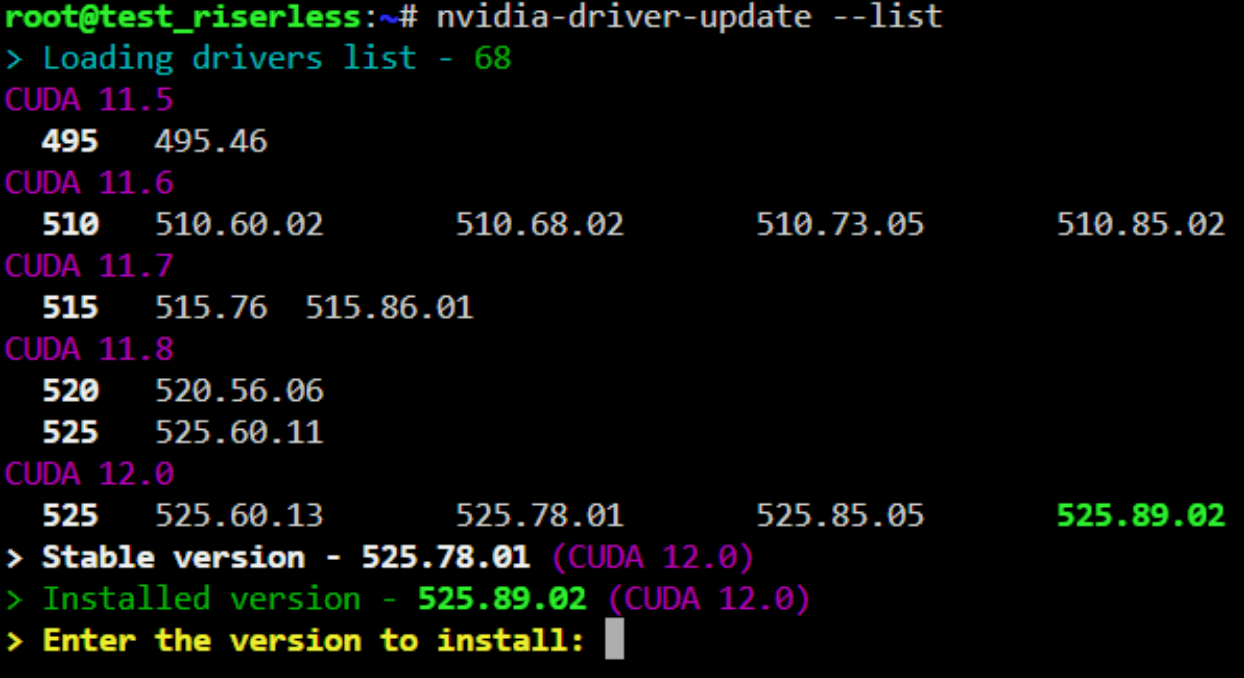
Here you can select the version you require from the available ones.
To install the required version, just enter the following command: nvidia-driver-update 495.46
Or simply specify a series of drivers, and Hiveon OS will install the newest available version from this series: nvidia-driver-update 495
If necessary, you can write the full address at which the archive with the driver software is located: nvidia-driver-update https://download.hiveos.farm/drivers/NVIDIA-Linux-x86_64-495.46.run
You can find drivers in the Software Collection at: https://download.hiveos.farm/drivers/.
Sometimes, after the update, the overclocking settings may not work. To return the previous functionality, you just need to write the following command: apt install —reinstall -y nvidia-settings
You shouldn’t have any issues here. In case of any error, you need to enter the command again — everything will work.
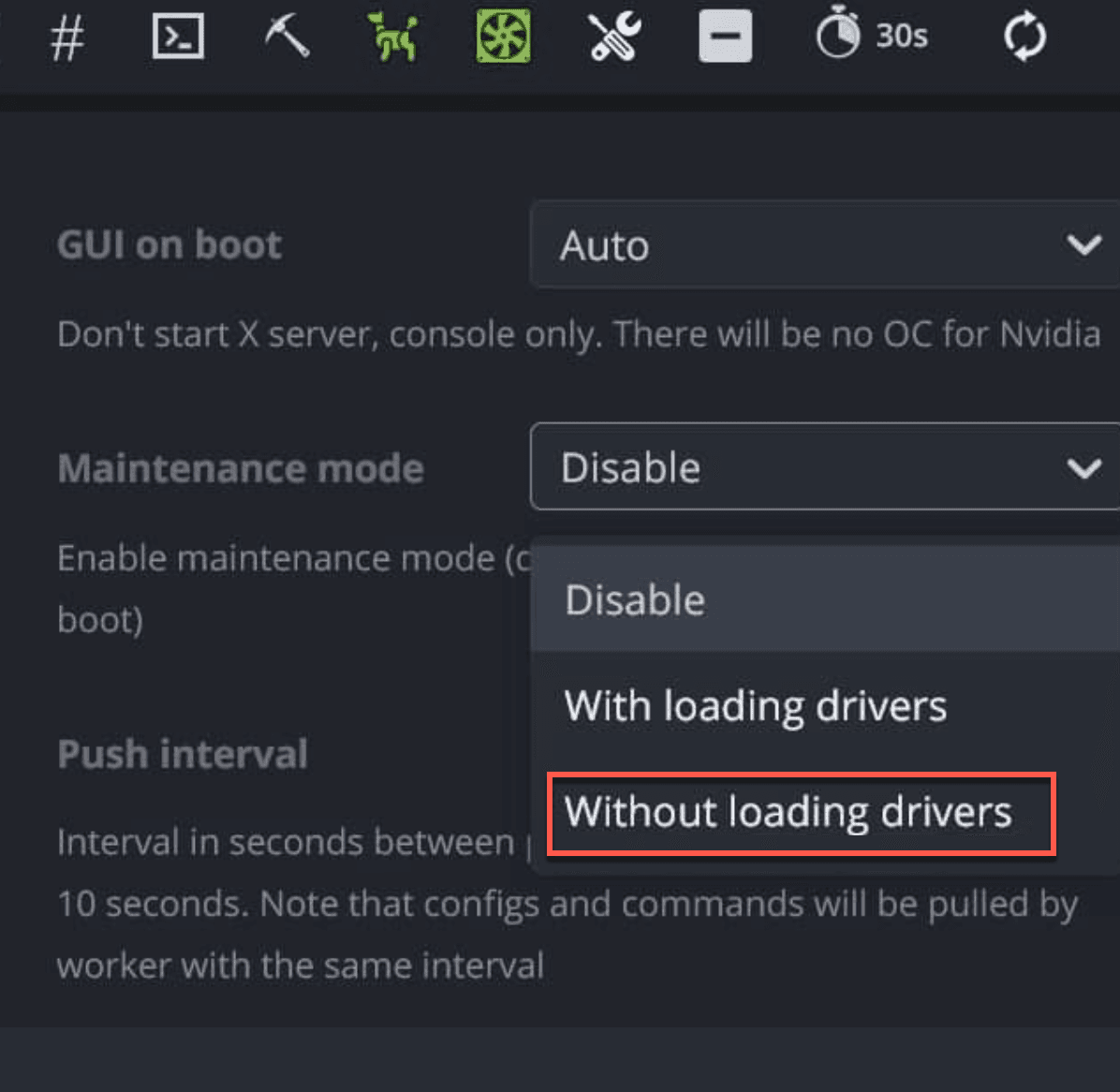
If it doesn’t work at all and you get errors like «Unload modules failed» (or something similar), you can try to enable maintenance mode without loading drivers, reboot and repeat the update procedure.
FAQ
How to update AMD drivers in Hiveon OS?
Hiveon OS updates come with new versions of AMD drivers. You can update the AMD drivers by updating the image to the version you want. You can find detailed instructions here. We do not recommend performing a HiveOS AMD driver update independently.
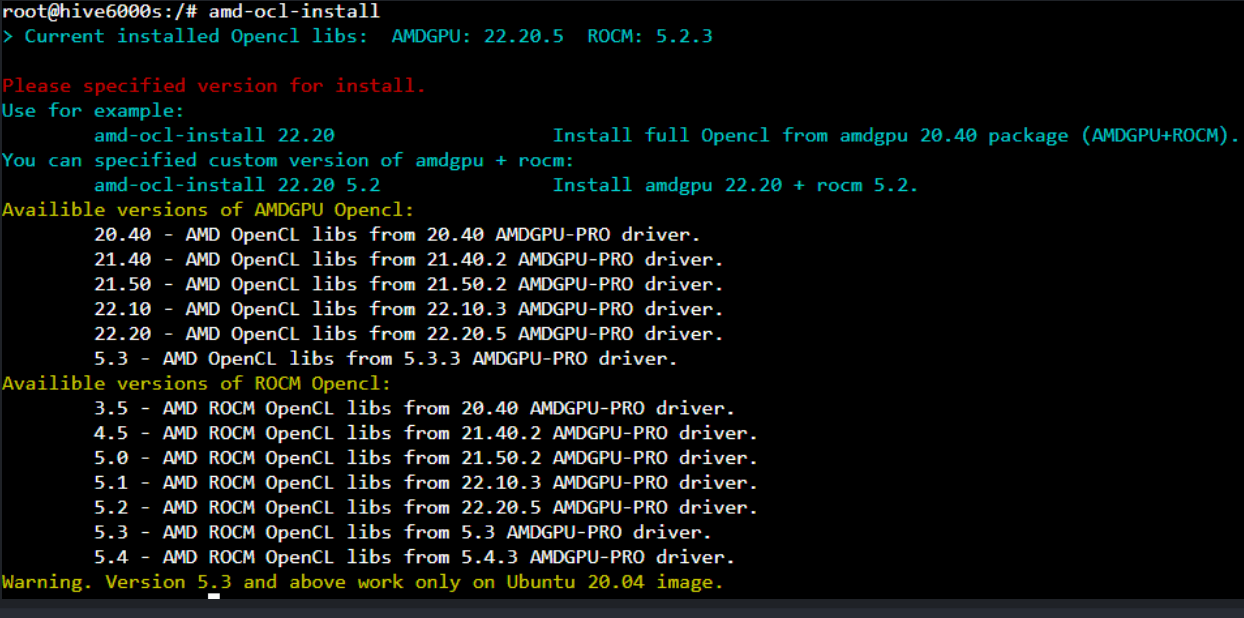
Starting with 06-220, a script was added to enable amd driver updates independent of the OS, running amd-ocl-install will give you a list of available AMD drivers to choose from:
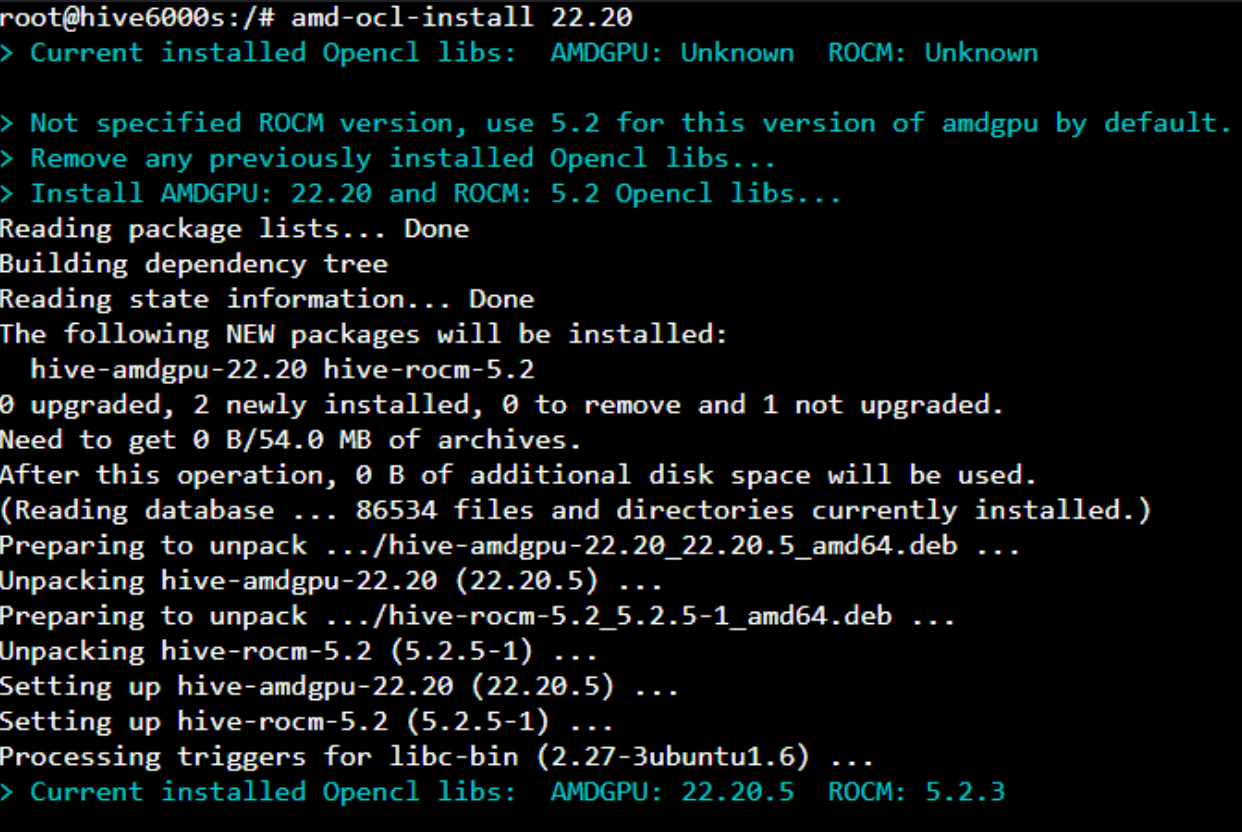
Running the command followed by a a driver version will install that version ex: amd-ocl-install 22.20
How to update NVIDIA drivers in Hiveon OS?
You can update NVIDIA drivers along with the Hiveon OS image, just like AMD, or independently to the selected version with the nvidia-driver-update —list command. If you’d like HiveOS to update NVIDIA drivers to the latest stable recommended version, you can just type the nvidia-driver-update command with no suffixes.
What are video card drivers?
Video card driver is a software that enables your computer to communicate effectively with your graphics card. Therefore, they are very important in cryptocurrency mining. They enable the GPUs to be detected and used for cryptocurrency mining. In Hiveon OS, we include them in the system image, so you don’t need to install them separately. The system also helps you update NVIDIA drivers separately with a simple, dedicated nvidia-driver-update command.