Support
Find answers, guides, and tutorials to supercharge your content delivery.
Categories
HTTP Port
Updated on February 4, 2021

In this guide, we’ll aim to explain everything you need to know about the HTTP port as you go forward in your networking journey!
IP addresses
When we discuss networking, IP address are often brought up. This is a sequence of numbers separated by dots that identify your computer to the world. Your computer has a public IP address that’s visible to the Internet. Additionally, it has a private IP address that is only visible to other machines on your Local Area Network (LAN).
Consider how many Internet-connected applications you use. For example, you probably are reading this right now in your web browser, you may have a mail client running, and countless other networked applications. This is where ports become important in networking.
Why use the HTTP port?
You can probably see the issue without using ports: we’d have all sorts of traffic flying around without a definitive destination. You can think of ports as virtual windows and your IP address as a building. Each port is designed to receive data of a specific format for a particular protocol.
This is how you’re able to run several applications connected to the Internet at the same time. Most popular protocols have reserved ports for themselves. For example, the HTTP port is always port 80 . These are always reserved for common protocols. If a developer makes an application utilize these ports for other purposes in their own applications, they run the risk of network communications failure.
UDP vs TCP ports
Before we dive into the list of reserved ports, there’s one more difference you’ll need to understand; this is the difference between UDP and TCP ports. User Datagram Protocol, also known as UDP, is used when there’s a huge amount of data to send, but it isn’t a big deal if a small amount of that data is missed by the recipient. Online streaming services often stream over UDP because much more data can be sent, but the recipient never verifies it got the data.
On the other hand, Transmission Control Protocol focuses on ensuring that the recipient gets every piece of data, also called packets. This protocol is used when every bit of data matters; for example, email uses this to ensure that the contents of messages is always verifiable. The client always acknowledges receipt of every single packet, and transmission of failed packets is always retried until it succeeds. While this is a slower way to transmit data, it’s guaranteed that the sender will know whether or not data was sent.
This is why you’ll see (TCP), (UDP), or (TCP/UDP) after each reserved port listing. This means that it can be used over either TCP or UDP. Note that the most modern version of HTTP, HTTP/3, is built on top of solely UDP in order to increase its speed, so our HTTP Port on modern devices will be UDP, but technically the port could operate on either TCP or UDP.
Our list only contains commonly utilized ports. Many low-numbered ports are still technically reserved but are not in common usage anymore. For example, port 8 used to be reserved for the quote of the day before Internet connections were common. However, now even most networking students would likely not be familiar with that port off-hand, and that’s completely fine!
Common ports, registered ports, and more
Generally speaking, ports numbered anywhere from 0 to 1023 are commonly known, reserved ports. That means that they’ve been used for the same program, protocol, or service for quite awhile. For example, as HTTP has been around for awhile, it’s simply port 80 . Likewise, the secure version, HTTPS, is on port 443 .
Ports numbered between 1024 and 49151 are called registered ports. This means that there is an official usage for most ports in this range. However, it’s less likely that these ports would be in usage on the average user’s machine than commonly known ports. They’re usually for specialized purposes and more likely to be used on corporate machines. Still, if you’re developing an application, you should not use these ports for anything other than their «registered» purposes.
Finally, we have unreserved ports. These run from 49152 through 65535 . These aren’t registered nor are they commonly used. Some textbooks and sites refer to these as ephemeral ports because they’re often temporarily utilized by applications to transfer data.
Why do port numbers end with 65535 ? They are technically 16-bit numbers. Since a bit is binary and can have a 0 or 1 value, there are two possible values for each bit in a sequence. To calculate the number of available ports, we would just count 2 to the sixteenth power (multiply the number 2 by itself 16 times). However, because ports are zero-indexed (they start with the number 0 rather than 1 ), we subtract 1. This works out to be 65535 .
The most important ports to know
The HTTP port isn’t the only common, reserved port! It’s crucial to know these common ports that are always reserved, especially if you’ll be working in the networking arena. Remember, (almost) all of these will be somewhere between 0 and 1023 !
Remember to also not use registered ports for customized purposes. IANA is the agency that determines when a port is considered common or registered. Its documentation is a bit dense, but it’s the most complete and authoritative publication on the subject of the HTTP port and others.
- SSH Port 22 (TCP) — This is an old but still used mechanism to securely transfer files from one machine to another. To guarantee integrity, this must use TCP.
- SMTP Port 25 (TCP) — This is how mail servers receive and send mail among each other.
- DNS Port 53 (TCP/UDP) — The Domain Name System (DNS) is what resolves domain names to IP addresses. Though you remember network addresses as names such as «google.com», it’s DNS servers that work to determine the exact IP address to which top-level domains correspond.
- HTTP Port 80 (TCP) — This is the server port your computer accesses when you go to a website without HTTPS protections.
- HTTPS Port 443 (TCP) — This is the port that you access on a server when you go to a web address that starts with https:// rather than just http:// . It uses Transport Layer Security (TLS) technology to ensure that information transmitted while connected is kept secure.
Keep in mind that this is by no means an exhaustive list. Now, let’s take a look at how a connection to a server’s HTTP port actually occurs!
Navigating an HTTP port connection
First, your computer needs to have a private port of its own. This is the port used to connect to port 80 on a remote server. This is typically a randomized ephemeral port. It’s not visible to anyone but you.
Once your device comes up with an internal port to utilize, it sends what’s called a SYN Packet to the HTTP server over port 80 . If all is well with the connection, the HTTP port sends back what’s called an ACK packet. This is to acknowledge that the initial packet was received and let you know that the server is ready to proceed.
Next, your computer sends over a SYN ACK packet from your internal port to the HTTP port on the remote server. This finalizes the initial handshake performed. Both servers are on the same page in terms of your client connectivity, and you’re ready to browse the site!
HTTP vs HTTPS: The Difference Between HTTP and HTTPS
Do you pay attention to whether the URL of the website you are visiting starts with HTTP or HTTPS in your browser’s address bar? If not, you should definitely do so in the future, especially when you enter your personal information or make online…
How Does a CDN Work?
We’ve previously discussed the specifics behind what is a CDN in another article, however, in this CDN tutorial we’ll dive a little deeper into how does a CDN work. Why speed matters It’s important to provide a fast web browsing experience to site…
Supercharge your content delivery ��
Try KeyCDN with a free 14 day trial, no credit card required.
Какой порт может использоваться клиентом со своей стороны при подключении к Web серверу?
port) — целое неотрицательное число, записываемое в заголовках протоколов транспортного уровня сетевой модели OSI (TCP, UDP, SCTP, DCCP). .
Как узнать порт подключения к серверу?
- Откройте командную строку
- Введите ipconfig.
- Далее введите netstat -a, после чего откроется список ваших номеров портов
Что такое порт 80?
Порт 80 является хорошо известным портом, что означает, что он хорошо известен как местоположение, где вы обычно найдете HTTP-серверы. Вы можете найти это документально в HTTP / 1.1 RFC . Наличие значения по умолчанию полезно именно потому, что вам не нужно вводить его в веб-браузер с помощью URI.
Для чего нужны порты в компьютерных сетях?
Основным предназначением портов является прием и передача данных определенного вида, а также устранение ошибки неоднозначности при попытке установить связь с хостом по IP-адресу. Для обеспечения трансляции данных с веб-сервера необходимо указать IP адрес хоста и номер порта, определяющий программу веб-сервера.
Что такое хост и порт?
localhost это твоя локальная машина, и обращаться к localhost можно как командами ping, так и из браузера и из любой другой программы, которая работает по ip протоколу. порты — это возможность слушать сетевые пакеты по протоколам tcp/ip или udp/ip определенной программой.
Какие 3 порта наиболее используемые?
- 20/TCP — передачи данных FTP (File Transer Protocol)
- 21/TCP — передачи команд FTP.
- 22/TCP,UDP — порт SSH (Secure Shell)
- 23/TCP,UDP — порт Telnet.
- 25/TCP,UDP — SMTP (Simple Mail Transfer Protocol) отправка почты
Как узнать к какому порту подключен USB?
В Диспетчере устройств нажмите Вид и затем Устройства по подключению. В представлении Устройства по подключению вы можете найти устройство хранения данных USB в категории Intel® USB 3.0 eXtensible Host Controller.
Как узнать какой порт использует сайт?
- Открываем командную строку: сочетание клавиш и вводим команду CMD.
- Запускаем tasklist и находим PID процесса.
- Для получения списка используемых портов воспользуемся утилитой командной строки netstat.
Какие порты нужны для WSUS?
По умолчанию службы WSUS используют порт 8530 для HTTP и порт 8531 для HTTPS.
Как открыть порт 80?
Самый простой и быстрый способ добавить исключение для отдельного порта в файрволе: Пуск -> Выполнить -> cmd -> OK. В этом примере открывается 80 порт, создаваемое правило будет названо «HTTP». Вместо 80 вам нужно указать номер порта, к которому вы хотите разрешить доступ, а вместо HTTP — название создаваемого правила.
Что такое IP адрес и порт?
Компьютеры идентифицируются в сети – локальной или Интернете — с помощью IP—адреса. Компьютеры или приложения, установленные на них, осуществляют связь друг с другом через коммуникационные порты. Существует два вида портов: TCP и UDP.
Что значит открыть порт?
Открытый порт на вашем компьютере (если не настроен файервол для запрета входящих соединений) означает, что к вашему компьютеру можно подключиться из вне.
Port 80 (HTTP) vs. Port 443 (HTTPS): Everything You Need to Know
Port 80 vs Port 443: Port 80 provides unencrypted connection, whereas Port 443 supports encrypted connection.

Port 80 vs. Port 443: Many of you have chaos about these different ports. When you read or hear about Port 80 vs. Port 443 what is the first thing that comes to your mind? Yes, you might have heard about HTTP vs. HTTPS. In this article, we will know about these two useful ports and how to enable them on different operating systems. Before that lets start from beginning.
What is a Port?
Generally, Port is used to make the computer understand what type of data is received from or sent to a computer over the similar network connection. Each Port is assigned with different functionality and a port number like Port 80, 443, 21, 25, etc. Port is a virtual numbered address used as an endpoint for communication to the various Transport Layer Protocols.
Transport Layer protocols include Transfer Control Protocol (TCP) and User Datagram Protocol (UDP) and are used in data transmission over the Internet.
UDP is mostly used for large volumes of data transfer where security is not of much significance, while TCP is used where data security is of prime importance. When data transfer occurs, each data pack comes with a port number attached to it, and the protocol directs each data pack to the appropriate Port with accuracy. According to the SMB vulnerability report, 65% of attacks target the main three ports: SSH- 22/TCP, HTTPS-443/TCP and HTTP-80/TCP.
Port 80
HTTP Port-80 is used for HTTP (Hyper Text Transfer Protocol) connection by default. It is a popular and widely used port across the globe. Port 80 was introduced by Tim Berners-Lee in 1991 in the HTTP 0.9 document. The document states that if there is no port assigned for HTTP connection, Port 80 is used by default. It connects you to the worldwide web (WWW). A user, with the help of this port, can connect to webpages available on the internet. It means unencoded data exchange takes place between the user’s browser and the server using this port. This port relates to TCP (Transfer Control Protocol- a protocol used in data transmission).
Port 443
HTTPS (Hypertext Transfer Protocol Secure) is a secured HTTP version where all traffic is bind with strong encryption that passes through 443. This port is also connected with TCP protocol and creates a secure connection between the webpages and browser. HTTPS Port 443 was officially published in RFC 1700 and solicited by “Kipp E.B. Hickman”. The main difference between Port 80 and Port 443 is strong security. Port-443 allows data transmission over a secured network, while Port 80 enables data transmission in plain text. Users will get an insecure warning if he tries to access a non-HTTPS web page. Port 443 encrypts network data packets before data transmission takes place. The security over port 443 is used by the SSL protocol (secure socket layer).
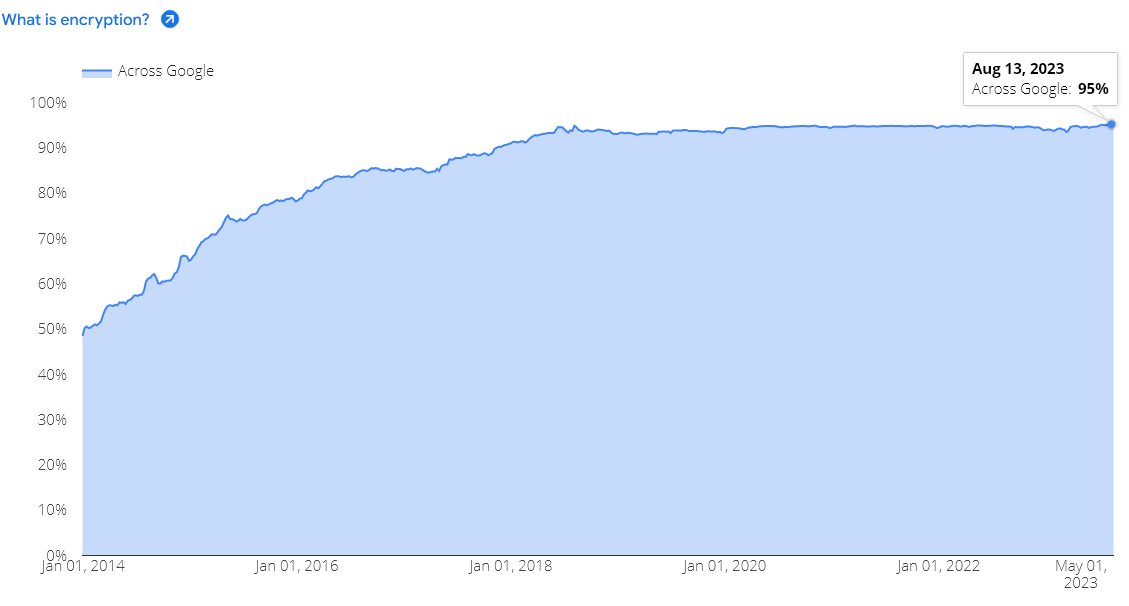
Due to the much-needed awareness spread among internet users regarding the safety of their data shared with the websites, over 95% of accessed websites are done using a secure HTTPS connection over Port 443, according to Google’s research.
Enable Port 80 and 443 on Windows
A firewall restricts traffic and protects you from the threats coming from the internet and local applications. If you wish to allow restricted traffic on the firewall, you need to open a specific port. Below we have explained the process to enable Port 80 and 443 on Windows.
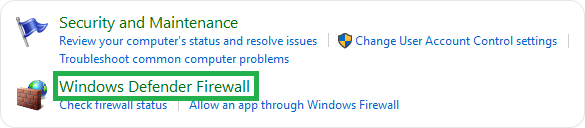
First, you need to browse the Control Panel and search for System and Security showing on the box’s left side. There you need to click on the Windows Firewall.
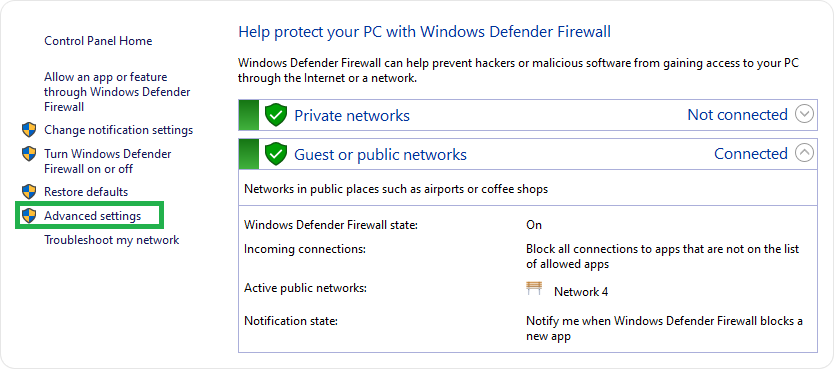
Now, go to the Advanced Settings option showing on the left side and click on it.
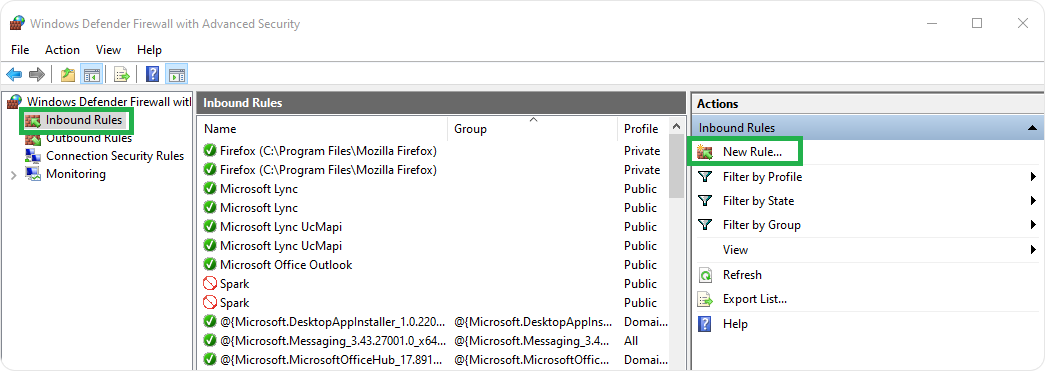
You will have a new window, “Windows Defender Firewall with Advanced Security”, where you need to the right click on ‘Inbound Rules’ and choose ‘New Rule’.
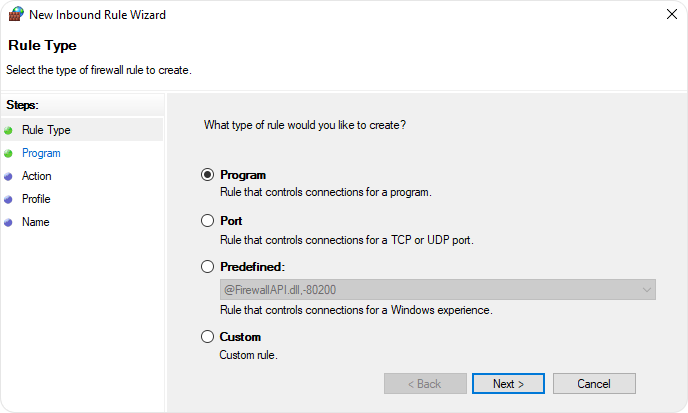
You will have a New Inbound Rule Wizard box where you need to checkmark against on ‘Port’ and click on the ‘Next’ button.
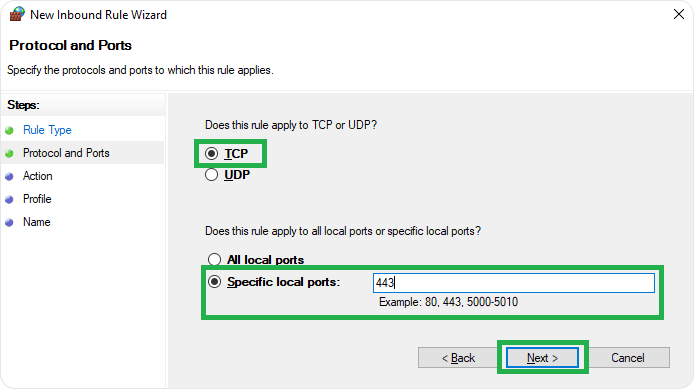
Choose UDP or TCP protocol and check mark against ‘Specific Local Port’ option. Here, you need to enter port and click on the ‘Next’ button.
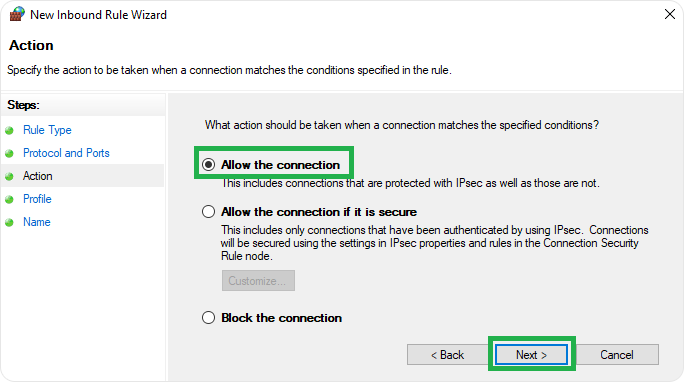
Now, choose ‘Allow the connection’ and click on the ‘Next’ button.
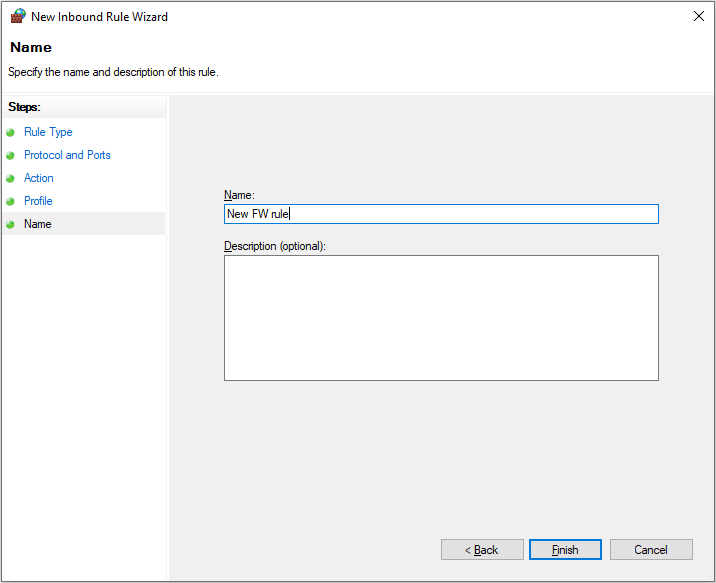
Here, you should keep the name of a rule and click on the Finish button.
Enable Port 80 and 443 on Mac
It is essential to know that Mac OS X opens ports as per requests by individual applications or services instead of managing ports individually. Most users using the default OS X firewall should use the following steps to Allow incoming connections for Applications.
- Open System Preferences > Security & Privacy > Firewall > Firewall Options.
- Click Add.
- Choose an application from the Applications folder and click Add.
- Ensure that the option next to the application is set to Allow incoming connections.
- Click OK.
To open a specific port on OS X, you need to go with Terminal. You need to use the pfctl command for OS X 10.10. In the earlier version, the ipfw command was used to open a specific port.
- Open Terminal app.
- Enter Sudo pfctl -d command to stop the active packet filter.
- Use a nano text editor to open configuration file for packet filter:
sudo nano /etc/pf.conf
- You can create customize rule for any port, for example 80, and enter the command below default configurations. It means you are allowing TCP incoming traffic from any machine to your machine without any inspection.
pass in inet proto tcp from any to any port 80 no state
- Press Ctrl-x and exit from nano text editor then, press Y and It means you have saved the file with the same name.
- Now, reload the firewall’s configuration from the earlier edited file.
sudo pfctl -f /etc/pf.conf
- Finally, restart the firewall with the below command:
sudo pfctl -E
For opening the port at system startup, use sudo nano /etc/pf.conf and add the sudo pfctl -vnf /etc/pf.conf to this pf.conf file.
Enable Port 80 and 443 on Linux
To open a port on Linux, you first need to check open ports using netstat or ss command as showing below:
netstat -lntu OR
ss -lntu
After testing opened ports, use the below commands to allow TCP connections. Here, we have taken port-80, for example.
netstat -na | grep :80
ss -na | grep :80
Enable Port 80 and 443 on Ubuntu
If you have an Ubuntu firewall named ufw, you should use the below command:
sudo ufw allow 80
Enable Port 80 and 443 on CentOS
For CentOS users, they should use the below command:
firewall-cmd --add-port=80/tcp –permanent
Note: The user can enable any port (80,443) with above commands.
Conclusion
However, Port 80 provides an HTTP connection under TCP protocol. This port provides an unencrypted connection between the web browser and the web servers, which leaves the sensitive user data exposed to cybercriminals and may lead to severe data misuse.
HTTPS Port 443 offers encrypted communication between the web browser and web server, making the data unreadable for any data breach. Hence, connecting through HTTPS Port 443 for web browsing certainly wins hands down over establishing an unsafe HTTP Port 80 connection for web surfing.
Related Articles:
- What is Port 443? A Technical Guide for HTTPS Port 443
- Why You Should Enable HTTPS on Your Website?
- How to Redirect HTTP to HTTPS using .htaccess or web.config
- How to Enable HTTPS / SSL for WordPress?

Quick Links
- Free SSL Testing Tools
- Download Free Site Seal
- SSL Discount Offers
What is HTTPS Port Number? [Default HTTPS Port 443 vs 80]
The default ports for HTTPS are 443 and 8443. Learn more about Default HTTPS Port and how it may safeguard your website by reading this post.
Updated: 18 Dec, 23 by Susith Nonis 18 Min
Download PDF
![What is HTTPS Port Number? [Default HTTPS Port 443 vs 80]](https://monovm.com/blog/what-is-https-port/https-port110-main.webp)
List of content you will read in this article:
We often encounter the HTTPS protocol at the start of a website address while browsing the Internet. It’s a communication channel over the Internet that seems to be more secure than other protocols like HTTP. But what exactly is the HTTPS protocol? How is it different? What ports does it use? How does it work? And why does the padlock icon appear on Chrome’s address bar when clicking on a website using an HTTPS port?
If you are confused by all these questions, don’t worry; we’ve got you covered. This article will explain what default HTTPS ports are and why they are important. Whether you want to launch your website or protect your online data and privacy, having information about HTTPS ports will help.
So let’s dive in without further ado.
What is HTTPS port? [Default HTTPS port number]
It stands for «Hypertext Transfer Protocol Secure.» HTTPS ports encrypt connections using SSL or TLS to provide an extra layer of security when accessing a site. Each HTTPS port has its own unique number that distinguishes it from the others.
Default HTTPS Port 443 or 8443 are used for HTTPS connections that protect web browser communication. For instance, when you access an HTTPS website, it sends a request to its hosting server for special services using network port 443 or 8443. Then the server connects to the requested port, which is encrypted in the case of HTTPS, to send the service to the website.
As a result, people who use web hosting servers can send and receive data over the Internet without any security concerns.
How HTTPS encrypts data during transmission over a network?
HTTPS uses SSL or TLS certificates to encrypt and protect data transmission. SSL and TLS work the same way, and many use these terms interchangeably.
However, TLS is the updated and more advanced version of SSL. Nowadays, more and more HTTPS websites are improving their protocol to the TLS version, which is more secure than SSL.
What is the difference between the HTTPS and SSL/TLS protocols?
Now that you understand the difference between TLS and SSL let’s see how HTTPS ports and SSL/TLS operate to establish a secure connection.
Websites run on HTTPS protocol, while HTTPS runs over an SSL/TLS certificate. It is installed on a web hosting server to provide a secure and encrypted connection between a website and a web browser. The SSL protocol authenticates users’ identities whenever they want to transmit information. Then HTTPS provides the channel to transfer that information to the server.
HTTPS vs HTTP: Difference you should know
Websites that use SSL certificates run on HTTPS, while sites with no SSL or TLS run over an HTTP port. The HTTPS protocol determines that data transmitted over the channel is encrypted and impossible to read, while websites using the HTTP protocol send and receive data in plain text.
Be careful when sending sensitive data, like credit card details, personal information, login credentials, etc., online. Ensure a website uses the HTTPS protocol to encrypt data and validate its identity. That way, you can be sure that your data is not at risk.
However, URLs preceded by the HTTP protocol are unsafe and may use your data for other purposes.
Distinguish between the HTTP and HTTPS Protocols
To make sure a website is using an SSL/TLS certificate, you have two main ways:
- Read the URL before clicking on a website link in the browser. If the URL starts with HTTPS protocol, your data will be safe.
- Look for the padlock icon preceding the website’s domain name in the search bar after visiting it. You can see the site’s information and connection details by clicking on the padlock.
Most Common HTTPS Ports
Secure online communication relies heavily on specific port numbers to ensure the confidentiality and integrity of transmitted data. In this section, we introduce some of the most common HTTPS ports:
Port 443
As the bedrock of secure internet communication, Port 443 serves as the primary gateway for HTTPS connections. This digital sentinel encrypts data using SSL or TLS protocols, transforming plain text into an unreadable algorithm during transmission. Recognizable by the «https://» prefix in URLs and the reassuring padlock icon in browsers, Port 443 plays a pivotal role in fortifying online security.
Its deployment ensures a protected conduit for sensitive information, such as personal details and financial transactions, shielding users from potential eavesdroppers and cyber threats. While Port 8443 offers an alternative, Port 443 remains the quintessential choice for establishing encrypted connections, embodying trust and privacy on the web.
Port 8443
In the realm of secure internet communication, Port 8443 emerges as a notable alternative to the default HTTPS port and gateway, Port 443. While both ports share the common goal of encrypting data for enhanced security, Port 8443 often finds its niche in specific applications and services. The versatility of Port 8443 lies in its ability to offer a secure channel, much like its counterpart, providing users and administrators with options for configuring encrypted connections based on their unique use cases.
Recognized as an alternative port for HTTPS, Port 8443 adopts similar encryption mechanisms, employing SSL or TLS protocols to safeguard data during transmission. It serves as a testament to the nuanced landscape of secure connections, where the choice between Port 443 and Port 8443 depends on the specific requirements of the applications or services in use.
List of HTTPS Port Numbers
Understanding the diverse landscape of HTTPS ports is crucial for configuring secure connections across various applications and services. While Port 443 is the default and most widely recognized, other port numbers cater to specific functionalities. Here’s a glimpse into some port HTTPS numbers and their corresponding services, helping you to find out what port is HTTPS:
- Port 443: The default and primary port for HTTPS, securing web browser communication through SSL or TLS.
- Port 8443: An alternative often used for HTTPS, providing versatility in configuring secure connections for specific applications or services.
- Port 832: Designated for NETCONF for SOAP over HTTPS, catering to network configuration needs.
- Port 5989: Reserved for WBEM CIM-XML (HTTPS), serving as a standard for web-based enterprise management.
- Port 8243: Associated with Synapse Non-Blocking HTTPS, offering a non-blocking approach to secure communication.
- Port 16993: Allocated for Intel(R) AMT SOAP/HTTPS, addressing secure communication in Intel’s Active Management Technology.
- Port 20003: Designated for Commtact HTTPS, facilitating secure communication specific to Commtact services.
These HTTPS port numbers represent a subset of the available ports, each serving distinct purposes in the realm of secure data transmission. For a comprehensive list, referring to the Internet Assigned Numbers Authority (IANA) registry is recommended. As the digital landscape continues to evolve, understanding these port numbers becomes paramount for configuring secure and encrypted connections tailored to specific needs.
How to Enable Port 443 and Port 8443
Before diving into the intricacies of enabling Ports 443 and 8443, it’s essential to understand the significance of these ports in ensuring secure online communication. Port 443, the default for HTTPS, serves as the gateway for encrypted data exchange, while Port 8443 often plays a specific role in secure web services. Enabling these ports on various operating systems is a crucial step in fortifying your system against potential security threats.
The following instructions outline the process of configuring Ports 443 and 8443 on Windows, macOS, Ubuntu, and CentOS, offering a comprehensive guide to establishing robust and secure connections.
Enable Ports 443 and 8443 on Windows
Securing your Windows environment by enabling Ports 443 and 8443 is vital for establishing encrypted and secure connections. Follow these steps to configure your Windows firewall:
- Access Windows Firewall Settings:
- Go to the Control Panel on your Windows system.
- Locate and select «System and Security.»
- Click on «Windows Firewall» to access firewall settings.
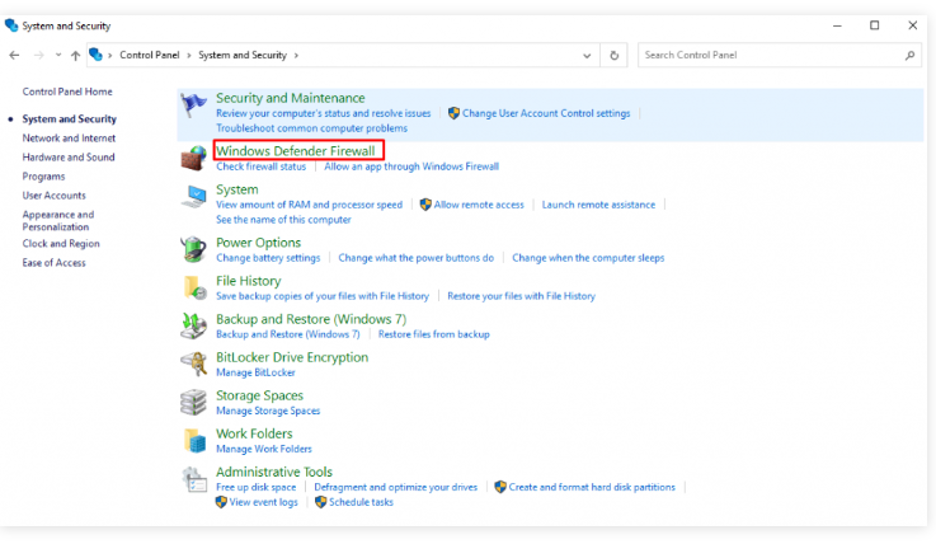
- Navigate to Advanced Settings:
- On the left sidebar, find and click on «Advanced settings.»
- This opens the «Windows Defender Firewall with Advanced Security» window.
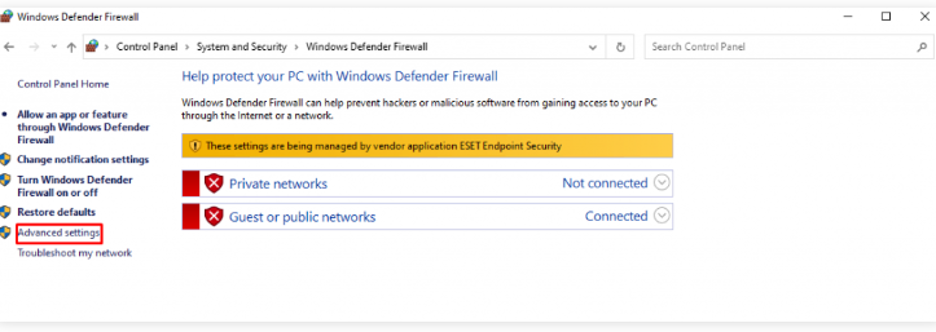
- Create New Inbound Rules:
- Right-click on «Inbound Rules» and choose «New Rule.»
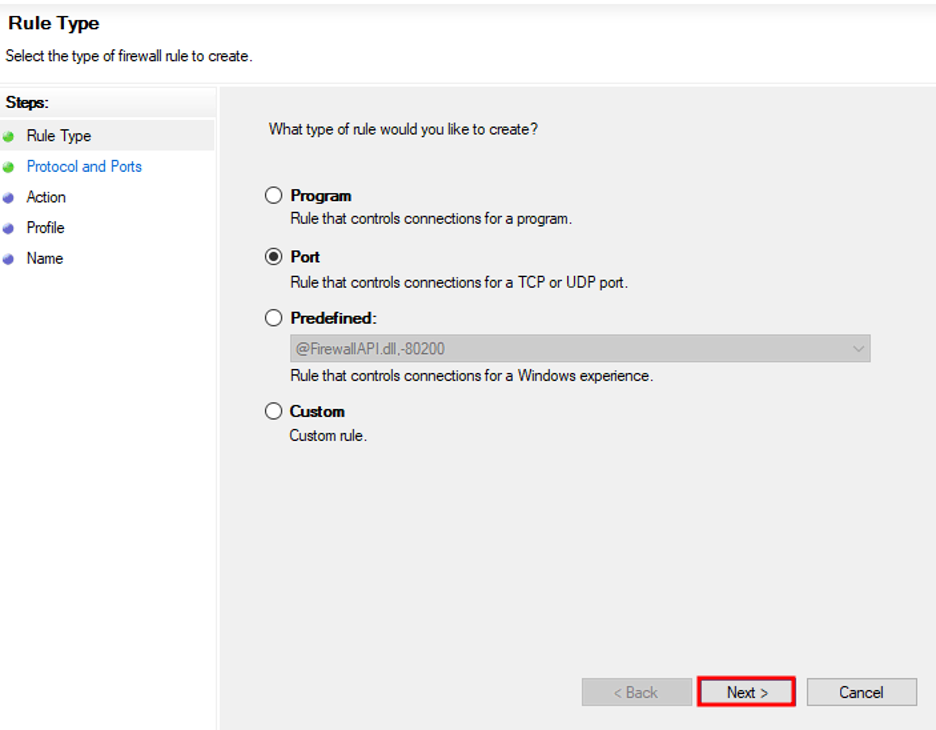
- In the New Inbound Rule Wizard, select «Port» and click «Next.»
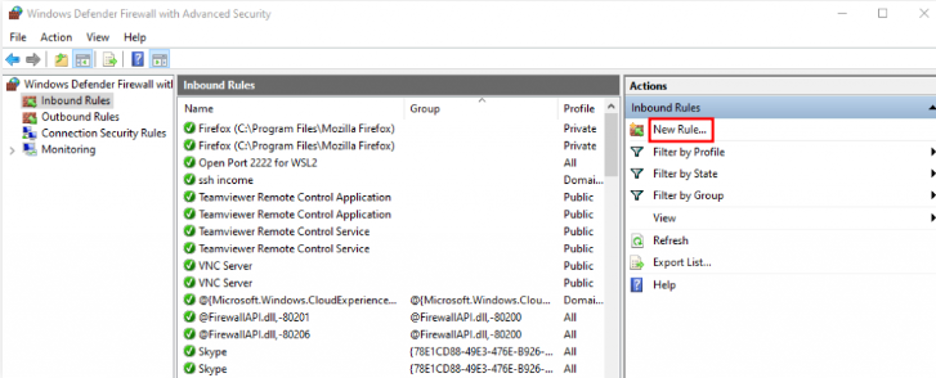
- Specify Port 443:
- Choose «TCP» and check «Specific local ports.»
- Enter «443» and click «Next.»
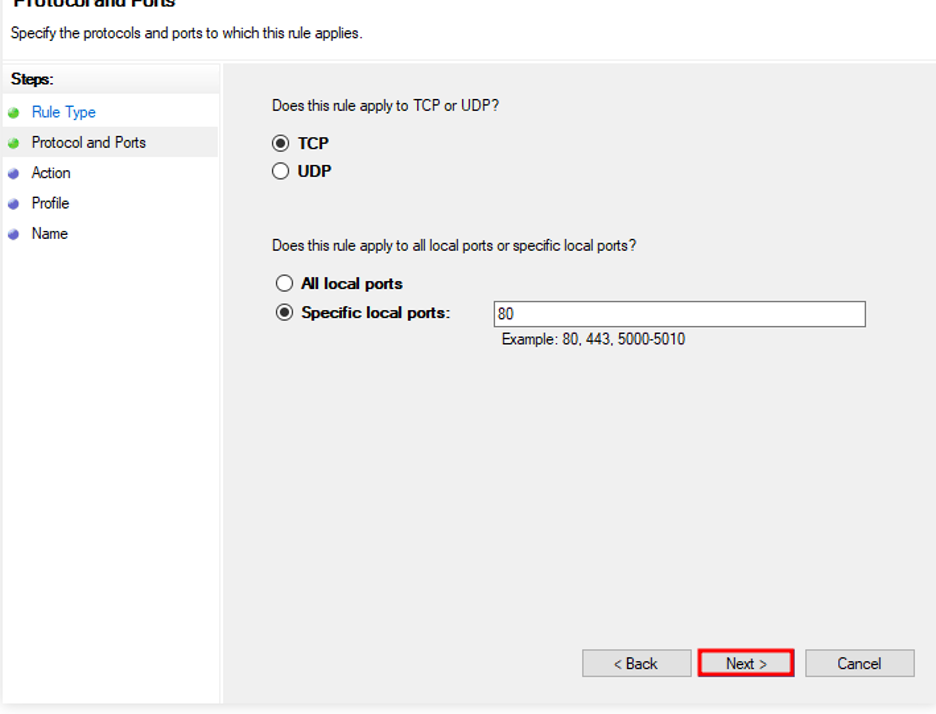
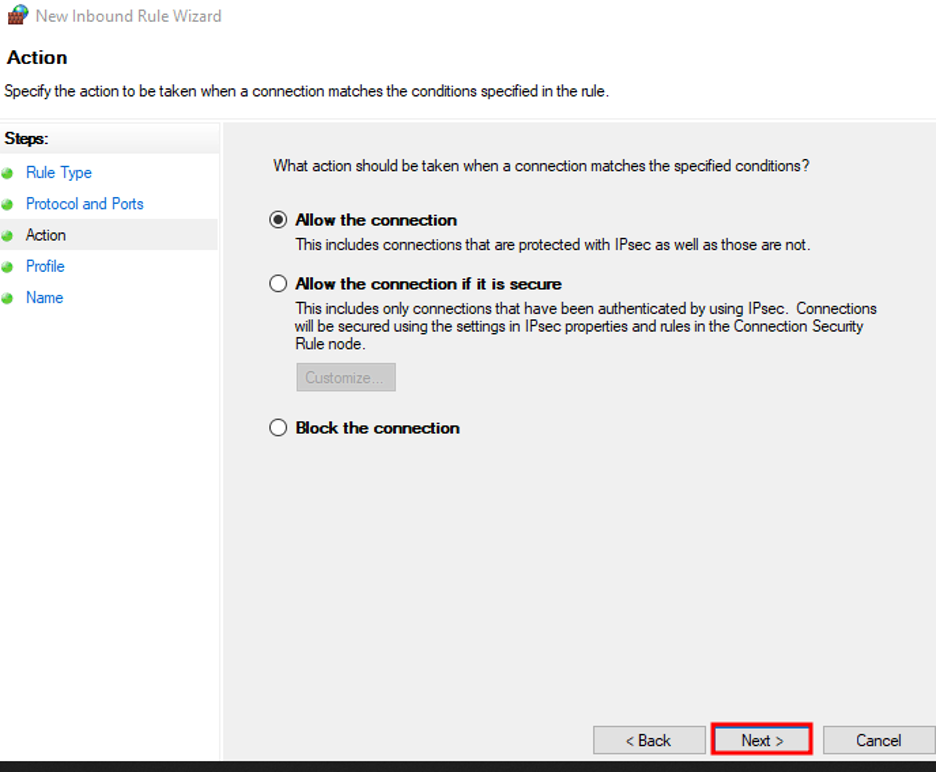
- Allow the Connection:
- Select «Allow the connection» and proceed with the wizard.
- Choose the appropriate settings for domain and private networks.
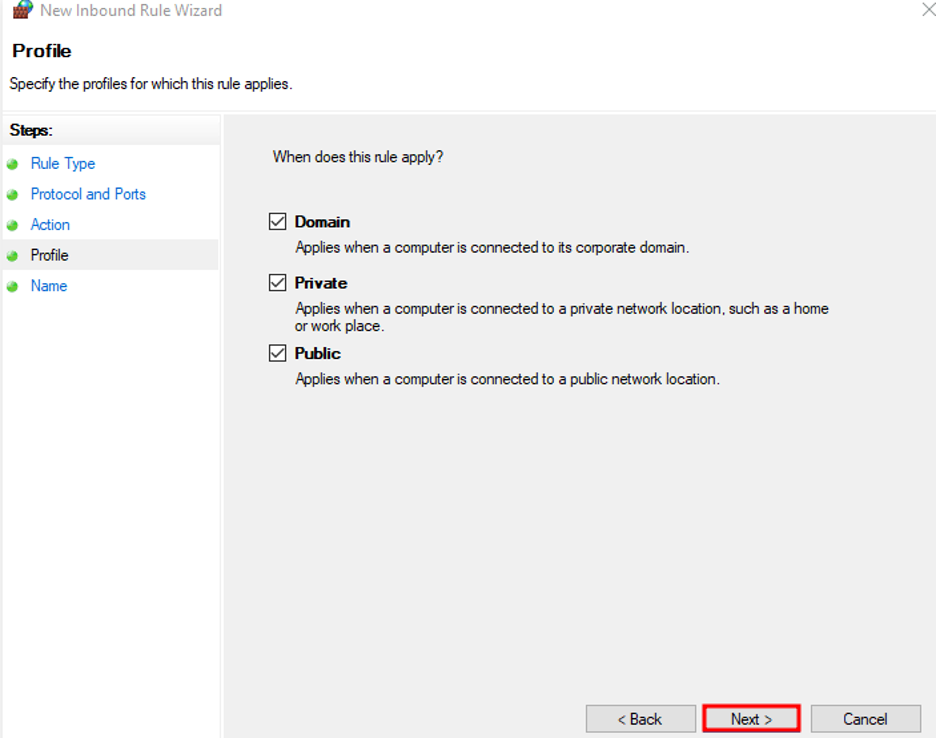
- Name the Rule:
- Provide a meaningful name for the rule and click «Finish.»
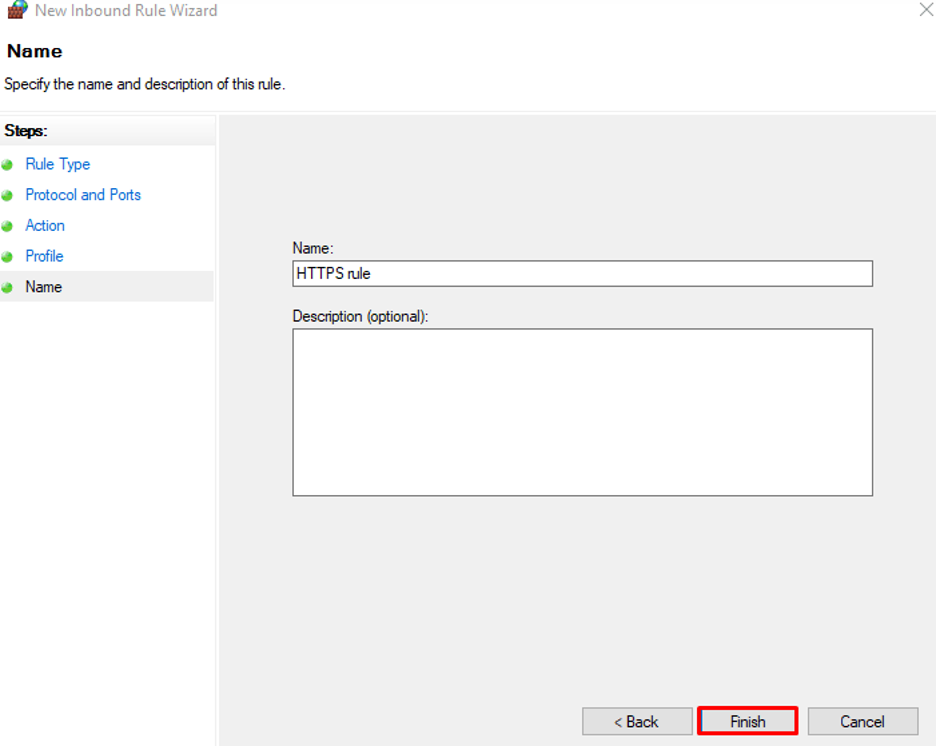
- Repeat for Port 8443:
- Repeat the process, creating a new rule for Port 8443 with the same steps.
By following these steps, you ensure that Ports 443 and 8443 are configured securely on your Windows system, allowing for encrypted and protected communication over these ports.
Enable Ports 443 and 8443 on macOS
Securing Ports 443 and 8443 on macOS is essential for maintaining a robust and protected online environment. Follow these steps to enable these ports on your macOS system:
- Access System Preferences:
- Open the «System Preferences» on your macOS.
- Navigate to Security & Privacy:
- Click on «Security & Privacy» to access the security settings.
- Open Firewall Options:
- In the Security & Privacy window, select the «Firewall» tab.
- Click on the «Firewall Options» button.
- Add Application Rules:
- Click on «Add» to add rules for specific applications.
- Choose an application from the Applications folder and click «Add.»
- Allow Incoming Connections:
- Ensure that the option next to the selected application is set to «Allow incoming connections.»
- Open Specific Ports (For Advanced Users):
- For advanced users, open Terminal.
- Stop the active packet filter using sudo pfctl -d .
- Use a text editor to open the configuration file for the packet filter: sudo nano /etc/pf.conf .
- Add rules for Ports 443 and 8443, following the given examples.
- Save the file and restart the firewall with sudo pfctl -E .
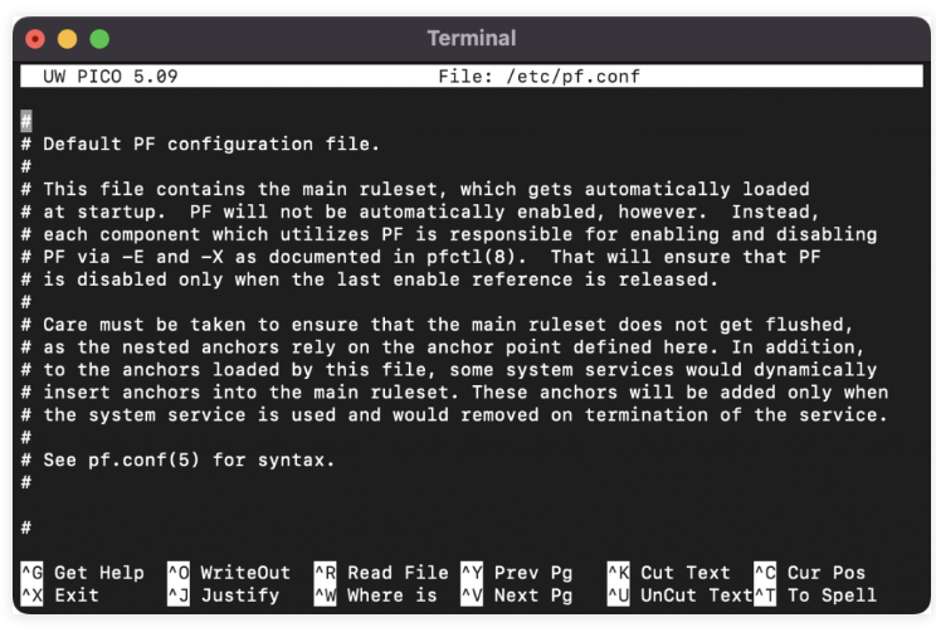
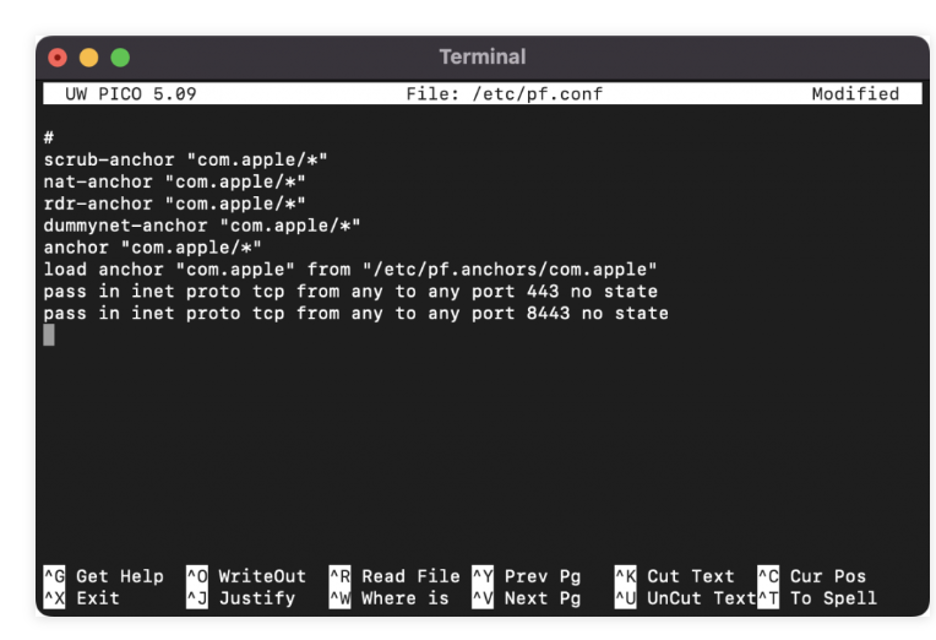
By following these steps, you secure Ports 443 and 8443 on your macOS system, ensuring encrypted and protected communication over these ports. Whether through the user-friendly System Preferences or the more advanced Terminal commands, macOS provides flexibility in configuring your system for a secure online experience.
Enable Ports 443 and 8443 on Ubuntu
Configuring Ports 443 and 8443 on Ubuntu is pivotal for establishing a secure network connection. Follow these steps to enable these ports on your Ubuntu system:
- Utilize Uncomplicated Firewall (ufw):
- Open a terminal on your Ubuntu system.
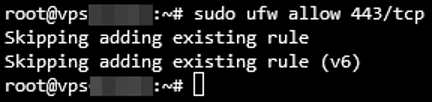
- Execute the following command to enable traffic on Port 443:
sudo ufw allow 443
- Allow Port 8443:
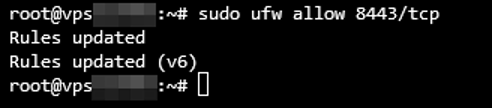
- Similarly, enable traffic on Port 8443 with the command:
sudo ufw allow 8443
- Verify Changes:
- Confirm that the changes have taken effect by checking the firewall status:
sudo ufw status
- The status should reflect the newly allowed ports.
By following these steps, you ensure that Ports 443 and 8443 are securely configured on your Ubuntu system, facilitating encrypted and protected communication over these ports. The Uncomplicated Firewall simplifies the process, making it accessible for users to enhance the security of their Ubuntu environment.
Enable Ports 443 and 8443 on CentOS
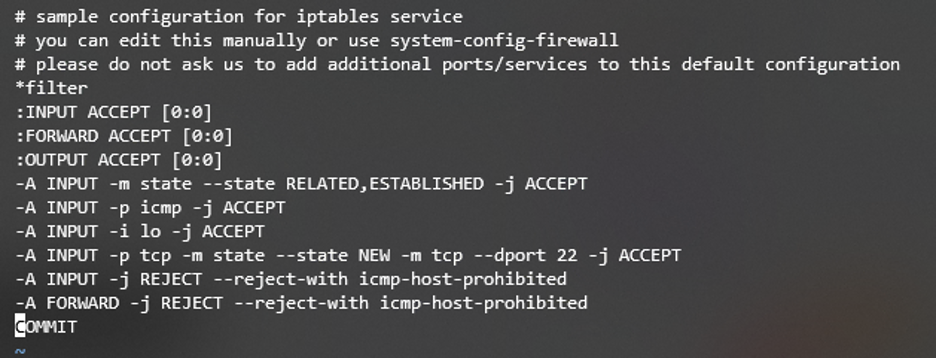
Securing your CentOS system involves configuring Ports 443 and 8443 to ensure encrypted and protected communication. Follow these steps to enable these ports on your CentOS system:
- Use Firewall-cmd:
- Open a terminal on your CentOS system.
- Execute the following command to allow traffic on Port 443:
sudo firewall-cmd —add-port=443/tcp —permanent
- Allow Port 8443:
- Similarly, enable traffic on Port 8443 with the command:
sudo firewall-cmd —add-port=8443/tcp —permanent
- Reload Firewall:
- Reload the firewall to apply the changes:
sudo firewall-cmd —reload
- Verify Changes:
- Confirm that the changes have taken effect by checking the firewall status:
sudo firewall-cmd —list-ports
- The list should include Ports 443 and 8443.
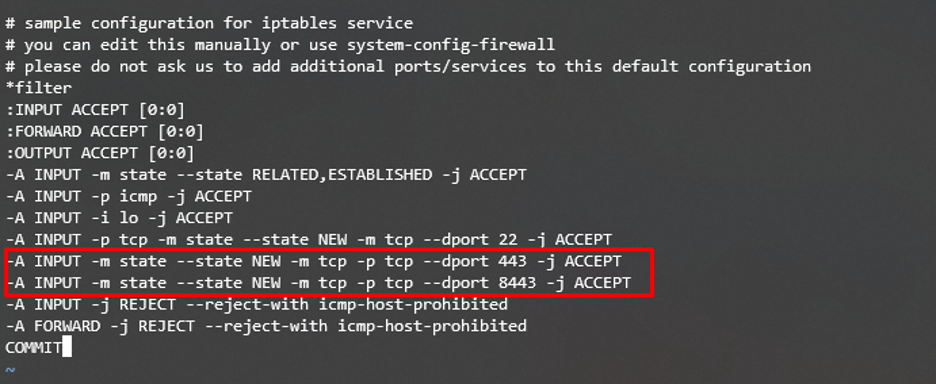
By following these steps, you ensure that Ports 443 and 8443 are securely configured on your CentOS system, establishing a fortified environment for secure online interactions. The firewall-cmd utility simplifies the process, making it accessible for users to enhance the security of their CentOS environment.
Difference between default HTTPS port 443 and 8443
As mentioned, ports are used for different services and are distinguished by numbers. 443 and 8443 are the most commonly used HTTPS ports. But how are they different? The obvious answer is the added number 8 to 443!
However, the real difference is more complicated than that. Let’s see what each port stands for and how they operate.
What is port number 443?
TCP local port 443 is the default number used for the HTTPS protocol. It’s the primary port that the Internet Engineering Task Force (IETF) recognises for the HTTPS protocol. Before data is transmitted over the Internet, port 443 uses an SSL/TLS certificate to change plain text into an algorithm. In other words, this browser-dedicated port encrypts data by converting it to an algorithm. Then, port 443 converts the algorithm to the ciphertext to send them to the server to prevent any possible privacy leak.
That way, port 443 provides a secure channel for the browser and server to communicate and transfer data.
What is port number 8443?
The Apache Tomcat server uses port 8443 as an alternative to the HTTPS protocol. Port 8443 lets the web server open the SSL/TLS text service. The main difference between ports 443 and 8443 is how each encrypts data.
Port 8443 creates a pair of keys for each individual using the browser. Then hide it within the web browser to authenticate the user and provide a secure communication channel.
Other HTTPS ports
However, many other HTTPS port numbers are available that provide similar services. You can check the Internet Assigned Numbers Authority (IANA) list of registries. Here are a few of them:
- 832: NETCONF for SOAP over HTTPS
- 5989: WBEM CIM-XML (HTTPS)
- 8243: Synapse Non-Blocking HTTPS
- 16993: Intel(R) AMT SOAP/HTTPS
- 20003: Commtact HTTPS
Why should I use HTTPS protocol for my website?
If you are a website owner, you may wonder whether switching to an HTTPS protocol is a good idea. We recommend you do it as quickly as possible; we have good reasons for it.
From the start, it gains users’ trust. Even if your clients don’t know the difference between HTTP and HTTPS, the padlock icon or the security warning browsers use can make them leave your website for good. Nowadays, nothing is more important than online security. Therefore, if you want your site visitors to come back again, providing a secure connection is the least you can do.
Furthermore, using an HTTPS protocol has many benefits, including:
- HTTPS protects your users’ data and your website’s data. It provides a strongly encrypted channel so requests can be sent and received over the network.
- It also has a significant effect on SEO. Google officially announced that using the HTTPS protocol will improve sites’ rank on the SERP (Search Engine Result Page). Currently, more than 94% of websites use HTTPS, which leaves you almost no chance to compete in ranking using an insecure protocol.
- Running an eCommerce website is impossible without an SSL or TLS certificate. PCI DSS (Payment Card Industry Data Security Standard) requires all websites using online payment services to run on the HTTPS protocol. Otherwise, they don’t meet the minimum standards.
Is port 8080 HTTP or HTTPS?
HTTPS protocol transfers encrypted data to port 443. On the other hand, as HTTP transfer data as plain text, port 80 or 8080 can receive them on the web server.
The port number identifies each protocol and allows more organized communication. As a result, port number 8080 is only recognizable for HTTP protocol.
Is HTTPS TLS or TCP?
One of the most confusing terms regarding how HTTPS works is TLS and TCP. You are familiar with TCP port 443, which HTTPS uses to transfer data to the web server. On the other hand, TLS is the improved version of SSL. It adds an extra layer of security to the TCP port to send and receive data.
In other words, HTTPS runs over TLS to encrypt data before sending them through TCP port number 443.
Is HTTPS protocol 100% secure?
Well, having 100% security online is almost impossible in the real world. Even the most secure platforms can get hacked, and HTTPS is no exception. Although it offers higher security than its counterparts, such as HTTP, expert cyber attackers can still access data transferred through port 443.
Wrapping up
The HTTPS protocol provides a secure network between a web browser and a web hosting server to communicate and transfer data. It uses SSL/TLS certificates to encrypt users’ sensitive data. We’ve covered everything you need to know about the default HTTPS port number and why it’s important for data transmission.
On the contrary, the HTTP protocol transfers data in plain text and exposes data to anyone accessing the channel. That’s why you should ensure the site you use runs over HTTPS ports like 443 or 8443 before sharing your information, credit card details, or other online credentials.
People also read:
- What is HTTP Error 503 and How to Fix It?
- How to Force HTTPS
- How to Fix HTTP Error 500?
FAQs About What is HTTPS Port Number? [Default HTTPS Port 443 vs 80]
Is 443 and 8443 same?
No, 443 and 8443 are not the same. While both are commonly used for HTTPS connections, they serve different purposes. Port 443 is the default port for HTTPS, while 8443 is an alternative often used for specific applications or services.
Is HTTPS 443 TCP or UDP?
HTTPS on port 443 uses TCP (Transfer Control Protocol). UDP (User Datagram Protocol) is not typically used for HTTPS; TCP is the standard protocol for reliable and secure data transmission in HTTPS connections.
I’m fascinated by the IT world and how the 1’s and 0’s work. While I venture into the world of Technology, I try to share what I know in the simplest way with you. Not a fan of coffee, a travel addict, and a self-accredited ‘master chef’.