MCafee Safe Connect — что за программа и нужна ли она
После установки антивируса MCafee, на компьютере появляются и другие продукты разработчика, которые идут в комплекте к приложению. Вопрос о пользе дополнительного софта возникает вполне логично, ведь любые защитные утилиты могут повлиять на быстродействие системы. Далее мы поговорим об одном из таких дополнительных продуктов компании, а именно про MCafee Safe Connect – что это за программа, нужна ли она на компьютере и как удаляется.
Что за программа
MCafee Safe Connect – VPN сервис для обеспечения безопасного подключения. Сервис скрывает приватную информацию и посещаемые ресурсы. Приложение ориентировано на среду общественных беспроводных сетей.

Защита личных данных становится все более значимой составляющей повседневной жизни. Это решение подойдет для пользователей, которые задумываются о том, как обезопасить себя от действий киберпреступников, ведь работа с различными сервисами подразумевает использование счета, номеров кредитных карт и другой информации, предоставляющей ценность для злоумышленников.
Особенности сервиса
Загрузить программу MCafee Safe Connect можно отдельно от антивируса. Доступна софтина для следующих платформ:
Версии имеют схожий функционал и алгоритмы. Это привлекательное решение для людей, регулярно пользующихся общественными сетями в повседневной жизни или во время путешествий. Примечательной особенностью софта является назначение единого IP-адреса несколькими девайсам, что делает невозможной идентификацию каждого из них.

Платная и бесплатная версия
Можно выбрать один из вариантов:
- пробный 7-дневный период или 250 Мб трафика;
- месячная подписка (499 рублей);
- годовой абонемент (2990 рублей).
В первом случае пользователь может использовать одно устройство и работать через 1 сервер. В платной подписке список устройств расширяется до 5, а количество серверов до 18, которые расположены в Европе, Азии, Северной Америке.
Стоимость годовой подписки делает MCafee Safe Connect одним из самых выгодных на рынке. Обратите внимание, что при выборе годовой подписки предоставляется возможность вернуть деньги, если работа приложения чем-то не устраивает – при ежемесячной оплате эта опция отсутствует.

После завершения пробного периода происходит списание средств по тарифу месячного использования. В дальнейшем работает автопродление, если его заблаговременно не отключить.
Преимущества и недостатки ПО
- низкая стоимость;
- высокая скорость передачи при активном VPN;
- простота эксплуатации;
- поддержка популярных платформ;
- защита конфиденциальности от злоумышленников;
- простота регистрации.
- отсутствие подробного описания применяемых технологий защиты;
- неполная информация об использовании обрабатываемых данных;
- понижаемая скорость при пиковых нагрузках;
- отсутствие серверов в Африке, Южной Америке (за исключением Бразилии);
- отсутствие настроек для опытных пользователей;
- при значительном удалении от сервера – падение скорости;
- невозможно установить на маршрутизатор.
Таким образом ПО подходит для вебсерфинга, работы мессенджеров и приложений соцсетей. Для просмотра видео в высоком качестве и игр пропускной способности серверов может не хватить.
Как удалить MCafee Safe Connect и нужно ли это делать?
Приложение можно удалить, оставив другие продукты разработчика. Процесс деинсталляции ничем не отличается от других программ: достаточно зайти в меню «Программы и компоненты», найти в списке MCafee Safe Connect, выбрать деинсталляцию и следовать инструкциям мастера удаления. После этого желательно почистить временные файлы утилитой CCleaner, перезагрузить ПК.

Если вдруг в списке её не будет. Значит выберите удаление самого антивируса MCAfee, далее будет меню, где можно выбрать удаление отдельных приложений. Там и увидите MCSC.
Удаление приложения в системе Андроид выглядит так.
- Зайти в меню установленных приложений, расположенного в настройках.
- Найти MCafee Safe Connect.
- Очистить кэш приложения и удалить его.
Если софт не удаляется и отображается в списке Админа, то его нужно предварительно отключить. Это делается так.
- Открыть раздел «Местоположение и безопасность» в настройках.
- Тапнуть «Администраторы устройства».
- Отключить в приложение в появившемся меню.
Удаление с платформы iOS.
- Зажать значок приложения, дождавшись его покачивания.
- В верхнем левом углу кликнуть на значке «X».
- Подтвердить удаление.
- Чтобы остановить покачивание нажать «Домой» или «Готово».
Сложностей с удалением возникнуть не должно благодаря стандартным инструкциям. Итак, мы разобрались с тем, что это за программа MCafee Safe Connect, а нужна она или нет – решать вам.
McAfee VPN Review
Techjury is supported by its audience. When you purchase through links on our site, we may earn an affiliate commission. Learn more.
Advertiser Disclosure
This page may contain links to our partners’ products and services, which allows us to keep our website sustainable. Тechjury.net may receive a compensation when you sign up and / or purchase a product or a service using our links. As an Amazon Associate we earn commissions from qualified purchases. This comes at no extra cost to you. On the contrary, these partnerships often allow us to give you discounts and lower prices. However, all opinions expressed on our site are solely ours, and this content is in no way provided or influenced by any of our partners.
Does McAfee have VPN services? It sure does, and it’s recommended that everyone starts using one if they’re concerned about internet privacy. But what is McAfee Safe Connect? And how does it compare to other VPNs? Let’s take a closer look in this McAfee VPN review.
Number of servers
Email and Live Chat

Minimum Price Free
Minimum Price
Best for: McAfee Total Protection Users
Above-average speeds
Gets around ISP throttling
Supports torrenting
Weaknesses
Poor privacy logging
Lacks features
No Mac version
McAfee Safe Connect for Windows and other devices is an easy-to-use VPN platform. It protects your identity online by encrypting data sent to and from your home or public network and hiding your actual IP address and location. This helps prevent web trackers , hackers, the government, and your own ISP from snooping on your internet activities. It also lets you access content from foreign countries that would usually be blocked.
There’s a McAfee Safe Connect trial to give it a test, and it’s compatible with Windows, Chrome OS, Android, and iOS . However, there is no McAfee Safe Connect Mac support.
What else does the company offer? And how to use McAfee Safe Connect ? Let’s find out!
McAfee Safe Connect VPN Features
Whether you’re a McAfee Safe Connect desktop user or are on the go on your mobile device, here are the features you can expect:
Safe reconnect
When doing this McAfee Safe Connect VPN review , I discovered the heavily criticized lack of a kill switch. However, the function has now been quietly implemented in the settings tab. It’s called Safe Reconnect and works the same way, keeping your location and data private until it automatically reconnects to a viable server.
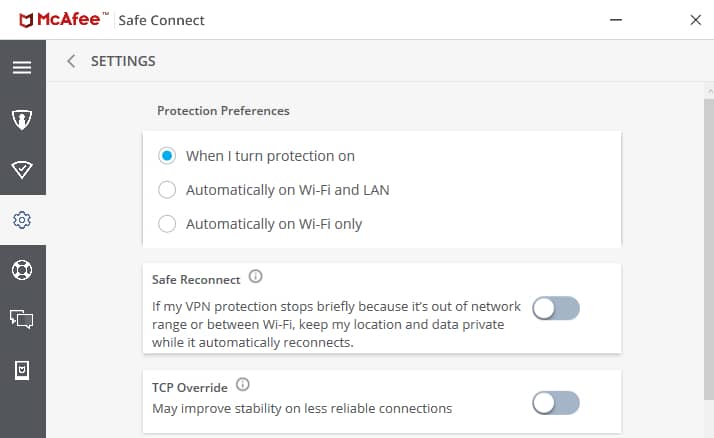
The only issue is that it’s not turned on automatically . You could easily find yourself exposing your real IP and internet requests without knowing it if you’re not an experienced user and unaware of the kill switch’s importance. So, install the Safe Connect app and hit that slider right away!
For those unaware, a kill switch freezes or otherwise protects your session if you become disconnected from the VPN.
Auto-connect
You can set various rules for automatically turning on the VPN under ‘Protection Preference.’ This includes automatically connecting on WiFi and LAN or WiFi only. In other words, whenever your computer or mobile device connects in this way, the VPN will jumpstart its protection.
Note, however, that you need to manually set this on, as it’s not functional by default.
Split tunneling
To my dismay, split tunneling is a feature only available on McAfee Safe Connect for Android . You can choose the specific programs, apps, sites, or type of traffic that is protected – a standard feature for most VPNs. In other words, some data goes through the encrypted tunnel while some don’t.
This is useful when you’re not concerned about your privacy or don’t want to deal with the speed drops that all VPNs create.
Simultaneous connections on multiple devices
You can use McAfee Safe Connect on mobile and desktop simultaneously, with a total of five devices of any supported kind. Depending on your situation, that would suit a small family or one busy user with lots of home and work devices.
This functions on a first-come, first-served basis, so you’ll need to disconnect one app to run it on another device if you’ve hit the limit.
McAfee Safe Connect VPN Advanced Features
Most Safe Connect Plus reviews agree that there isn’t much in the way of advanced features. That’s not a bad thing for inexperienced users but it would be nice to see split tunneling across devices, more control over the servers you connect to, and a choice of protocols . There are also no multi-hop or double VPN settings, so it’s not ideal for traveling or getting around the great firewall of China .
McAfee Safe Connect for Google Chrome
The McAfee Safe Connect extension for Chrome uses is the only form of split tunneling you’ll find on Windows. This allows you to turn on the VPN when only using the browser , leaving all other software vulnerable. Of course, you may not be using that software and just want a simple way to protect your privacy while browsing the internet. For that, this is a great feature.
TCP Override
TCP Override is an advanced feature only accessible on the Windows version . This switches from the usual UDP connection method used by OpenVPN to another supported method called TCP. While slower, it provides a more stable connection and should be your last resort if you keep experiencing connection drops.

Reasons why your connection can’t handle UDP can vary. The McAfee Safe Connect app itself might be under heavy load. However, usually, it has something to do with your own connection and internet provider. It might be one of those days when it’s just a bit spotty, or the ISP is running maintenance.
Furthermore, some ISPs have become smart to VPN use and can recognize UDP connections , deliberately slowing down speeds in an effort to curtail use. They can’t necessarily prove you’re using a VPN, but they can ‘throttle’ speeds based on the type of traffic you’re using.
You may only need this option temporarily, so remember to turn it off and test things again at a later date.
Location chooser
You can choose the location of the VPN servers McAfee connects you to. This is useful if you want to bypass specific geo-blocks , i.e., Netflix unblocking or to get a better speed . As a rule, a location closer to home should be faster, but other factors such as the load from other users can impact speed as well. As a result, sometimes, it’s worth playing around to find the fastest current location. While McAfee claims to do this for you automatically, it doesn’t always go to plan.
McAfee Safe Connect VPN Servers and Locations
The Safe Connect VPN has a small number of locations compared to other providers . You get just 23 countries with no individual city or server selection, which is a disappointment.
However, McAfee Safe Connect servers have good distribution, covering New Zealand, Japan, the US, UK, India, Brazil, Hong Kong, Canada, Mexico, Australia, and Singapore. Across these countries are 2,000 servers in total , which is above average.
It also has acceptable speeds, which makes up for the below-average number of locations.
In short, for such a giant in the computer security industry, McAfee Safe Connect is subpar when it comes to locations but at least has a large number of servers that shouldn’t get overloaded with users.
McAfee Safe Connect VPN Speed
Data has to travel through encrypted servers, resulting in speed drops whenever you use a VPN. To test how much of an impact McAfee had, I used SpeedTest.net to compare my unprotected internet connection speed with other servers provided by McAfee. My regular speed in the UK came out as follows:

When selecting the US as a location using McAfee Safe Connect desktop , speeds actually increased , suggesting some ISP throttling may be going on. However, the ping was more than double, which could be an issue for gaming lag if it gets much higher.

When using France as a location (close to the UK), speeds were even better without much ping difference at all. This reinforces the notion that McAfee can bypass ISP throttling . On the other hand, if you personally have particularly fast internet, the results might not be as impressive even if your ISP artificially slows down speeds.

As expected, going halfway across the world to New Zealand resulted in the biggest drop in the download speed of around 31% and almost seven times the ping latency . Meanwhile, upload speed stayed remarkably strong – even faster than without the MacAfee Safe Connect protection.

To conclude, McAfee produces speeds well within the average for VPNs , despite not having a lot of locations. Moreover, in apparent cases of ISP throttling, it provides impressive results. I can upload faster from a server in New Zealand than when not using a VPN at all.
McAfee Safe Connect VPN Privacy and Jurisdiction
McAfee Safe Connect security is what you would expect from a VPN, but its logging policy is one of the worst. The cornerstone of a VPN is its ability to keep you anonymous. Not only does it fail to mention a logging policy at all, but in the course of this McAfee VPN review, I discovered it wanted my home address and phone number , not just payment info and an email address like most providers.
Furthermore, it logs private information, including:
- Session times
- Your IP addresses and geo-location
- Browser type
- The sites you visited before and after turning on the Safe Connect app
- And most flagrantly – the requests you make while using a McAfee Safe Connect server itself.
That doesn’t necessarily mean it’s handing any of this off to anyone else, but it certainly conflicts with the principles of a virtual private network . You’d struggle to find another provider that would collect such information.
More worrying is McAfee’s headquarters in the United States. The country is a member of the Five Eyes alliance, which requires companies to hand over data to the government if requested. Most VPNs have strict no-log policies, so there’s nothing to hand over. McAfee does not seem to be such a fan of internet privacy .
Of course, the old saying “if you’ve got nothing to hide, you’ve got nothing to worry about” might get bandied around. Other McAfee Safe Connect reviews suggest it could be appealing to its existing mass customer base, who are not well versed in the concept of VPNs.
On a positive note, it uses what it calls bank-grade 256-bit AES encryption . This is the standard encryption across the VPN industry and is also used by the military.
McAfee Safe Connect VPN Security and Protocols
McAfee Safe Connect for PC and mobile uses the Catapult Hydra protocol for encryption and managing your private connection. This has been criticized because it’s not open source like OpenVPN and has had security vulnerabilities in the past.
Catapult Hydra is Hotspot Shield ’s proprietary protocol, developed by AnchorFree. Notably, this protocol isn’t compatible with routers and consoles.
McAfee is not open about the protocol, which is a bit of a red flag. Another downside is that this is the only option available , and there is little in the way of tweaks or settings. You get what you get.
McAfee Safe Connect VPN Leak Test Results
According to McAfee, turning on protection means your ISP and others cannot see your IP address , DNS info, or the sites you visit. I can vouch for this by using IPLeak.net. It clearly showed all US information, despite my real location being within the UK. See the comparison below:


This proves Safe Connect VPN is working as a VPN should.
McAfee Safe Connect VPN and Streaming Services
McAfee Safe Connect Netflix results are not quite up to par. In the past other McAfee Safe Connect reviews shunned the service for completely failing to unlock international versions of the streaming service.
While things have improved since then, I still found Netflix inconsistent . Sometimes it would work just fine. Other times it would discover I was using a VPN and stop it in its tracks. The same occurs with Disney+ and Amazon Prime. That doesn’t say much about the reliability of the servers and how the apps have been developed.
If you do get connected, speed is not an issue . But it’s a bit of trial and error, which isn’t fun if you want to relax after a long day and watch some international shows.
YouTube had no issues, but it’s not a particularly popular service when it comes to geo-restrictions on content in the first place. Furthermore, every VPN can handle YouTube because there’s very little in the way of protection on its end.
How Good Is McAfee Safe Connect VPN for Torrenting?
McAfee Safe Connect torrent use and other P2P sharing are possible. You should be able to fire up your favorite P2P app and receive reasonable speeds , including when uploading, as long as you’re securely connected. With the addition of a kill switch, even if there’s uncertainty over their overall privacy policies, which you can read about below.
Can McAfee Safe Connect VPN Bypass Geoblocks?
We should clarify that the VPN McAfee site promotes itself as having no geo-restrictions whatsoever. We’ve already seen that this isn’t always the case for streaming services . However, it unblocks bog-standard websites like GDPR-blocked news sites just fine.
When conducting my McAfee Safe Connect review , I found anything purely web-based without an added component like streaming or gaming can be unblocked. Thus, it deserves some credit for doing what a VPN should.
Ease of Use
Regardless if you are using McAfee Safe Connect VPN for PC or mobile, it couldn’t be easier to use. Moreover, you don’t get confused moving between devices because the intuitive layout is similar across the board.
It’s essentially just a window with your account, usage stats, and settings available via tabs down the left-hand side. Simply hit ‘start protection’ for it to find the fastest server (usually in your country) or use the dropdown window to select a location. On iOS and Android, it’s simply a case of tapping and swiping instead.

You can also connect by right-clicking the icon in the Windows system tray if you’re using the desktop software.
In addition, there are tabs for accessing help and sending feedback. The help section just embeds the FAQ page from the McAfee website. Feedback provides a vague form where you can suggest how the provider can improve the app.
Customer Support
Reaching the McAfee Safe Connect customer support team is easier from the website than from the app. There is an extensive FAQ page to answer common queries, while you can reach staff directly via email and live web chat . As part of the McAfee Safe Connect review , I reached out to the support team.
My test question was answered in 10 minutes when sent via live chat, which is perfectly acceptable.
McAfee Safe Connect VPN Price
McAfee Safe Connect Free is a ‘forever free’ version of the software that gives you access to all the features. It imposes a 250MB a month limit, making it practically unusable for a long-term solution. Instead, it’s a good way to test the VPN before committing to a premium plan:
- $7.99/month
- $47.99/year ($3.99 monthly equivalent).
- Limited First Year Deal: $19.99/year ($1.66 monthly equivalent)
Even if you jump from the McAfee Safe Connect free version to premium, you still get a 30-day money-back guarantee , so you can get your cash returned if it’s not up to scratch.
If you’re wondering, does McAfee Total Protection include VPN tools, you’re in luck. The full VPN software comes as part of any of the suite’s plans.
Verdict
So, is McAfee Safe Connect a good VPN ?
To conclude this McAfee VPN review , there are definitely concerns over its overreaching traffic and personal data logging. Furthermore, it lacks a lot of features, as well as a Mac version. However, it’s easy to use, speeds are good , and it supports torrenting .
Because there are so many great VPNs out there these days, I recommend McAfee Safe Connect for those already paying for or considering the Total Protection suite. If you just want a standalone VPN solution or one installed at the router level, there are better options to choose from.
Aditya is an Azure DevOps and Infrastructure Virtualization Architect with experience in automation, infrastructure management, and designing and implementing virtualization solutions. His expertise encompasses both on-premise and cloud-based systems. Aditya’s articles on TechJury serve as a reliable resource for individuals and organizations looking to harness the power of cloud computing, embrace automation, and leverage infrastructure-as-code practices.
Leave your comment
Your email address will not be published.
Что такое VPN?

VPN (виртуальная частная сеть) — это сервис, который защищает ваши данные и конфиденциальность в Интернете. Он создает зашифрованный туннель для сохранения вашей анонимности посредством маскировки вашего IP-адреса при подключении к публичным точкам доступа Wi-Fi.
*Подробности предложения ниже. Оплата раз в год. *Подробности предложения ниже. Оплата раз в месяц.
Windows ® | Chrome OS ™ | Android ™ | iOS ®
Планы включают в себя 5 лицензий.
Зачем использовать VPN?
Использование VPN (виртуальной частной сети) – это один из способов защиты вашей конфиденциальности в Интернете и защиты вашей информации от хакеров, поставщиков интернет-услуг и других третьих сторон.
Использование VPN позволяет безопасно просматривать страницы в Интернете и получать доступ к личным данным через общедоступные сети. Подобно тому, как брандмауэр защищает данные на вашем компьютере, VPN защищает вашу деятельность путем шифрования ваших данных при подключении к Интернету из удаленного или общедоступного расположения. Использование VPN позволяет маскировать ваши местоположение, IP-адрес и действия в Интернете.
Преимущества VPN
Использование VPN позволяет скрыть вашу конфиденциальную информацию как от хакеров, так и от компаний, сайты которых вы посещаете. Когда вы используете VPN, страницы, которые вы просматриваете, пароли, сообщения электронной почты и другие данные выглядят как непонятный набор символов для любого, кто пытается получить к ним доступ. Это останавливает не только киберпреступников, но и компании, которые пытаются передать данные о ваших действиях в Интернете сторонним организациям.

Нужно ли мне использовать VPN?
Если вы предпочитаете брать с собой ноутбук или мобильное устройство в библиотеку или кафе, вы, скорее всего, подключаетесь к общедоступной сети Wi-Fi. Проблема в том, что многие бесплатные общедоступные сети Wi-Fi не защищены. Это означает, что хакер может легко перехватить информацию, которую вы отправляете по общедоступной сети, включая ваши пароли и банковские данные. Но если вы используете личную сеть VPN, вы можете безопасно подключиться в любое время, находясь вдали от дома.
Нужно ли мне использовать VPN во время путешествий?
Путешествия часто вынуждают подключаться к незнакомым сетям Wi-Fi. Эта уязвимость делает особенно важным наличие интеллектуального решения для обеспечения безопасности для всех ваших устройств. Если вы склонны тратить много времени на просмотр страниц в Интернете или работу на своем устройстве во время путешествия, обязательно загрузите приложения для обеспечения безопасности (включая VPN), которые защитят ваши устройства.
Если вы путешествуете по городам, где воровство является обычным явлением (или если вы просто забывчивы), многие из приложений для обеспечения безопасности также предлагают защиту от кражи. Эта функция позволяет удаленно выполнять резервное копирование, блокировку и уничтожение информации на устройстве, если ваш телефон будет украден.
McAfee Safe Connect VPN
McAfee Safe Connect VPN — это круглосуточная кибербезопасность, которая вам нужна. Независимо от того, совершаете ли вы покупки в Интернете или оплачиваете счета, защитите информацию о просмотренных страницах и данные от киберпреступников с помощью VPN с шифрованием банковского уровня. Благодаря шифрованию Wi-Fi банковского уровня ваши личные данные и действия в Интернете скрыты от посторонних глаз.
Скачать для компьютера
Скачайте бесплатно и установите McAfee Safe Connect VPN 2024 по прямой ссылке с сервера. Программа имеет лицензию «Демо-версия» и разработана McAfee, Inc., подходит для компьютера и ноутбука с Windows 7, 8, 10. Размер загружаемого файла составляет 92 Мб.
Описание программы
Защитите свою конфиденциальность, скрыв свой IP-адрес. Ваше физическое местоположение, учетные данные банковского счета и информация о кредитной карте защищены, когда вы просматриваете веб-страницы в Интернете. Наслаждайтесь неограниченной защитой данных без ежемесячных ограничений или скрытых платежей с премиальными планами.
McAfee Safe Connect VPN использует 256-битное шифрование AES банковского уровня, чтобы обеспечить защиту вашей информации о просмотре веб-страниц и онлайн-привычек дома и в пути. Несмотря на удобство, подключение к общедоступной сети Wi-Fi может раскрыть ваши конфиденциальные данные, такие как ваше физическое местоположение, учетные данные банковского счета и информацию о кредитной карте, для посторонних глаз.
Защитите свое физическое местоположение от рекламодателей или нежелательных третьих лиц
Защитите свои личные и финансовые данные, такие как онлайн-банковские счета и кредитные карты, против посторонних глаз.
McAfee Safe Connect VPN включает пять устройств и совместим с устройствами Windows, Chrome OS, iOS и Android. Однако бесплатная версия приложения поддерживает только одно устройство и имеет ограничение в 250 МБ данных в месяц.
Комментарии пользователей
Программы от McAfee, Inc.
McAfee Security Scan Plus
Версия 3.11.717.1 — 11.1 Мб
Он активно проверяет ваш компьютер на наличие антивирусного программного обеспечения, защиты.
McAfee Stinger
Версия 12.2.0.513 — 18.3 Мб
McAfee Stinger — это очень популярная утилита для удаления вирусов, вредоносных программ и онлайн-угроз.
McAfee Consumer Product Removal Tool
Версия 10.5.162.0 — 11.8 Мб
Используйте McAfee Consumer Product Removal Tool, чтобы полностью удалить данные из установки продукта McAfee Security в.
Программы «Брандмауэры и безопасность»
Data Guardian
Версия 7.0.5 — 35.1 Мб
Data Guardian для ПК позволяет защитить ваши логины, пароли, адреса, заметки, номера кредитных карт, квитанции.
KeePass Password Safe
Версия 2.52 — 4.19 Мб
KeePass — это бесплатный менеджер с открытым исходным кодом, который избавит вас от необходимости.
GoLogin
Версия 2.0.6 — 146 Мб
GoLogin — это программное обеспечение, которое позволяет вам скрывать и контролировать свой цифровой.
LastPass
Версия 4.104.0 — 33.2 Мб
64-битная версия LastPass — это последний пароль, который вам когда-либо понадобится. Это позволяет вам.
Kaspersky Total Security
Версия 202121.3.10.391 — 2.7 Мб
Kaspersky Internet Security предлагает новейшие уровни безопасности — защитите вашу конфиденциальность, деньги.
USB Secure
Версия 2.2.2 — 1.4 Мб
С USB Secure вы можете защитить свой USB-накопитель надежным паролем! Вы ищете что-то похожее на хранилище для.
Folder Password Lock Pro
Версия 11.6.0 — 12.2 Мб
Folder Password Lock Pro — это профессиональная утилита безопасности, которая может предоставить пользователям.
eScan Total Security Suite
Версия 22 — 438 Мб
EScan Total Security Suite с Cloud Security — лучшее решение для обеспечения безопасности для всех ваших вычислительных.
ZoneAlarm Free Firewall
Версия 15.8.211.19229 — 5.7 Мб
ZoneAlarm Free Firewall блокирует вирусы, которые пропускает только антивирус, останавливает хакеров, пытающихся.
VPN Proxy Master
Версия 3.6.0 — 59.2 Мб
VPN Proxy Master — лучший VPN, который работает более чем в 40 точках по всему миру и предоставляет лучшие услуги.
Planet VPN
Версия 1.4.01 — 19.2 Мб
Planet VPN — это высококонкурентный сервис виртуальной частной сети, который позволяет пользователям по.
VuzeVPN
Версия 2.0.1.1 — 12.2 Мб
VuzeVPN предлагает лучший VPN-сервис, который вы когда-либо найдете, и его можно скачать бесплатно! В мире.