How To Add Tron (TRX) To Metamask Easily (2 Methods)
The Tron network is the world’s fastest-growing blockchain with over 3.7 billion completed transactions and counting. TRX is the native token of the Tron mainnet and it is issued by the Tron DAO and is one of the top tokens in the crypto space.
Metamask in contrast is the leading non-custodial crypto wallet available right now. It is an open-sourced decentralized crypto wallet that is used by many to send, receive, stake, store, and trade different cryptocurrencies and other crypto assets across compatible blockchains.
If you currently hold some TRX tokens on a crypto exchange or an external wallet and currently exploring methods to add the Tron blockchain and its native token – TRONIX (TRX) – to your Metamask wallet, then you’re on the right page.
In this article, you will learn how to add Tron (TRX) to your wallet on both the Metamask browser extension and mobile app on Android or iOS.
Article Contents show
Can You Add The Tron Network (TRC20) To Metamask?
No, you cannot add the Tron Network (TRC20) and its native token – TRX – to your Metamask wallet because the Tron network is not compatible with Metamask.
You can not add the Tron Network to your Metamask wallet because the Tron Mainnet is not an EVM-compatible network. Only blockchains that are compatible with the Ethereum Virtual Machine (EVM) can be added to Metamask via specific custom RPC endpoints.
How To Add Tron (TRX) To Metamask (Alternative Methods)
While you simply can not add the native TRC20 network to your wallet since the Tron Mainnet is not compatible with Metamask, you can get the TRX token on your Metamsk wallet using some alternative methods.
One such method is to add the Binance-Pegged version of TRX to your Metamask wallet via the Binance Smart Chain network.
If you don’t consider using Binance-Peg TRX as an option, you can simply download and configure a wallet which compatible with the Tron network to get the native Tron token on your device.
Both alternative methods you can consider to add TRX to Metamask are discussed in detail below.
Method 1: Add TRX To Metamask via the Binance Smart Chain.
The first alternative method you can use to get TRX on your Metamask wallet is by adding the Binance-Pegged version of the TX token to your wallet using the Binance Smart Chain.
While this is not the native TRX token that is used on the TRC20 network, it is the Binance-Pegged version of the token which carries the same value as the native TRX token.
Binance Pegged tokens are 100% backed by the native coin in reserve and the reserve addresses are published for anyone to audit.
One Binance-Peg TRX holds the same value as 1 TRX just on different blockchains. You can also convert the Binance-Peg TRX to native TRX and vice versa using the Binance bridge on the Binance exchange.
Below is how you can add Binance-Pegged TRX to your Metamask wallet easily.
Step 1: Copy the contract address for Binance-Pegged TRX.
To add the Binance-Pegged TRX token to your Metamask wallet, you need the correct contract address for the token.
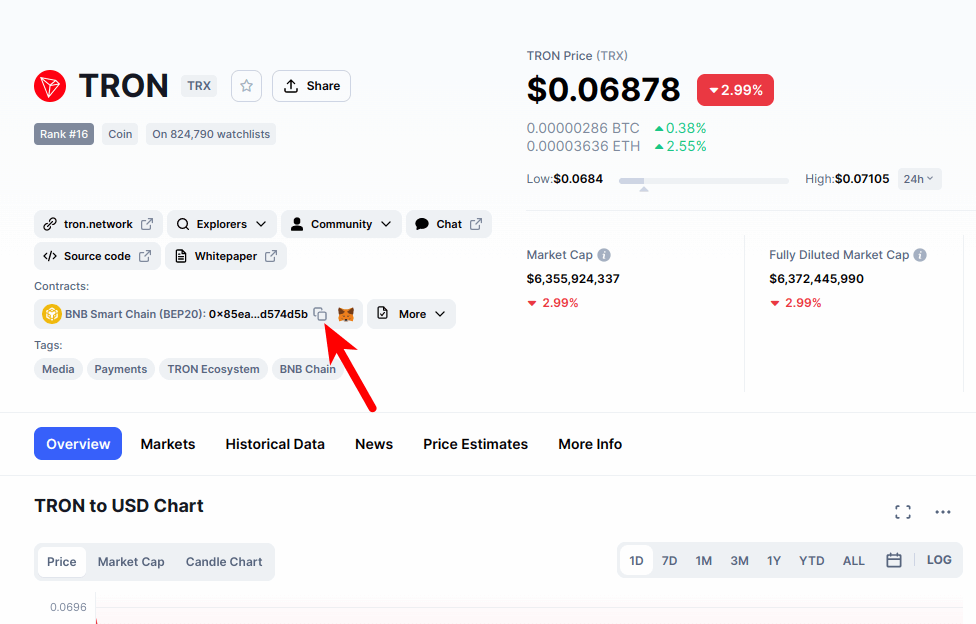
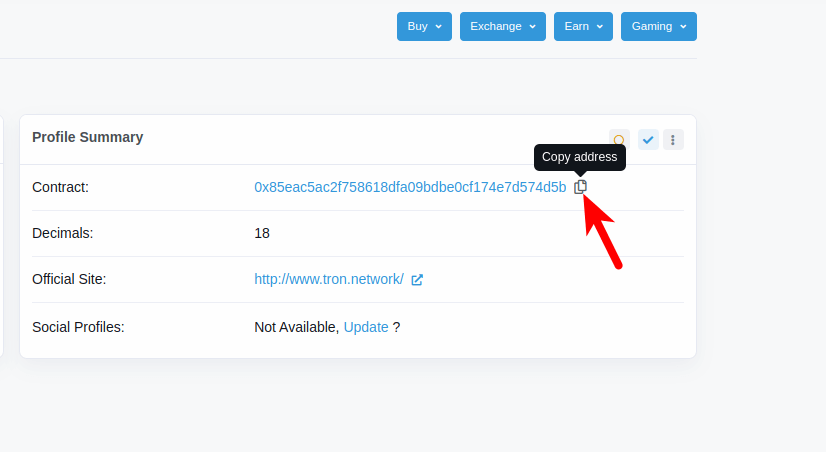
The contract address for Binance-Pegged TRX can be found on the Binance-Pegged TRX contract page on BSCScan. The correct contract address for Binance-Pegged TRX is “0x85eac5ac2f758618dfa09bdbe0cf174e7d574d5b” so go ahead and copy that to your device clipboard.
Alternatively, you can visit the Binance-Pegged TRX contract page on BSCScan or the official TRX token page on CoinMarketCap and copy the contract address directly from there.
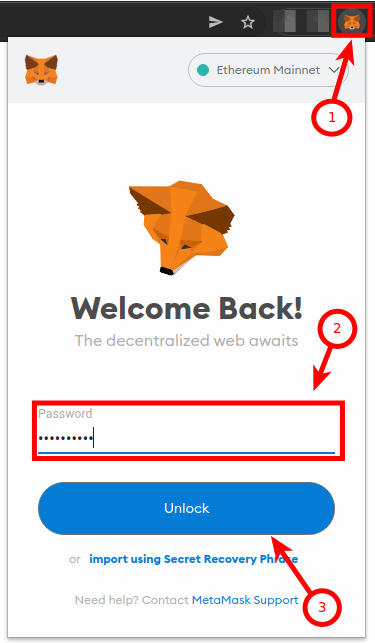
Step 2: Launch the Metamask extension and enter your password.
Next, launch the Metamask extension and enter the account password to unlock your wallet.
If you use the Metamask app on your mobile device, then you can simply unlock your wallet using any of the available biometric methods like Face ID, fingerprint, PIN, or Face Unlock.
Step 3: Ensure Binance Smart Chain is the selected network.
Since we’re adding TRX (Binance-Pegged) to Metamask via the Binance Smart Chain, you want to make sure that you have already added the Binance Smart Chain network to your Metamask wallet and selected it as the default network.
If you haven’t added the Binance Smart Chain to your Metamask wallet, we have a good tutorial on how to add BSC to Metamask easily on both the extension and mobile app. You will need to follow the steps in that article to add the network to your Metamask wallet before moving forward with this guide.
Once you have added the Binance Smart Chain network to your wallet, go ahead and select it as the default network as shown in the screenshot below.
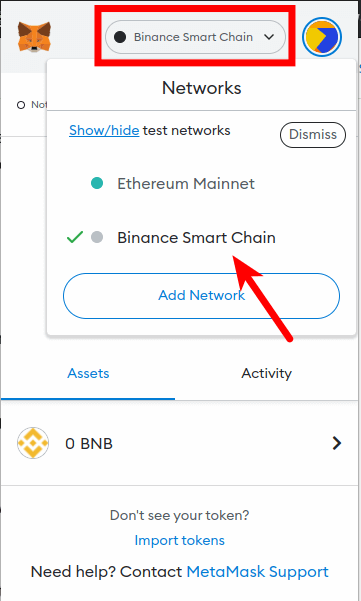
Step 4: Click on [Import tokens].
Now that you have selected the correct network, scroll down on the Metamask window and click on [Import tokens].
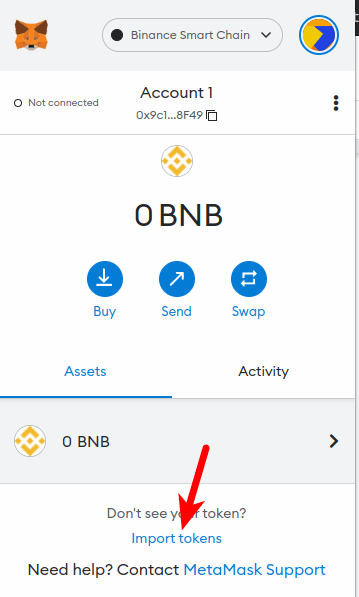
Step 5: Paste the Contract Address and click [Add Custom Token].
Now paste in the Binance-Pegged TRX contract address you copied earlier and wait a few seconds for Metamask to automatically fetch the Token Symbol and Ticker.
Once that’s done, click on [Add Custom Token].
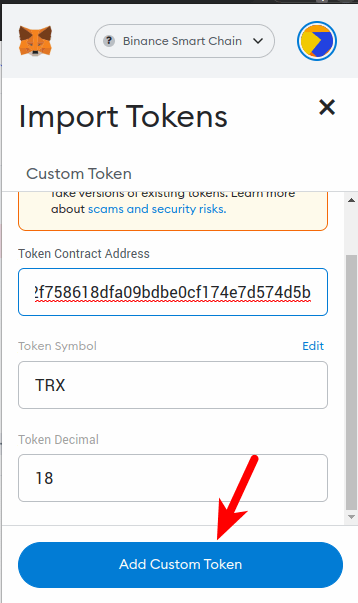
Finally, click on [Import Tokens] to add Binance-Pegged TRX to your Metamask wallet.
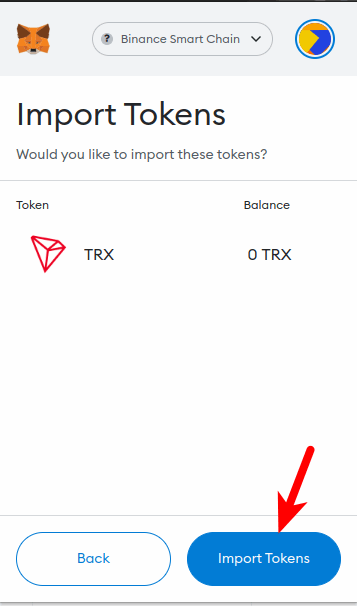
With this, you have successfully added Tron (TRX) to your Metamask wallet on the Binance Smart Chain.
Note: You can not send native Tron tokens (TRX) to your Metamask Binance-Pegged TRX wallet address and this is because these two tokens are deployed on different blockchains even though they have the same value.
Sending native TRX tokens to your Metamask wallet will result in a permanent loss of funds. You can only send TRX to your wallet on Metamask using the Binance Smart Chain (BEP20) network.
Some crypto exchanges like Binance allow you to TRX to an external wallet (Metamask in this case) using multiple networks.
If you’re sending TRX from your Binance account to Metamask, ensure you select “BNB Smart Chain (BEP20)” as the network to be used for the transaction else you may lose your funds permanently.
Method 2: Download and install a Tron-compatible wallet.
Since it is currently not possible to hold native TRX tokens on your Metamask wallet due to Metamask not being compatible with the Tron network, an alternative way to hold your TRX tokens (if you don’t want to use the Binance-Pegged version of TRX) would be to download a wallet that is compatible with the Tron blockchain by default.
There are a handful of crypto wallets that are compatible with the Tron network. The leading and recommended Tron wallet is the TronLink wallet which is available as a browser extension (just like Metamask) and as a mobile app for Android & iOS devices.
TronLink is an easy-to-use decentralized crypto wallet that fully supports the Tron network and all associated tokens deployed on the Tron ecosystem. On TronLink, you can send, receive, store, swap, and trade native TRX and more.
Below is how you can easily download and set up Tronlink on your device.
Step 1: Download and Install the TronLink wallet on your device.
To use the TronLink wallet, you first have to download and install it on your device. TronLink is available as a browser extension (for desktop users) and as a mobile app for those on Android & iOS platforms.
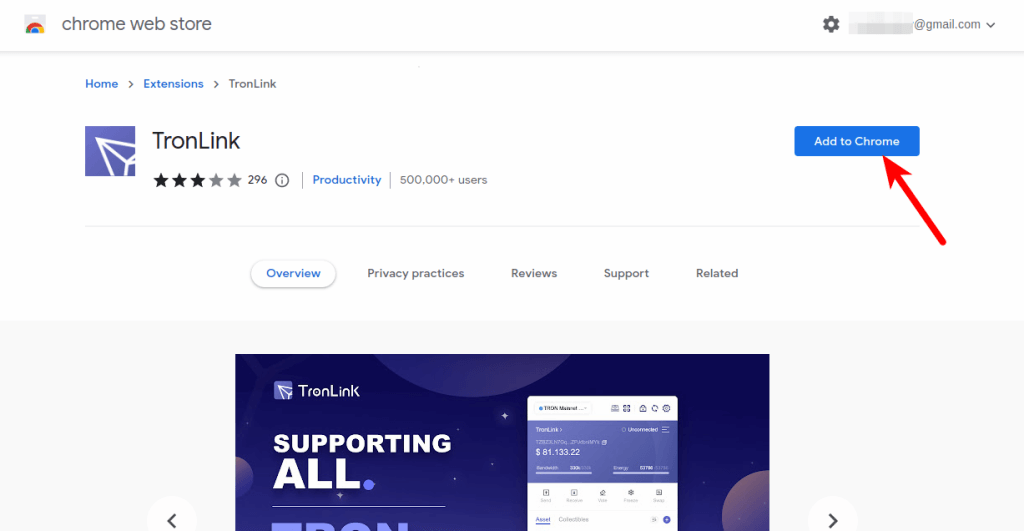
To install the wallet on your device, head over to the TronLink website and install the correct version of the wallet.
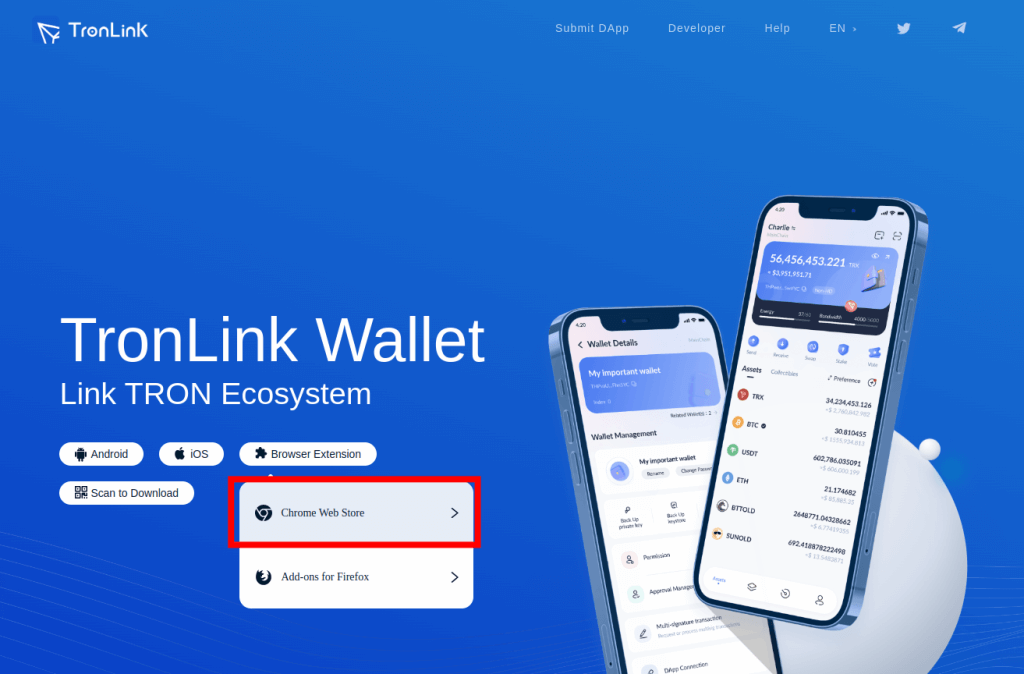
For this tutorial, we will be showing you how to install and set up TronLink on the Chrome browser. The process is the same on all versions of the TronLink wallet.
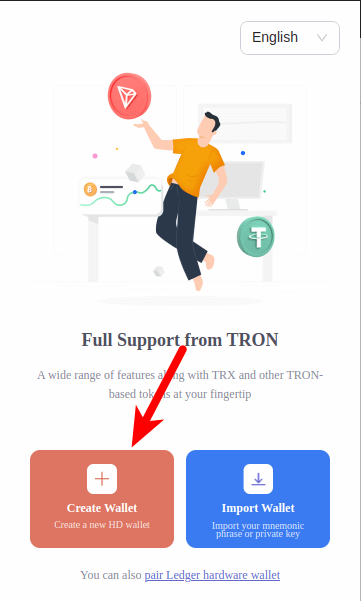
Step 2: Launch TronLink and click on [Create Wallet].
Now that you have installed TronLink on your device/web browser, launch the extension/mobile app on your device and click on [Create Wallet] then agree with the User Agreement.
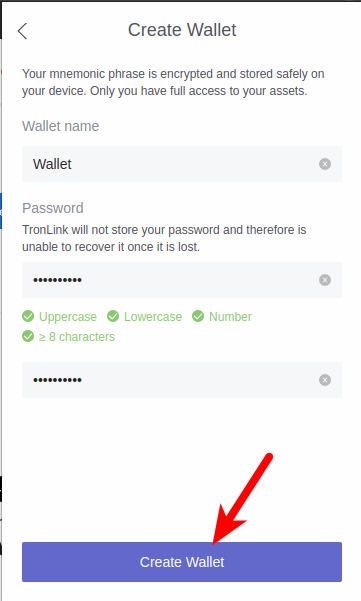
Step 3: Enter a wallet name and create a password for your wallet.
Next, enter a wallet name for your Tron wallet and create a password using the guide provided on the page then click on [Create Wallet] to create your TronLink wallet.
Step 4: Back up your secret recovery phrase.
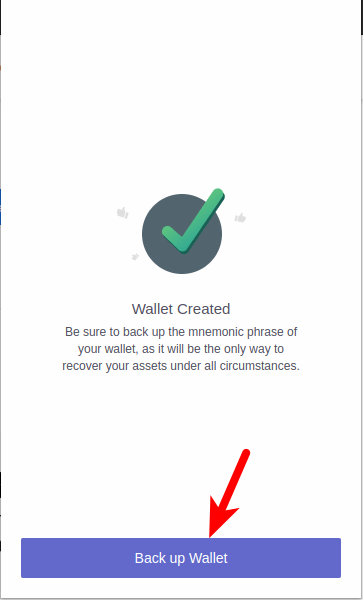
Finally, click on [Backup Wallet] and store your 12-word secret recovery phrase securely preferably offline and complete the verification to complete your wallet setup.
Can You Buy Tron Directly on Metamask?
No, you cannot buy Tron (TRX) directly on Metamask.
To get TRX on your Metamask wallet, you need to purchase TRX on a crypto exchange that supports the token and then transfer it to your Metamask wallet using the BSC network.
We generally recommend using Binance to purchase cryptocurrencies and if you don’t have a Binance account, you can create one using this link.
On Binance, you can purchase TRX using either your debit/credit card, direct bank deposit, P2P trading, or through third-party payment providers.
Once you have Tron on your Binance account, navigate to your spot wallet and transfer TRX to your Metamask wallet address while selecting “BNB Smart Chain (BEP20)” as the network to be used for the transaction.
Wrapping Up
You’re currently unable to add the native Tron token (TRX) to your Metamask wallet because Tron is not an EVM-compatible blockchain and Metamask can only be configured to work with blockchains that are compatible with the Ethereum Virtual Machine.
You can however add the Binance-Pegged version of TRX (Binance-Pegged TRX) to your Metamask wallet via the Binance Smart Network by manually inputting the correct contract address of the token into your Metamask wallet.
Alternatively, you can also use a different wallet entirely that comes with native Tron network support. One such wallet is the TronLink Wallet which is available as a browser extension and a mobile app for Android and iOS.
If you were searching for a guide on how to add Tron to Metamask, we hope you found this guide helpful.
Related Guides:
- How To Transfer Crypto From Coinbase To Metamask
- How To Add Rinkeby Network To Metamask Easily
- How To Transfer USDC From Metamask To Binance
- How To Connect Metamask To Etherscan
Share this post on social!
Jay Wilkins
Jay is a former freelance crypto writer who now heads up guides for IsItCrypto.com. He is also a contributor to some top publications in the crypto space. When he’s not cranking up some crypto-related guides for our readers, he’s probably trying to find the next moonshot tokens and NFTs.View Author posts
How to Add Tron Network to MetaMask Wallet?
The crypto market is growing slowly but surely, and with so many cryptocurrencies available, it may seem pretty hard to find crypto projects that are truly valuable and can bring you significant profits.
Still, some cryptocurrencies steal the spotlight thanks to the features they provide, and Tron Network is a great example. In a pretty short time, the crypto project gained remarkable popularity and gathered millions of users around its concept.
But the more complicated part comes when you have to find secure ways to store your Tron tokens. A safe option might be MetaMask, but you still have to know how to add TRX to your MetaMask account, and this article will help you understand the process better.
About Tron (TRX)
Tron is a blockchain-based platform that provides its own cryptocurrency, called Tronix or TRX token. The crypto project was founded in 2017 by Tron Foundation, a Singapore-based non-profit organization. Tron aims to provide a global entertainment system that enables users to share digital content cost-effectively.
Tron Network is often compared to Ethereum, as it uses some of the same building blocks, such as smart contracts and decentralized applications (dApps). Many experts consider that Tron can be a competitor of Ethereum, and with the rapid growth of the project, this thought is slowly becoming part of the reality.
The main goal of Tron Network is to allow content creators to share their content directly with consumers without the need for third-party entities. Developers use Solidity to build apps that are stored on the Tron blockchain.
The native token of Tron is TRX. TRX is used by consumers to directly pay content creators to access their applications. On the other hand, content creators do not have to pay any type of fee on the Tron blockchain. Furthermore, Tron transactions are entirely free on the platform.
MetaMask at a Glance
Launched in 2016 by Aaron Davis, MetaMask is one of the most popular crypto software wallets available. MetaMask is a non-custodial cryptocurrency wallet, meaning that nobody else can control digital assets but the users who hold them.
Currently, MetaMask supports a wide range of cryptocurrencies, including popular crypto such as Ether (ETH), Tether (USDT), or USD Coin (USDC). However, it is essential to note that the wallet does not support Bitcoin. Still, MetaMask allows users to store all ERC-20 tokens and many others.
MetaMask is pretty accessible to users from all over the world. The wallet can be downloaded as a mobile app available on iOS and Android devices. Furthermore, MetaMask is available as a web browser extension available on the most popular browsers.
Does MetaMask Support Tron Network?
Basically, you cannot add Tron tokens to your MetaMask wallet because the latter does not support TRX. At this point, you might wonder what’s the purpose of this whole article if you cannot actually add Tron tokens to MetaMask. Well, don’t leave just yet because there are some alternative methods through which your TRX can be stored on MetaMask.
How to Add Tron Network (TRX) to MetaMask?
Add TRX to MetaMask Using Binance Smart Chain
Binance Smart Chain is a network launched by Binance in 2020. It was developed to be compatible with EVM (Ethereum Virtual Machine) and support smart contracts.
To add TRX to your MetaMask wallet through Binance Smart Chain, you actually need to add the Binance-pegged version of Tron. CoinGecko and CoinMarketCap also allow users to do that directly on their platforms.
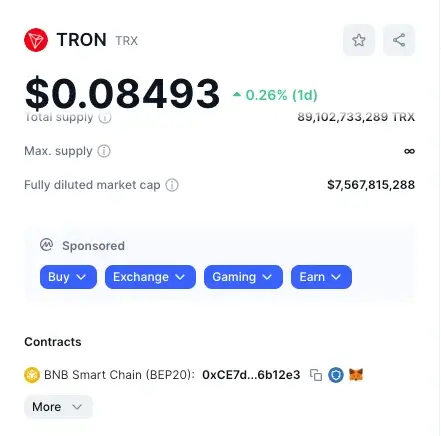
The Binance-peg TRX token is not the TRX token itself, but it is always backed by the native token and has the same value as the original TRX.
Step 1: Copy the contract address of the Binance-pegged TRX token
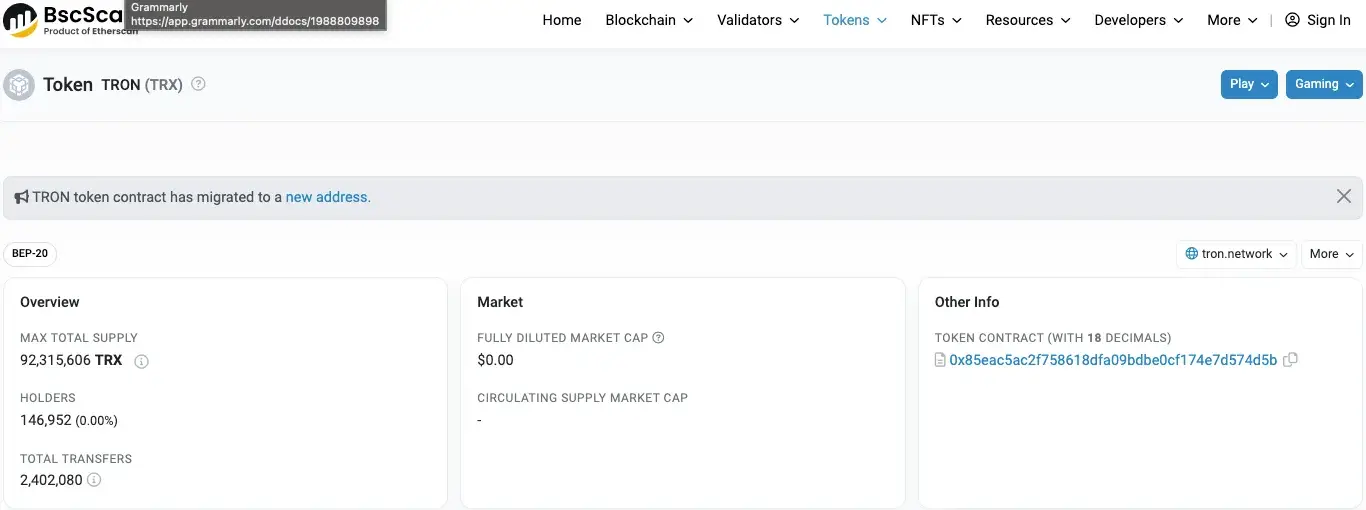
To do this, you can go on CoinMarketCap, for example, and click on the “copy” icon next to the Binance Smart Chain address. As mentioned, you can also do that by clicking on the MetaMask icon next to “Copy.” You can also find the Binance Smart Chain address on the BscScan contract page and other such platforms.
Step 2: Go to MetaMask on your phone or PC
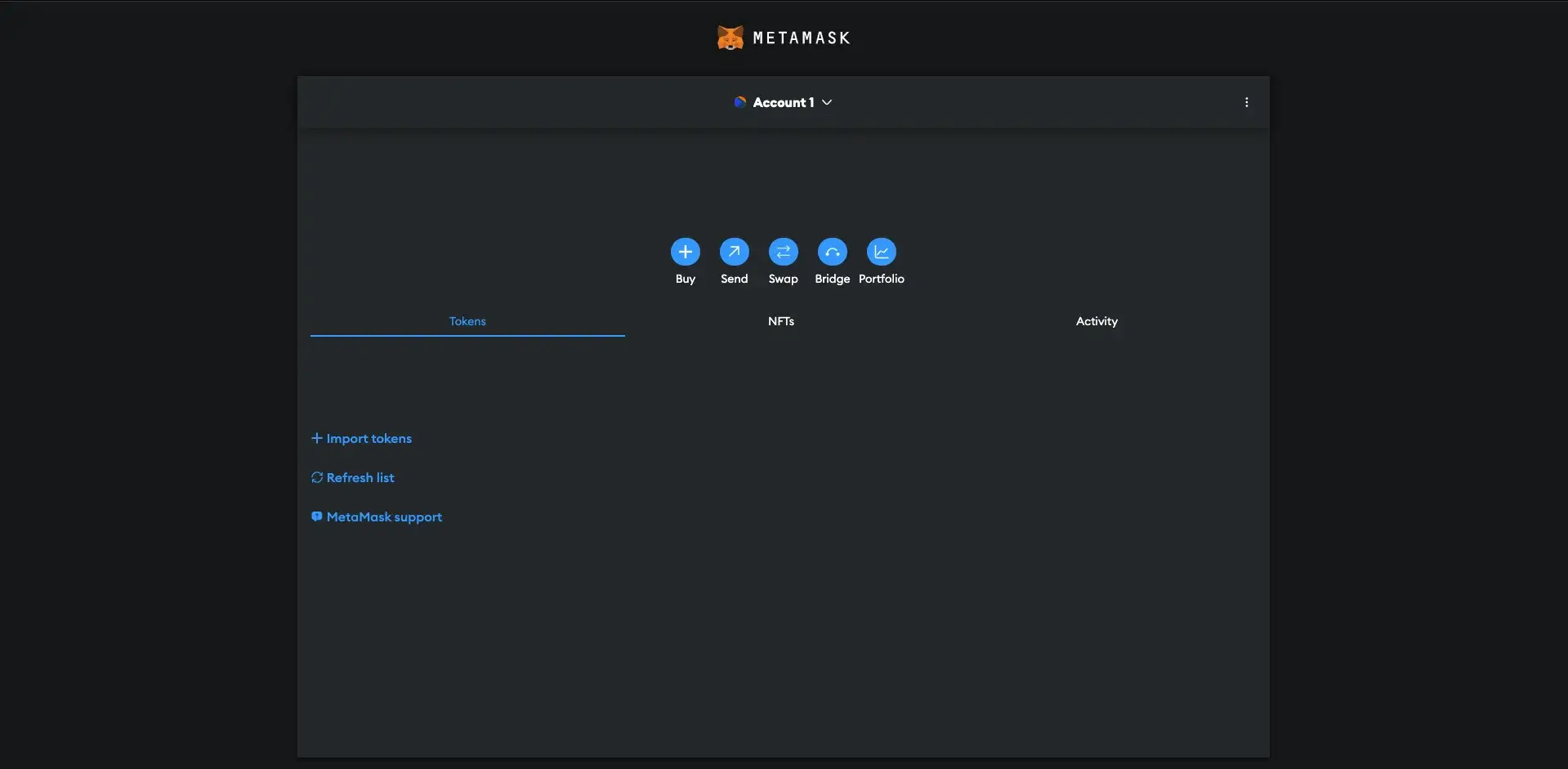
The next step is to access your MetaMask wallet. You can do that on your phone and through the web browser extension. In this guide, we will use the web version. You will also have to enter your password to be able to access the MetaMask account.
Step 3: Choose the Binance Smart Chain account
Go to the dropdown in the upper left section of the page (or on the account icon in the mobile app’s case) and choose the Binance Smart Chain account. If you don’t have one, click on “Add network.”
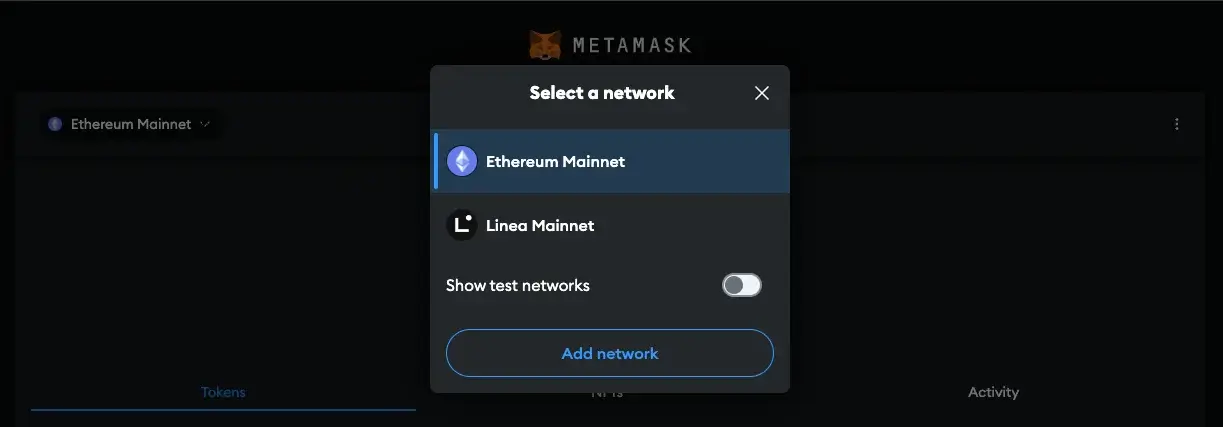
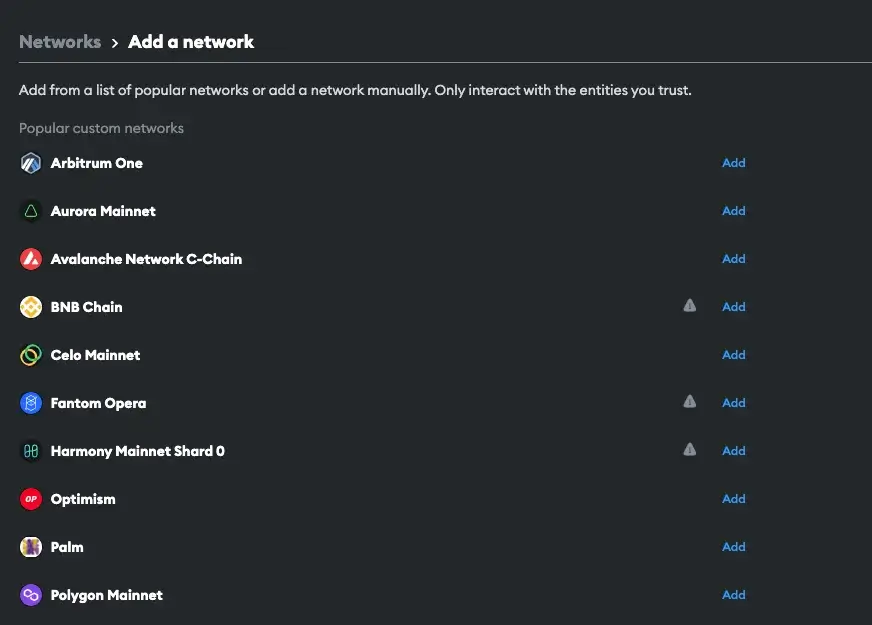
To add a new network, you can search for BNB in the list given by MetaMask or add the network manually.
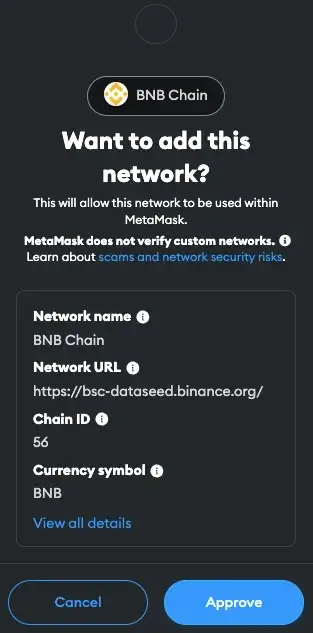
Then, you can approve the process.
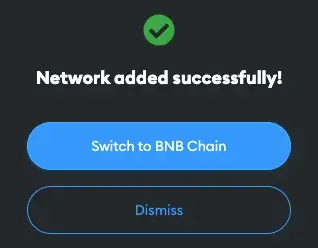
Now, MetaMask will ask you if you want to switch to Binance Smart Chain.
Step 4: Click on “Import tokens”

Now, you can simply click on “Import tokens” and start to move your TRX tokens to MetaMask just like you would import other custom tokens.
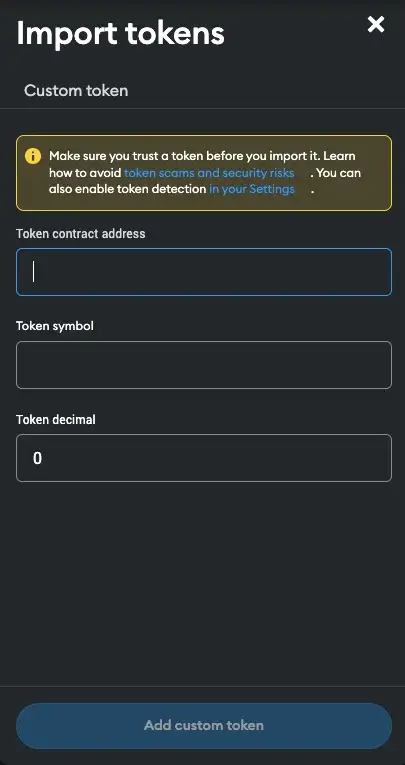
Step 5: Enter the Binance-pegged TRX contract address
Go to “Token contract address” and paste the address you copied earlier from CMC, CoinGecko, or BscScan.
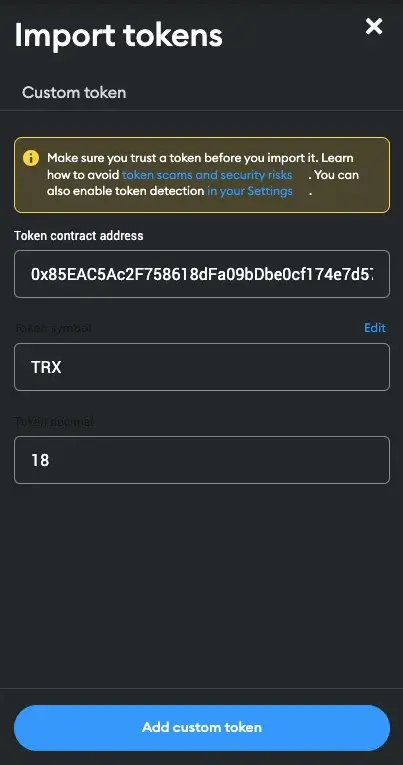
Then, you can wait for MetaMask to fill in the other information. Afterward, you can click on “Add custom token.”
Step 6: Import TRX tokens to MetaMask
The last step you have to complete is to click on “Import tokens” to add TRX to your MetaMask account.
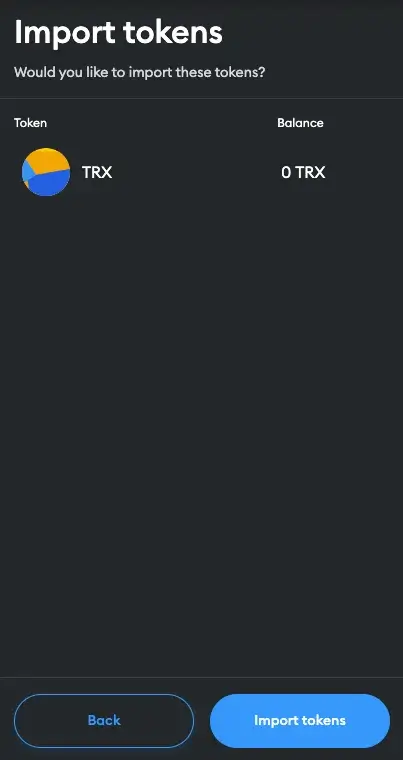
Then, you will notice that TRX was added to your account.
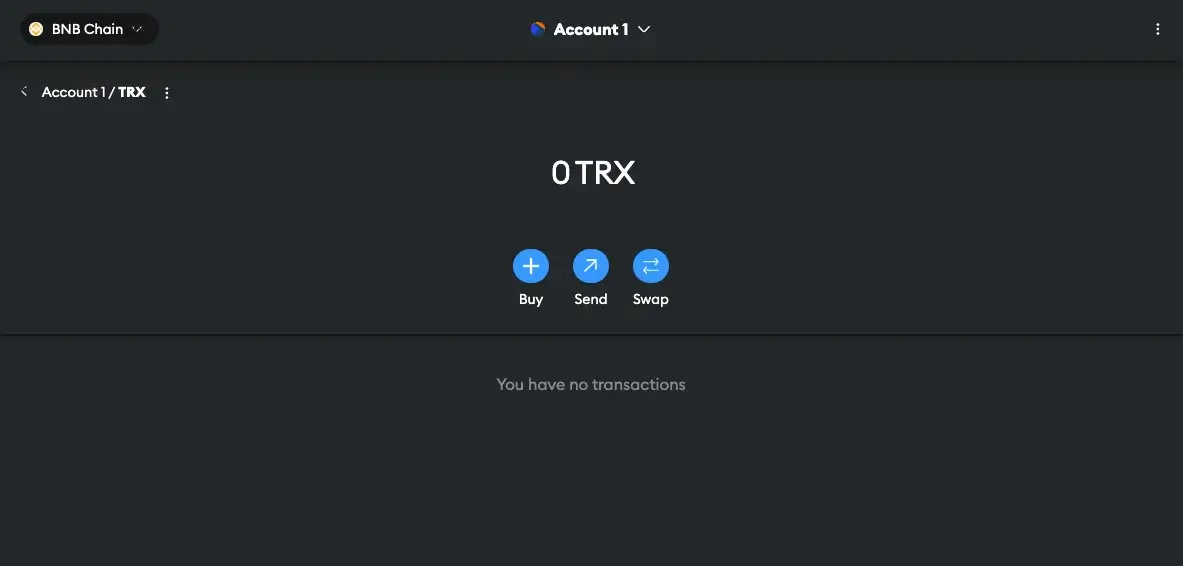
Other Options to Store TRX
While MetaMask does not directly support TRX and the process we have just discussed might seem a little complicated, especially to newcomers, you can still store your TRX tokens on a Tron-compatible wallet.
Top TRX-Compatible Wallets
1. Tronscan
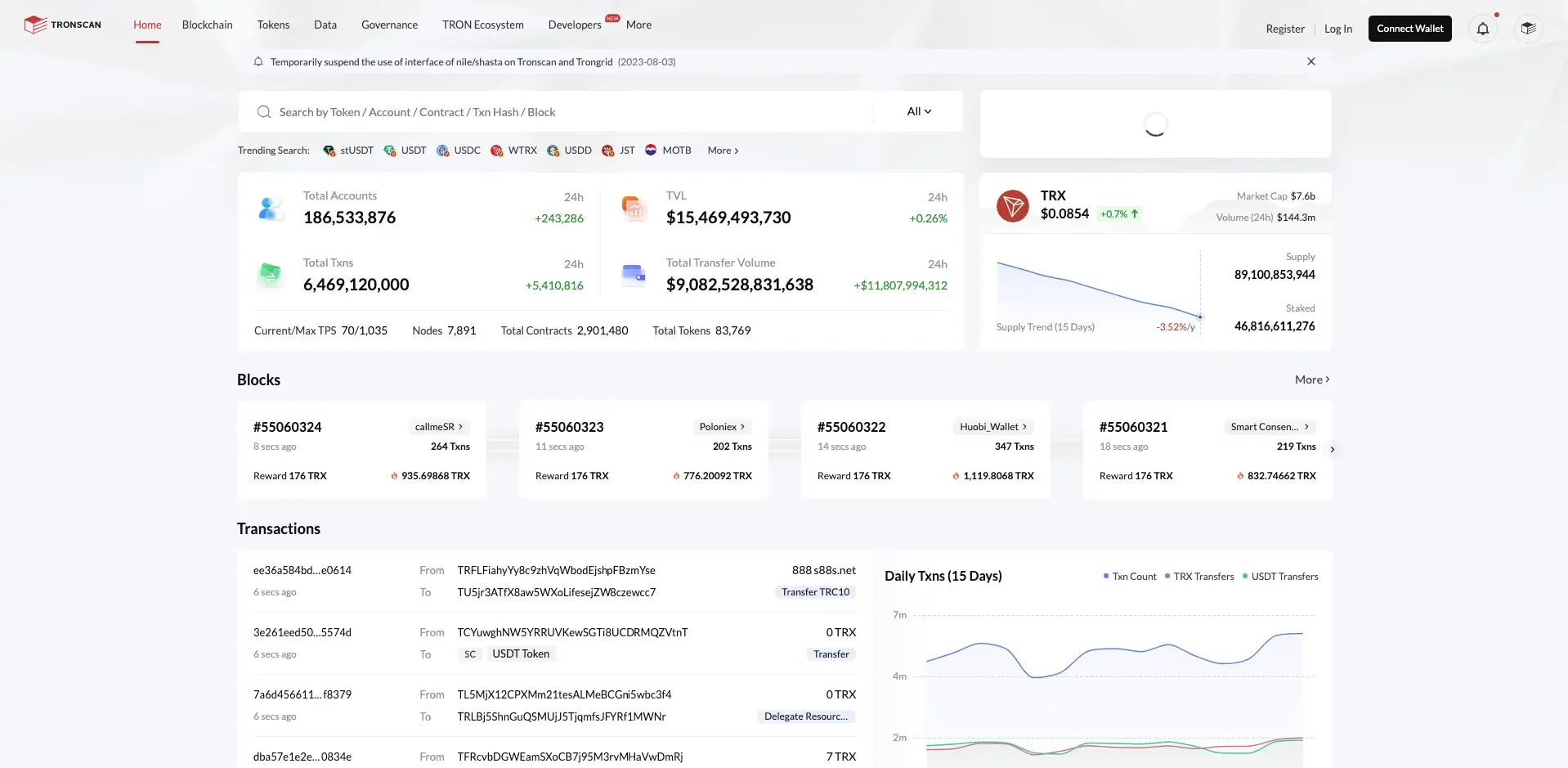
At the moment, Tronscan is the official TRX wallet and has become one of the most popular Tron-compatible wallets. The project is not only a wallet but also a decentralized block explorer for the Tron blockchain. Thus, users will also be able to view transaction queries and get data statistics.
Apart from being a pretty user-friendly platform, Tronscan is also renowned for its strong security features. Furthermore, when combined with a cold wallet such as Ledger, Tronscan can provide advanced security features, considering that users can store their private keys offline and protect them from various thefts and hacks.
2. TronLink
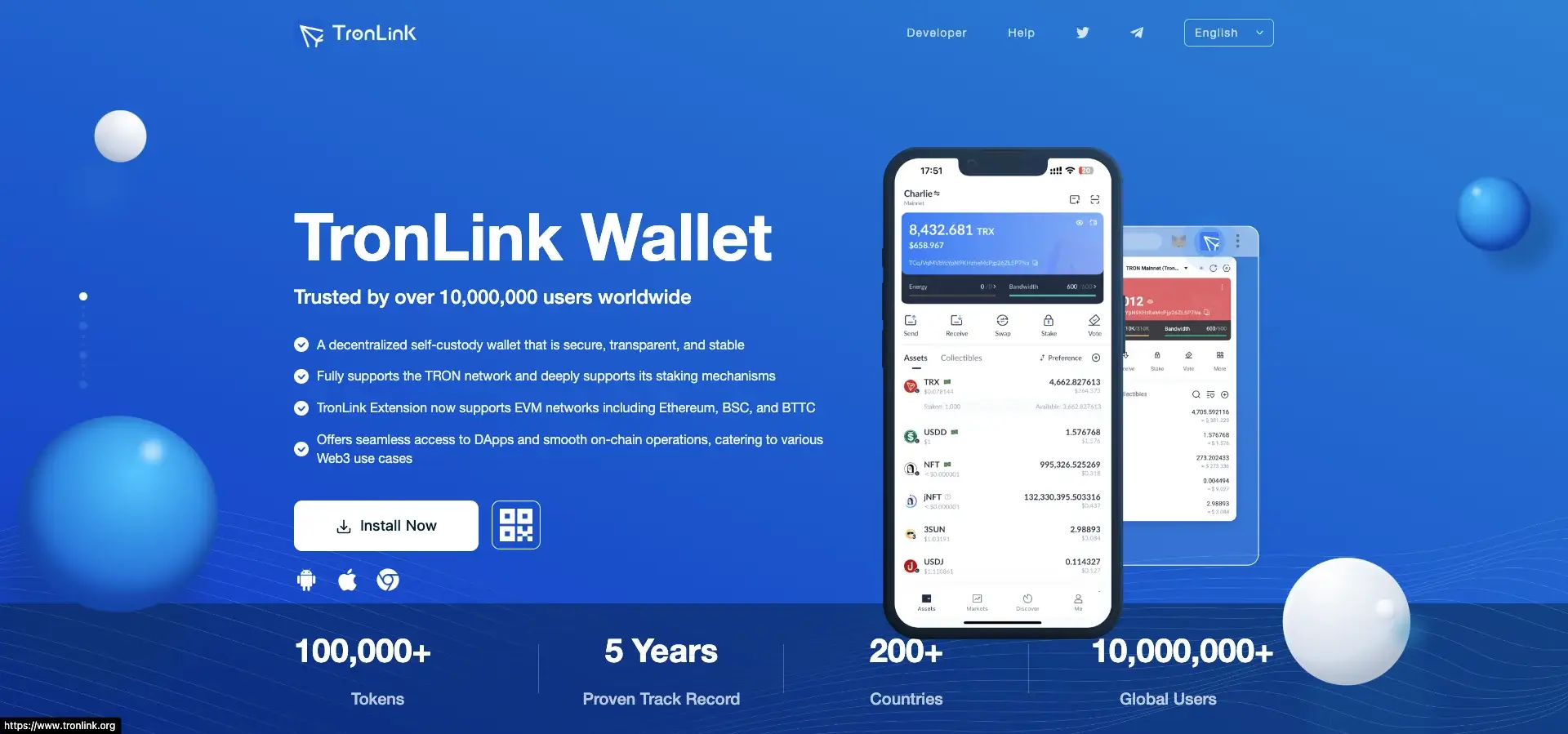
TronLink is a decentralized self-custody crypto wallet available on Android, iOS, and as a Chrome extension. The wallet fully supports the Tron network and is now compatible with EVM networks such as Ethereum and Binance Smart Chain network.
TronLink has gathered over 10 million users around its product thanks to its safety features, user-friendliness, and its compatibility with major crypto platforms. The wallet provides local storage of private keys and has added multi-layered encryption for an additional safety layer. TronLink is fully compatible with all tokens on the Tron network, including TRX, as well as all TRC-10 and TRC-20 tokens.
3. Ledger
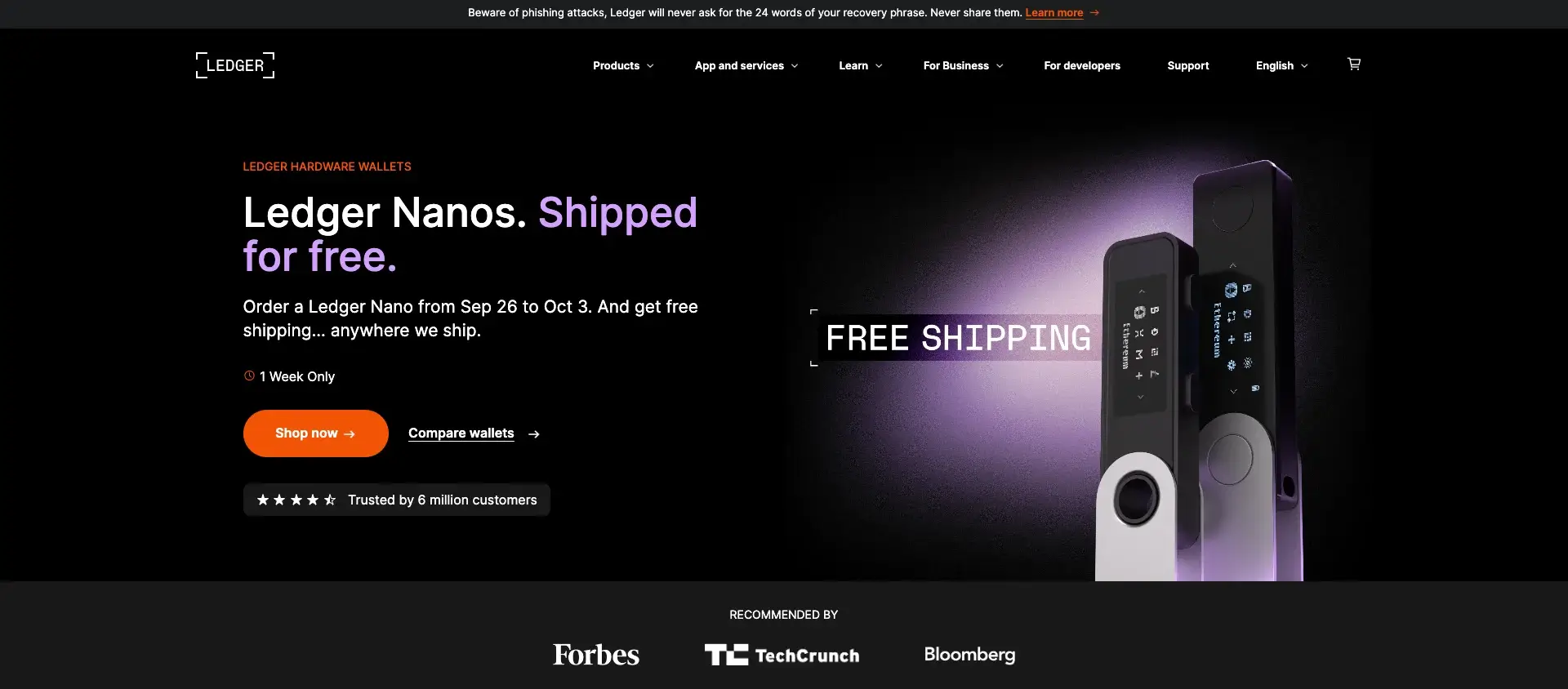
We all know that cold storage is the safest, and if you want to keep your TRX as safe as possible, you can choose a hardware wallet such as Ledger. Founded in 2014, Ledger is one of the most popular cold wallets on the market. It has launched multiple models, but Ledger Nano X and Ledger Nano S Plus remain the most used devices.
When using Ledger, your TRX tokens are stored online, and you can connect the wallet to multiple platforms to trade your assets seamlessly. Besides, setting up the wallet is a pretty straightforward process. You only need to plug the device, generate a PIN, and keep the secret recovery phrase as safe as possible.
4. Trust Wallet
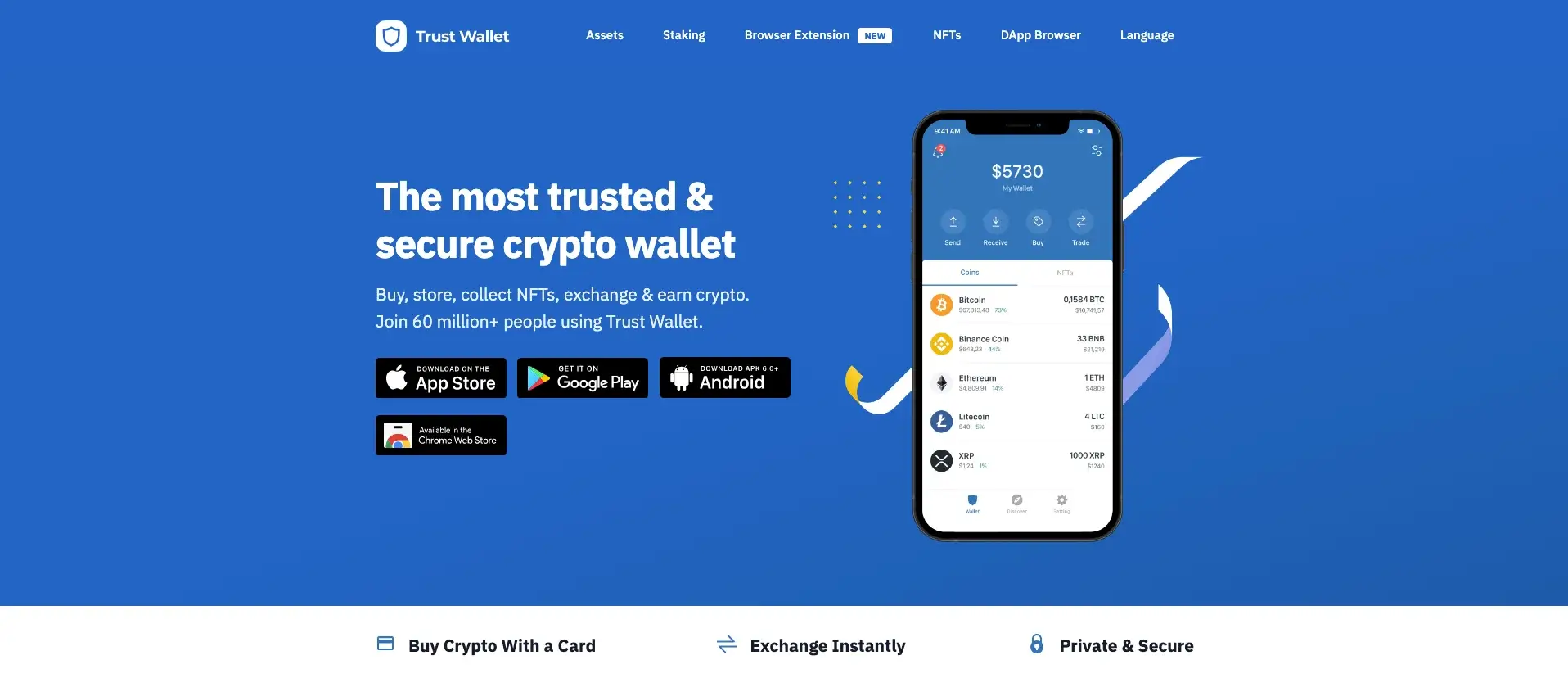
Trust Wallet is a non-custodial wallet specially designed with mobile-friendliness in mind. Launched in 2017 by Viktor Radchenko, the wallet currently supports over 4.5 million digital assets, including TRX. Trust Wallet developed a light app suitable for both beginners and experienced traders, and the app is compatible with various hardware wallets, this being a significant advantage when it comes to the safety of users’ assets.
Furthermore, Trust Wallet has also integrated a DEX (Decentralized Exchange), making it significantly easier for investors to interact with the tokens they store.
Final Thoughts
Tron Network has gained remarkable popularity in quite a short time. Launched in 2017, Tron is considered to be one of Ethereum’s competitors, with millions of users investing in TRX, the project’s native cryptocurrency.
If you want to add your TRX tokens to MetaMask, keep in mind that the latter does not actually support TRX. However, an alternative is to add the Binance-pegged version of TRX to your MetaMask account. Other options to store TRX tokens include Tronscan, TronLink, Ledger, or Trust Wallet.
Share this Post
* The information in this article and the links provided are for general information purposes only and should not constitute any financial or investment advice. We advise you to do your own research or consult a professional before making financial decisions. Please acknowledge that we are not responsible for any loss caused by any information present on this website.
How to Add Tron (TRX) to MetaMask
Discover why Tron (TRX) cannot be integrated with MetaMask and learn about the top DeFi applications available in the Tron ecosystem.

Dylan Matthews
Last Updated
January 6, 2024
Affiliate Disclosure
Buy Bitcoin Bank is an industry-leading resource for crypto insights, and we sustain ourselves through affiliate relationships. Our aim is to arm you with reliable information and tools to make informed financial decisions in the digital asset ecosystem. While we do earn commissions when you click on links to products or services, this never influences our content integrity.
Active Partnerships
Buy Bitcoin Bank is in affiliate programs with various companies, including but not limited to eToro, Bybit, Kraken, and Uphold. These partnerships help support our platform but do not sway the trustworthiness of our content.
Table Of Contents
How to Bridge to Aptos Network
StarkNet Airdrop Guide
MetaMask Wallet Review
Summary: Despite originating as an Ethereum fork and being compatible with Ethereum Virtual Machine (EVM), the Tron Network is not supported by the MetaMask Wallet. This incompatibility is due to Tron’s distinct evolution and token standards. Therefore, Tron users are advised to utilize a dedicated wallet for TRX like TronLink, for engaging with notable DeFi applications such as JustLend, SUN, and JustStables.
Best MetaMask Alternative for Tron
Visit Site
Platform Highlights
- Largest and most popular Tron Wallet with 10m users.
- Full coverage of TRX, TRC-10, TRC-20 and TRC-721 tokens.
- Safe and trusted with no exploits. Easy compatibility with TRX DeFi.
Table of Contents
Can I Add Tron to MetaMask?
No, it is not possible to add Tron (TRX) to MetaMask. This incompatibility arises from the Tron network’s evolution. Initially, Tron was a fork of GETH, Ethereum’s Go-based client, and used Ethereum’s ERC-20 token standard. However, Tron has since developed its own token standards, namely TRC-20, TRC-10, and TRC-721. MetaMask is designed to support Ethereum and its associated ERC (Ethereum Request for Comment) tokens, and does not support these Tron-specific standards.
How to Add Tron to MetaMask Alternative
For Tron Network users seeking a DeFi and on-chain wallet comparable to MetaMask, TronLink stands out as the leading choice. Its popularity stems from user-friendly features and functionality akin to MetaMask. TronLink, used by over 10 million individuals, is accessible on Web, iOS, and Android platforms, supporting major browsers like Chrome and Mozilla Firefox.
To start using TronLink, the top alternative for Tron on MetaMask, follow these four simple steps:
.webp)
- Navigate to the TronLink website and download the wallet extension.
- Set up your account and securely store your seed address.
- Transfer TRX tokens into your account from a centralized exchange to fund it.
- You’re now ready to safely engage with TRX-native DeFi applications.
Most Popular Tron DeFi Applications
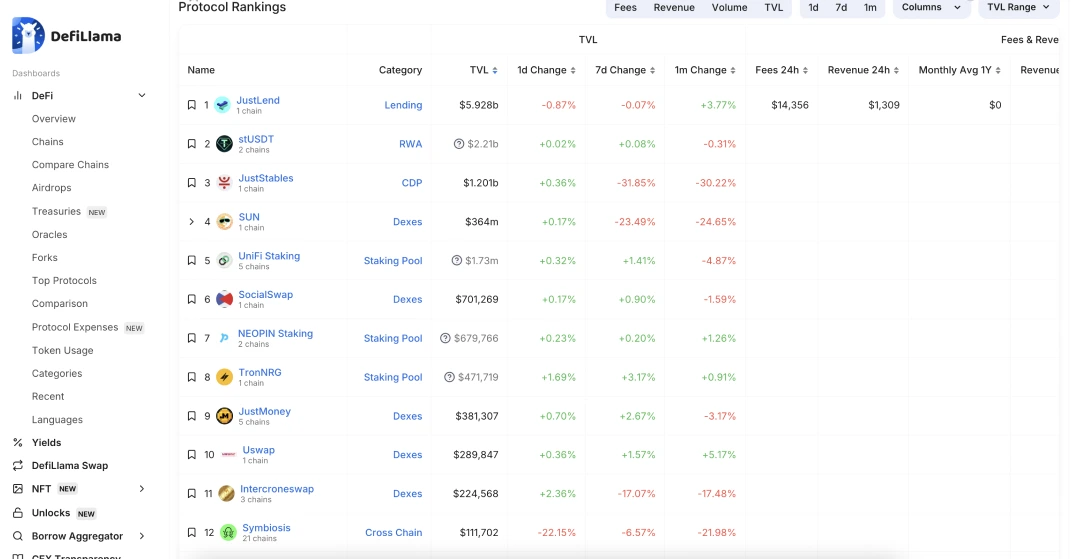
If you’ve recently set up your Tron (TRX) wallet and are exploring on-chain applications, here’s a guide to the five most popular DeFi applications on the Tron network, ranked by Total Value Locked (TVL). These applications have undergone thorough vetting by our team and have been corroborated by Defillama, a leading authority in DeFi analytics.
- JustLend (Lending Platform): $5.928 billion in TVL.
- stUSDT (Real World Asset — RWA): $2.21 billion in TVL.
- JustStables (Collateralized Debt Position Vaults): $1.201 billion in TVL.
- SUN (Decentralized Exchange — DEX): $364 million in TVL.
- UniFi Staking (Staking Pool): $1.73 million in TVL.
This list reflects the latest trends and performance metrics, offering a comprehensive overview of the most utilized and trusted DeFi applications within the Tron ecosystem.
What is Tron (TRX)?
Tron, launched in 2017, is a cutting-edge blockchain platform with a vision to decentralize the internet and its infrastructure. Its protocol, one of the largest blockchain-based operating systems globally, offers high throughput, scalability, and availability for all decentralized applications in its ecosystem. The acquisition of BitTorrent in July 2018 reinforced Tron’s commitment to a decentralized ecosystem. Tron’s architecture includes a three-layer structure: Storage Layer, Core Layer, and Application Layer, supporting a variety of features like smart contracts and a decentralized exchange.
It employs a unique consensus mechanism called Delegated Proof of Stake (DPoS), enhancing scalability and efficiency. The platform uses TRX as its primary cryptocurrency, facilitating transactions within its network. Tron’s development tools and robust ecosystem support the creation of diverse decentralized applications, aiming to solve the scalability challenges faced by earlier blockchain systems like Bitcoin and Ethereum.
Final Thoughts
In conclusion, while the Tron Network shares roots with Ethereum, its unique development trajectory and token standards render it incompatible with MetaMask Wallet. For Tron users, TronLink emerges as the optimal solution, mirroring MetaMask’s user-friendly interface and robust functionality. The wallet facilitates access to top DeFi applications on the Tron network, as evidenced by the significant Total Value Locked in platforms like JustLend, stUSDT, and JustStables.
Как добавить Tron (TRX) в MetaMask
Узнайте, почему Tron (TRX) не может быть интегрирован с MetaMask, и узнайте о лучших приложениях DeFi, доступных в экосистеме Tron.
Дилан Мэтьюс
Соучредитель
Последнее обновление
6 января 2024 года
Рассмотрено
Раскрытие информации о партнерах
Buy Bitcoin Bank является ведущим отраслевым ресурсом для криптовалют, и мы поддерживаем свою деятельность за счет партнерских отношений. Наша цель — предоставить вам достоверную информацию и инструменты для принятия обоснованных финансовых решений в экосистеме цифровых активов. Хотя мы получаем комиссионные, когда вы переходите по ссылкам на товары или услуги, это никогда не влияет на целостность нашего контента.
Активное партнерство
Buy Bitcoin Bank участвует в партнерских программах с различными компаниями, включая, но не ограничиваясь, eToro, Bybit, Kraken и Uphold. Эти партнерства помогают поддерживать нашу платформу, но не влияют на надежность нашего контента.
Оглавление
Как подключиться к сети Aptos
StarkNet Airdrop Guide
Обзор кошелька MetaMask
Краткое описание: Несмотря на то, что сеть Tron является форком Ethereum и совместима с Ethereum Virtual Machine (EVM), она не поддерживается кошельком MetaMask. Эта несовместимость обусловлена особенностями развития Tron и стандартами токенов. Поэтому пользователям Tron рекомендуется использовать специальный кошелек для TRX, например TronLink, для взаимодействия с известными приложениями DeFi, такими как JustLend, SUN и JustStables.
Лучшая альтернатива MetaMask для Tron
Посетите сайт
Основные положения платформы
- Крупнейший и самый популярный кошелек Tron с 10 млн. пользователей.
- Полный охват токенов TRX, TRC-10, TRC-20 и TRC-721.
- Безопасный и надежный, без эксплойтов. Легкая совместимость с TRX DeFi.
Оглавление
Могу ли я добавить Tron в MetaMask?
Нет, добавить Tron (TRX) в MetaMask невозможно. Эта несовместимость обусловлена эволюцией сети Tron. Изначально Tron был форком GETH, клиента Ethereum на базе Go, и использовал стандарт токенов Ethereum ERC-20. Однако впоследствии Tron разработал собственные стандарты токенов, а именно TRC-20, TRC-10 и TRC-721. MetaMask разработан для поддержки Ethereum и связанных с ним токенов ERC (Ethereum Request for Comment) и не поддерживает эти специфические для Tron стандарты.
Как добавить Tron в MetaMask Alternative
Для пользователей Tron Network, ищущих DeFi и внутрицепочечный кошелек, сравнимый с MetaMask, TronLink является ведущим выбором. Его популярность обусловлена удобством использования и функциональностью, схожей с MetaMask. TronLink, которым пользуются более 10 миллионов человек, доступен на платформах Web, iOS и Android и поддерживает основные браузеры, такие как Chrome и Mozilla Firefox.
Чтобы начать использовать TronLink, лучшую альтернативу для Tron на MetaMask, выполните следующие четыре простых шага:
- Перейдите на сайт TronLink и загрузите расширение для кошелька.
- Создайте свою учетную запись и надежно храните свой семенной адрес.
- Переведите токены TRX на свой счет с централизованной биржи, чтобы пополнить его.
- Теперь вы готовы к безопасной работе с TRX-нативными приложениями DeFi.
Самые популярные приложения Tron DeFi
Если вы недавно завели кошелек Tron (TRX) и изучаете приложения для работы с цепочкой, представляем вам руководство по пяти самым популярным приложениям DeFi в сети Tron, ранжированным по показателю Total Value Locked (TVL). Эти приложения прошли тщательную проверку нашей командой и были подтверждены Defillama, ведущим специалистом в области аналитики DeFi.
- JustLend (платформа для кредитования): 5,928 миллиарда долларов в TVL.
- stUSDT (Real World Asset — RWA): $2,21 млрд в TVL.
- JustStables (хранилища обеспеченных долговых позиций): 1,201 миллиарда долларов в TVL.
- SUN (децентрализованная биржа — DEX): 364 миллиона долларов в TVL.
- Ставки UniFi (ставочный пул): 1,73 миллиона долларов в TVL.
Этот список отражает последние тенденции и показатели производительности, предлагая полный обзор наиболее используемых и надежных приложений DeFi в экосистеме Tron.
Что такое Tron (TRX)?
Tron, запущенная в 2017 году, — это передовая блокчейн-платформа, целью которой является децентрализация интернета и его инфраструктуры. Ее протокол, одна из крупнейших в мире операционных систем на основе блокчейна, обеспечивает высокую пропускную способность, масштабируемость и доступность для всех децентрализованных приложений в своей экосистеме. Приобретение BitTorrent в июле 2018 года укрепило приверженность Tron к децентрализованной экосистеме. Архитектура Tron включает в себя трехслойную структуру: уровень хранения, уровень ядра и уровень приложений, поддерживающих различные функции, такие как смарт-контракты и децентрализованная биржа.
В ней используется уникальный механизм консенсуса под названием Delegated Proof of Stake (DPoS), повышающий масштабируемость и эффективность. Платформа использует TRX в качестве основной криптовалюты, облегчающей транзакции внутри сети. Инструменты разработки и надежная экосистема Tron поддерживают создание разнообразных децентрализованных приложений, призванных решить проблемы масштабируемости, с которыми сталкивались более ранние блокчейн-системы, такие как Bitcoin и Ethereum.
Заключительные размышления
В заключение отметим, что, хотя сеть Tron имеет общие корни с Ethereum, уникальная траектория развития и стандарты токенов делают ее несовместимой с кошельком MetaMask. Для пользователей Tron TronLink является оптимальным решением, зеркально отражающим удобный интерфейс и надежную функциональность MetaMask. Кошелек облегчает доступ к лучшим DeFi приложениям в сети Tron, о чем свидетельствует значительная общая стоимость, заблокированная в таких платформах, как JustLend, stUSDT и JustStables.