Setup software p state limit что это
Процессоры Intel поддерживают несколько технологий для оптимизации энергопотребления. В этой статье (перевод [1]) дается обзор p-состояний (оптимизация напряжения питания и частоты CPU во время работы) и c-состояний (оптимизация потребления мощности, если ядро не выполняет ни одной инструкции).
[P-состояния]
Во время выполнения кода операционная система и CPU могут оптимизировать энергопотребление с помощью различных P-состояний (P это сокращение от «performance», что означает «производительность»). В зависимости от требований, CPU работает на разных частотах. Состояние P0 соответствует самой высокой частоте (с самым высоким напряжением питания).
Для процессоров Intel до архитектуры Haswell/Broadwell, желаемая частота (и соответствующее ей напряжение питания) указывается операционной системой путем записи соответствующих величин в специальные регистры процессора [2][3].
В архитектуре Skylake операционная система может оставить управление P-состояниями аппаратуру CPU (Speed Shift Technology, Hardware P-states [4]). С Kaby Lake эти функции были дополнительно оптимизированы [5].

Speed Schift (сдвиг скорости). P-состояния определяются в BIOS, и управляются операционной системой. Технология Speed Schift дает полное или частичное управление частотой тактирования CPU (может осуществляться либо во всем диапазоне, либо в узком окне). Speed Schift требует поддержки со стороны операционной системы (Windows 10 с новыми обновлением эту функцию поддерживает), также требуется любой процессор Intel 6 Skylake. Сдвиг скорости означает ускоренный отклик на запросы изменения производительности со стороны ПО (JavaScript, инструменты офиса, веб-браузеры). Технология сдвига скорости обеспечивает увеличение производительности для обычных задач, при этом незначительно снижается общее энергопотребление, т. е. эффективность работы всей системы повышается.
[C-состояния]
В отличие от P-состояний, которые были разработаны для регулирования потребления мощности во время выполнения кода (т. е. в нормальном рабочем состоянии процессора), C-состояния используются для оптимизации энергопотребления в режиме ожидания (idle mode, т. е. когда никакой код процессором не выполняется).
Типовые C-состояния следующие:
C0 – Active Mode: код выполняется, это состояние соответствует одному из P-состояний.
C1 – Auto Halt (автоматическая приостановка).
C1E – Auto halt, low frequency, low voltage (автоматическая приостановка с пониженной частотой и напряжением питания).
C2 – Временное состояние перед переходом в C3. Память в рабочем состоянии.
C3 – Сброс кэшей L1/L2 (flush), выключение тактовых частот.
C6 – Сохранение состояний ядра перед выключением, и выключение PLL (т. е. прекращение синтеза тактовых частот).
C7 – C6, плюс может быть сброшен LLC (LLC означает кэш самого высокого уровня, т. е. самая медленная память кэш).
C8 – C7, плюс должен быть сброшен LLC.

Примечание *: показано в грубом приближении.
C-состояния можно отличить друг от друга по C-состояниям ядра (Core C-states или CC-states), состояниям корпуса (Package C-states или PC-states) и логическим состояниям. В большинстве случаев операционная система устанавливает определенное состояние для ядра путем выполнения команды MWAIT.

Примечание: «состояние ядра» (core state) относится к ядру, которое находится в состоянии самого большого потребления энергии (наиболее активно).
[Запрет в BIOS функции CPU Power Saving]
В некоторых случаях рекомендуется деактивировать в BIOS настройки экономии питания CPU. Здесь показано, где найти эти опции и как их запретить, чтобы опции управления питанием (CPU P State Control и CPU C State Control) были полностью запрещены в BIOS (на примере материнской платы Supermicro X10DRi и процессора Intel Xeon E5 2620v4.
Как запретить CPU Power Saving:
1. Во время начального процесса загрузки (сразу после включения питания или сброса) нажмите специальную клавишу для входа в BIOS. Чаще всего это Del (Delete) или F2, для материнской платы Supermicro X10DRi это клавиша Delete.
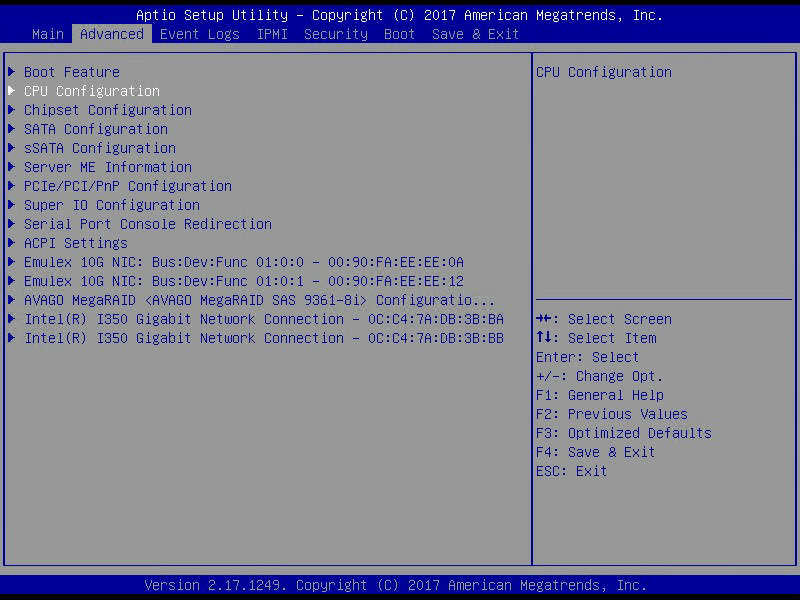
2. Перейдите в раздел настроек Advanced CPU Configuration -> Advanced Power Management Configuration.

3. Поменяйте настройку Power Technology в состояние Custom и Energy Efficient Turbo в состояние Disable.
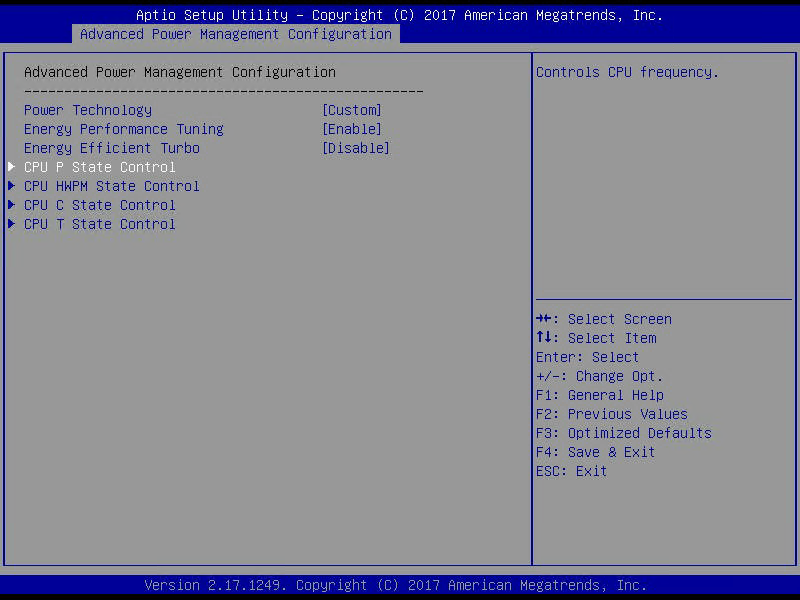
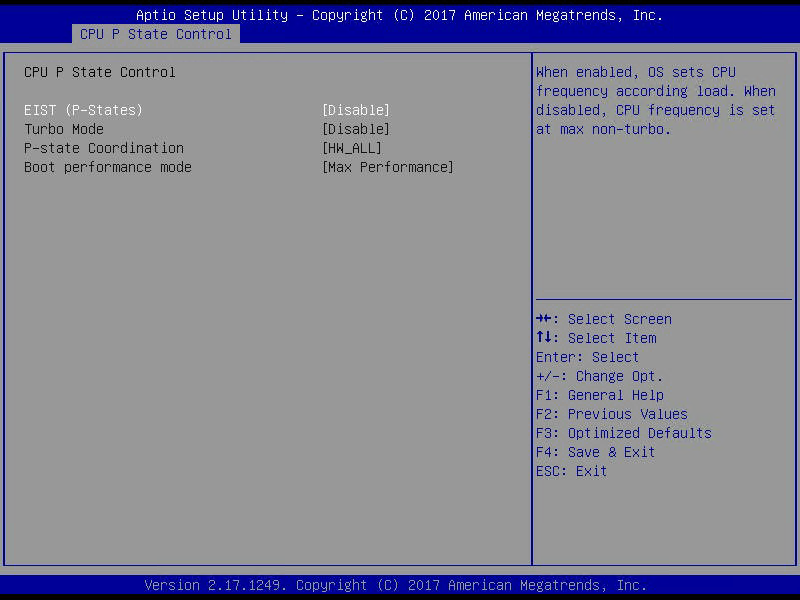
4. Перейдите в раздел CPU P State Control, деактивируйте EIST (P-States) and Turbo Mode.
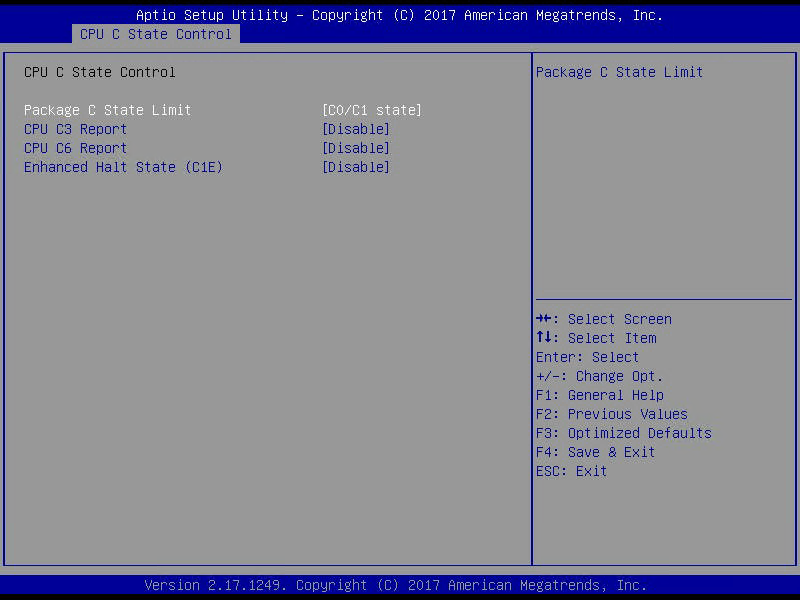
5. Перейдите в раздел CPU C State Control, поменяйте Package C State Limit на C0/C1 state и деактивируйте CPU C3 Report, CPU C6 Report и Enhanced Halt State (C1E).
[Ссылки]
1. Processor P-states and C-states site:thomas-krenn.com.
2. Intel Xeon Processor E3-1200 V3 site:intel.com.
3. What exactly is a P-state? site:intel.com.
4. [IDF15]Intel’s 6th Gen Skylake Unwrapped – CPU Microarchitecture, Gen9 Graphics Core and Speed Shift Hardware P-State site:wccftech.com.
5. Intel Kaby Lake: 14nm+ und optimiertes Speed Shift steigern Performance site:thomas-krenn.com.
P-STATES

Мне посоветовали выставить частоту и напряжение на процессоре с помощью p-states, но я нигде не нашел, как это делается! Подскажите, если про это знаете! Спасибо, заранее.
Комментарии 10

3 года назад
А материнскую и процессор с трёх попыток угадать нужно?
Свернуть ответы 2

3 года назад
я так понимаю что нужно притвориться Шерлоком и нарыть в предыдущих темах автора MSI x470 Gaming Pro Max xD
Свернуть ответы 1
3 года назад
3 года назад
материнской платой MSI не обладаю, но на моей Gigabyte это выглядит так: Peripherals -> AMD CBS -> ZEN common options -> CUSTOM PSTATES -> CUSTOM PSTATE 0
Развернуть ответы 4
Пришелец-UY8887
3 года назад
Мне этот совет как раз Вы ( Темный ) и дали, и я хочу ему последовать. Но в биосе не могу найти! И материнка у меня как раз MSI x470 Gaming Pro Max, а процессор Ryzen 3800. Жду помощи.
Свернуть ответы 1
3 года назад
придётся вам самостоятельно погуглить, ибо я такой матерью не обладаю.
Обсуждение товара
Процессоры 1 год назад
андервольтинг Ryzen 5600X
Приветствую! Пытаюсь с помощью утилиты AMD Ryzen Master залочить частоту процессора AMD Ryzen 5 5600X на 4,500 МГц и снизить напряжение до 1,225В. При включении теста ПК перезагружается. Раньше частота и напряжение были установлены на указанных уровнях через БИОС, проблем не возникало.
Процессоры 9 дней назад
Настройка вольтажа на ryzen 5600
Подскажите какое максимум напряжение можно выставить на данный процессор чтобы не вовред было?
Процессоры 9 месяцев назад
Про AVX-512
(тема) Хотелось бы уточнить. Микрокод 0x15 от куда взят? Для МП ASUS? Если я модифицирую биос для МП GIGABYTE B760M GAMING X AX DDR4, это сработает? Возможен ли, если что не так, после этого запуск биос на случай отката на официальный? Буквально на днях вышел новый f3.
Процессоры 3 года назад
Режим PBO
Подскажите, если отключить режим PBO, выставить частоту 4300 и напряжение 1,3 v на постоянку, это не вредит процессору ( AMD RYZEN 3800x ). Я слышал, что снизятся температура и немного повысится общая производительность. Но в простое напряжение же не снизится? И как это скажется на процессоре? Спасибо!
Процессоры 2 месяца назад
Температуры Ryzen 7700x с рамкой thermalright и без
Если ли вообще смысл её ставить на амд?знаю что на интеле это роляет,а вот про амд не нашел ,заранее спасибо
Intel CPUs: P-state, C-state, Turbo Boost, CPU frequency, etc.
Ten years ago, most computers were desktop computers designed for best performances and their CPU frequency was fixed. Nowadays, most devices are embedded and use low power consumption processors like ARM CPUs. The power consumption now matters more than performance peaks.
Intel CPUs evolved from a single core to multiple physical cores in the same package and got new features: Hyper-threading to run two threads on the same physical core and Turbo Boost to maximum performances. CPU cores can be completely turned off (CPU HALT, frequency of 0) temporarily to reduce the power consumption, and the frequency of cores changes regulary depending on many factors like the workload and temperature. The power consumption is now an important part in the design of modern CPUs.
Warning! This article is a summary of what I learnt last weeks from random articles. It may be full of mistakes, don’t hesitate to report them, so I can enhance the article! It’s hard to find simple articles explaining performances of modern Intel CPUs, so I tried to write mine.
Tools used in this article
This article mentions various tools. Commands to install them on Fedora 24:
dnf install -y util-linux :
dnf install -y kernel-tools :
sudo dnf install -y msr-tools :
Other interesting tools, not used in this article: i7z (sadly no more maintained), lshw, dmidecode, sensors.
The sensors tool is supposed to report the current CPU voltage, but it doesn’t provide this information on my computers. At least, it gives the temperature of different components, but also the speed of fans.
Example of Intel CPUs
My laptop CPU: /proc/cpuinfo
On Linux, the most common way to retrieve information on the CPU is to read /proc/cpuinfo. Example on my laptop:
selma$ cat /proc/cpuinfo processor : 0 vendor_id : GenuineIntel model name : Intel(R) Core(TM) i7-3520M CPU @ 2.90GHz cpu MHz : 1200.214 . processor : 1 vendor_id : GenuineIntel model name : Intel(R) Core(TM) i7-3520M CPU @ 2.90GHz cpu MHz : 3299.882 .
«i7-3520M» CPU is a model designed for Mobile Platforms (see the «M» suffix). It was built in 2012 and is the third generation of the Intel i7 microarchitecture: Ivy Bridge.
The CPU has two physical cores, I disabled HyperThreading in the BIOS.
The first strange thing is that the CPU announces «2.90 GHz» but Linux reports 1.2 GHz on the first core, and 3.3 GHz on the second core. 3.3 GHz is greater than 2.9 GHz!
My desktop CPU: CPU topology with lscpu
smithers$ cat /proc/cpuinfo processor : 0 physical id : 0 core id : 0 . model name : Intel(R) Core(TM) i7-2600 CPU @ 3.40GHz cpu cores : 4 . processor : 1 physical id : 0 core id : 1 . (. ) processor : 7 physical id : 0 core id : 3 .
The CPU i7-2600 is the 2nd generation: Sandy Bridge microarchitecture. There are 8 logical cores and 4 physical cores (so with Hyper-threading).
The lscpu renders a short table which helps to understand the CPU topology:
smithers$ lscpu -a -e CPU NODE SOCKET CORE L1d:L1i:L2:L3 ONLINE MAXMHZ MINMHZ 0 0 0 0 0:0:0:0 yes 3800.0000 1600.0000 1 0 0 1 1:1:1:0 yes 3800.0000 1600.0000 2 0 0 2 2:2:2:0 yes 3800.0000 1600.0000 3 0 0 3 3:3:3:0 yes 3800.0000 1600.0000 4 0 0 0 0:0:0:0 yes 3800.0000 1600.0000 5 0 0 1 1:1:1:0 yes 3800.0000 1600.0000 6 0 0 2 2:2:2:0 yes 3800.0000 1600.0000 7 0 0 3 3:3:3:0 yes 3800.0000 1600.0000
There are 8 logical CPUs (CPU 0..7 ), all on the same node (NODE 0) and the same socket (SOCKET 0). There are only 4 physical cores (CORE 0..3 ). For example, the physical core 2 is made of the two logical CPUs: 2 and 6.
Using the L1d:L1i:L2:L3 column, we can see that each pair of two logical cores share the same physical core caches for levels 1 (L1 data, L1 instruction) and 2 (L2). All physical cores share the same cache level 3 (L3).
P-states
A new CPU driver intel_pstate was added to the Linux kernel 3.9 (April 2009). First, it only supported SandyBridge CPUs (2nd generation), Linux 3.10 extended it to Ivybridge generation CPUs (3rd gen), and so on and so forth.
This driver supports recent features and thermal control of modern Intel CPUs. Its name comes from P-states.
The processor P-state is the capability of running the processor at different voltage and/or frequency levels. Generally, P0 is the highest state resulting in maximum performance, while P1, P2, and so on, will save power but at some penalty to CPU performance.
It is possible to force the legacy CPU driver (acpi_cpufreq) using intel_pstate=disable option in the kernel command line.
- Documentation of the intel-pstate driver
- Some basics on CPU P states on Intel processors (2013) by Arjan van de Ven (Intel)
- Balancing Power and Performance in the Linux Kernel talk at LinuxCon Europe 2015 by Kristen Accardi (Intel)
- What exactly is a P-state? (Pt. 1) (2008) by Taylor K. (Intel)
Idle states: C-states
C-states are idle power saving states, in contrast to P-states, which are execution power saving states.
During a P-state, the processor is still executing instructions, whereas during a C-state (other than C0), the processor is idle, meaning that nothing is executing.
- C0 is the operational state, meaning that the CPU is doing useful work
- C1 is the first idle state
- C2 is the second idle state: The external I/O Controller Hub blocks interrupts to the processor.
- etc.
When a logical processor is idle (C-state except of C0), its frequency is typically 0 (HALT).
The cpupower idle-info command lists supported C-states:
selma$ cpupower idle-info CPUidle driver: intel_idle CPUidle governor: menu analyzing CPU 0: Number of idle states: 6 Available idle states: POLL C1-IVB C1E-IVB C3-IVB C6-IVB C7-IVB .
The cpupower monitor shows statistics on C-states:
smithers$ sudo cpupower monitor -m Idle_Stats |Idle_Stats CPU | POLL | C1-S | C1E- | C3-S | C6-S 0| 0,00| 0,19| 0,09| 0,58| 96,23 4| 0,00| 0,00| 0,00| 0,00| 99,90 1| 0,00| 2,34| 0,00| 0,00| 97,63 5| 0,00| 0,00| 0,17| 0,00| 98,02 2| 0,00| 0,00| 0,00| 0,00| 0,00 6| 0,00| 0,00| 0,00| 0,00| 0,00 3| 0,00| 0,00| 0,00| 0,00| 0,00 7| 0,00| 0,00| 0,00| 0,00| 49,97
Turbo Boost
In 2005, Intel introduced SpeedStep, a serie of dynamic frequency scaling technologies to reduce the power consumption of laptop CPUs. Turbo Boost is an enhancement of these technologies, now also used on desktop and server CPUs.
Turbo Boost allows to run one or many CPU cores to higher P-states than usual. The maximum P-state is constrained by the following factors:
- The number of active cores (in C0 or C1 state)
- The estimated current consumption of the processor (Imax)
- The estimated power consumption (TDP — Thermal Design Power) of processor
- The temperature of the processor
Example on my laptop:
selma$ cat /proc/cpuinfo model name : Intel(R) Core(TM) i7-3520M CPU @ 2.90GHz . selma$ sudo cpupower frequency-info analyzing CPU 0: driver: intel_pstate . boost state support: Supported: yes Active: yes 3400 MHz max turbo 4 active cores 3400 MHz max turbo 3 active cores 3400 MHz max turbo 2 active cores 3600 MHz max turbo 1 active cores
The CPU base frequency is 2.9 GHz. If more than one physical cores is «active» (busy), their frequency can be increased up to 3.4 GHz. If only 1 physical core is active, its frequency can be increased up to 3.6 GHz.
In this example, Turbo Boost is supported and active.
Turbo Boost MSR
The bit 38 of the Model-specific register (MSR) 0x1a0 can be used to check if the Turbo Boost is enabled:
selma$ sudo rdmsr -f 38:38 0x1a0 0
0 means that Turbo Boost is enabled, whereas 1 means disabled (no turbo). (The -f 38:38 option asks to only display the bit 38.)
If the command doesn’t work, you may have to load the msr kernel module:
sudo modprobe msr
Note: I’m not sure that all Intel CPU uses the same MSR.
intel_state/no_turbo
Turbo Boost can also be disabled at runtime in the intel_pstate driver.
Check if Turbo Boost is enabled:
selma$ cat /sys/devices/system/cpu/intel_pstate/no_turbo 0
where 0 means that Turbo Boost is enabled. Disable Turbo Boost:
selma$ echo 1|sudo tee /sys/devices/system/cpu/intel_pstate/no_turbo
CPU flag «ida»
It looks like the Turbo Boost status (supported or not) can also be read by the CPUID(6): «Thermal/Power Management». It gives access to the flag Intel Dynamic Acceleration (IDA).
The ida flag can also be seen in CPU flags of /proc/cpuinfo.
Read the CPU frequency
General information using cpupower frequency-info :
selma$ cpupower -c 0 frequency-info analyzing CPU 0: driver: intel_pstate . hardware limits: 1.20 GHz - 3.60 GHz .
The frequency of CPUs is between 1.2 GHz and 3.6 GHz (the base frequency is 2.9 GHz on this CPU).
Get the frequency of CPUs: turbostat
It looks like the most reliable way to get a relialistic estimation of the CPUs frequency is to use the tool turbostat:
selma$ sudo turbostat CPU Avg_MHz Busy% Bzy_MHz TSC_MHz - 224 7.80 2878 2893 0 448 15.59 2878 2893 1 0 0.01 2762 2893 CPU Avg_MHz Busy% Bzy_MHz TSC_MHz - 139 5.65 2469 2893 0 278 11.29 2469 2893 1 0 0.01 2686 2893 .
- Avg_MHz: average frequency, based on APERF
- Busy%: CPU usage in percent
- Bzy_MHz: busy frequency, based on MPERF
- TSC_MHz: fixed frequency, TSC stands for Time Stamp Counter
APERF (average) and MPERF (maximum) are MSR registers that can provide feedback on current CPU frequency.
Other tools to get the CPU frequency
It looks like the following tools are less reliable to estimate the CPU frequency.
selma$ grep MHz /proc/cpuinfo cpu MHz : 1372.289 cpu MHz : 3401.042
In April 2016, Len Brown proposed a patch modifying cpuinfo to use APERF and MPERF MSR to estimate the CPU frequency: x86: Calculate MHz using APERF/MPERF for cpuinfo and scaling_cur_freq.
The tsc clock source logs the CPU frequency in kernel logs:
selma$ dmesg|grep 'MHz processor' [ 0.000000] tsc: Detected 2893.331 MHz processor
selma$ for core in $(seq 0 1); do sudo cpupower -c $core frequency-info|grep 'current CPU'; done current CPU frequency: 3.48 GHz (asserted by call to hardware) current CPU frequency: 3.40 GHz (asserted by call to hardware)
selma$ sudo cpupower monitor -m 'Mperf' |Mperf CPU | C0 | Cx | Freq 0| 4.77| 95.23| 1924 1| 0.01| 99.99| 1751
Conclusion
Modern Intel CPUs use various technologies to provide best performances without killing the power consumption. It became harder to monitor and understand CPU performances, than with older CPUs, since the performance now depends on much more factors.
It also becomes common to get an integrated graphics processor (IGP) in the same package, which makes the exact performance even more complex to predict, since the IGP produces heat and so has an impact on the CPU P-state.
I should also explain that P-state are «voted» between CPU cores, but I didn’t understand this part. I’m not sure that understanding the exact algorithm matters much. I tried to not give too much information.
Annex: AMT and the ME (power management coprocessor)
Computers with Intel vPro technology includes Intel Active Management Technology (AMT): «hardware and firmware technology for remote out-of-band management of personal computers». AMT has many features which includes power management.
Management Engine (ME) is the hardware part: an isolated and protected coprocessor, embedded as a non-optional part in all current (as of 2015) Intel chipsets. The coprocessor is a special 32-bit ARC microprocessor (RISC architecture) that’s physically located inside the PCH chipset (or MCH on older chipsets). The coprocessor can for example be found on Intel MCH chipsets Q35 and Q45.
More recently, the Intel Xeon Phi CPU (2016) also includes a coprocessor for power management. I didn’t understand if it is the same coprocessor or not.
Consumption in Intel processors: P-States and Power Limits or PL
The consumption of Intel processors is an issue that has caused several rivers of ink to flow and that brings confusion to many of the users. That is why we have decided to write an article to explain how the power consumption of a processor works and so that you can see that it is not a subject that we can qualify as black or white, but with a gray scale.
If we look at the technical specifications of Intel processors we will observe that several different energy consumptions are marked, which leads to several confusions on the part of many users. How does the transition from one to the other take place, what rules do they follow and what are the reasons for having several consumption profiles on the same CPU.
Energy consumption in an Intel processor

Whether we talk about a CPU or a GPU today, what is sought is that they consume the least amount of energy possible, which also means reducing the heat they give off. For this there are methods that make the clock speeds and the voltage used at all times fluctuate. And it is that we are not always going to need all the power of a processor, since we may be running an environment with a very low workload where, for the user, running the processor at a higher speed does not imply a visible improvement in performance.
We must bear in mind that the consumption formula in a processor is the following:
Consumption = Capacitance * Clock Frequency * Voltage squared
The capacitance in a processor is a constant, so the variables used to fluctuate energy consumption, measured in watts (W), are clock frequency and voltage. The relationship between the two is that the higher the clock speed we want to achieve, the higher the voltage we need, this causes the increase in consumption to be not linear, but rather exponential.
Now, we can find that the same clock speed can be reached by different voltages and it is ideal for consumption to have the lowest value, although this in the face of temporary increases in clock speed is counterproductive, since it can be that peak speed cannot be reached without using a higher value.
What is the ACPI standard?
To understand the different consumption states of an Intel processor, we must first understand how the ACPI standard works, which stands for Advanced Configuration and Power Interface ( ACPI ), which would translate into Advanced Configuration and Power Interface. This gives the operating system the following capabilities:
- Explore and discover new components or peripherals connected to I / O interfaces. What also allows Plug and Play and Hot Swapping.
- Control energy consumption, which allows them to vary the clock speed and the voltage consumed by each of them.
- Have the ability to put the processor and different hardware components to sleep.
- It is key to monitoring software and hardware.
- G0: the computer is working at one hundred percent capacity.
- G1: the system is in standby, so it is on, consuming as little as possible
- G2: The system is idle, but the software execution has completely stopped, so there is no background execution.
- G3 : when this state is activated, the entire computer shuts down.
In this article we will talk about what happens when the computer is in G0 mode and therefore we will not take into account sleep or hibernation modes that are defined through C-States. More than anything because of the fact that we believe it is important to break the myth of high consumption in Intel CPUs.
The P-States and the consumption in Intel processors
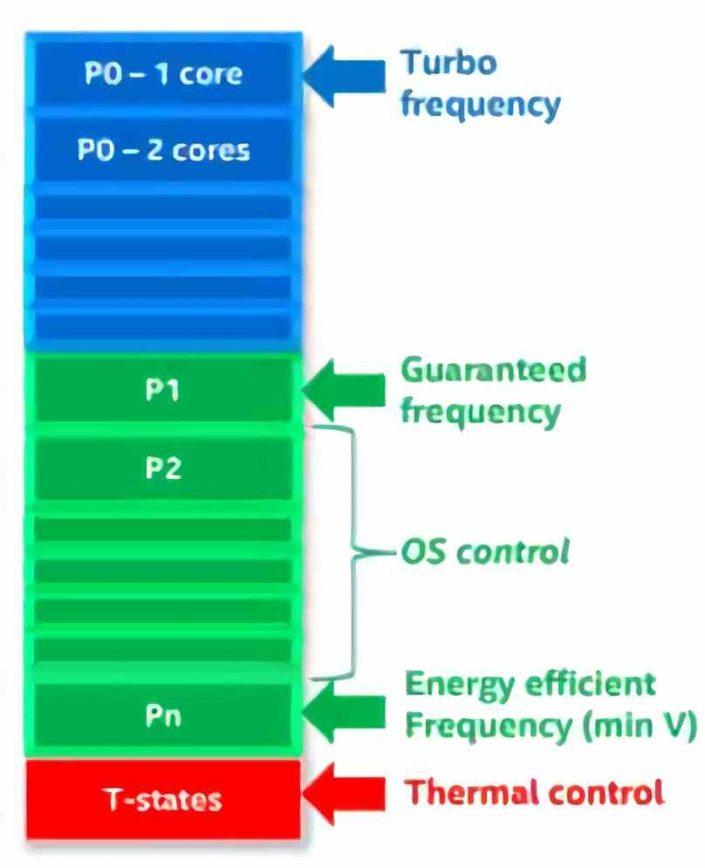
For the P-States to be active, it is necessary that the PC be in the G0 state and therefore C0, where we are talking about the CPU being running and therefore executing code. That is, the usual use of the CPU where it has access to all the energy that the power supply can give it through the motherboard
According to the original ACPI standard, the operating system, which is in charge of managing the different processes, has to be in charge of managing the CPU power, although from the Intel Sky Lake architecture onwards, important changes were made and the P -States were no longer controlled by the operating system to be a hardware unit in charge of changing from one state to another, taking information from the internal MEMS for this
The number of P-States varies by processor and scales from the lowest clock speed and using a single core to the one using all cores at the highest possible clock speed. We must take into account that the total clock speed is obtained from a base frequency that can be multiplied several times, so that a random clock speed will not be taken, but the multiplier will vary as appropriate.
P-States make processors more efficient
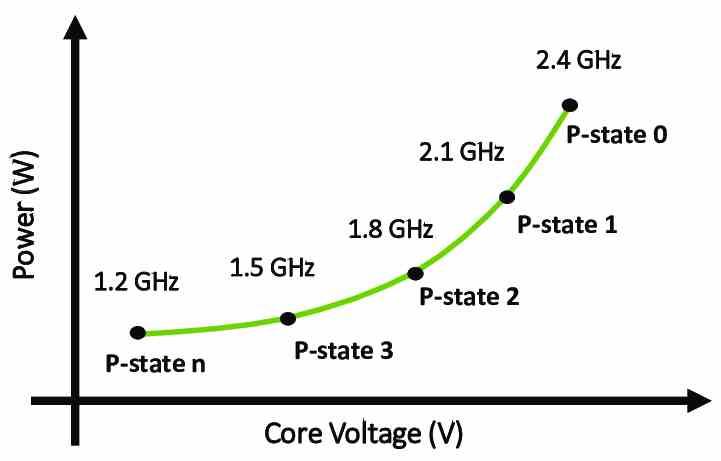
As you can see in the graph above, which is an illustrative example, the energy consumption of Intel processors in each of the P-States is closely related to voltage and remember that this is related to clock speed, but of In order to achieve greater efficiency, an additional variable is used.
Well, neither more nor less than the workload that the CPU has and since it is there what it does is execute instructions, the workload is defined from the outset by the amount of instructions it has to execute. What happens today is that we have multitasking environments where several programs and their processes run simultaneously at the same time and in multicore systems, so we have different workloads that are distributed among the different cores.
As the operating system assigns these processes to the different cores, it knows what its level of workload is on each one. However, not what each instruction does but also how much each one consumes when executing is kept under lock and key. Today within the CPU there are a series of hardware units commissioned for it. This technology is key to reducing the consumption of Intel processors and making them more efficient depending on the applications you run.
And what defines each P-State? Well, the number of active cores, the clock speed and the voltage in each of them, of course having a processor for gaming is like having a super sports car and you don’t want there to be a speed limit, especially if you are competing or in our case running a high-performance application such as games.
What are PL1, PL2, and PL4 on Intel CPUs?
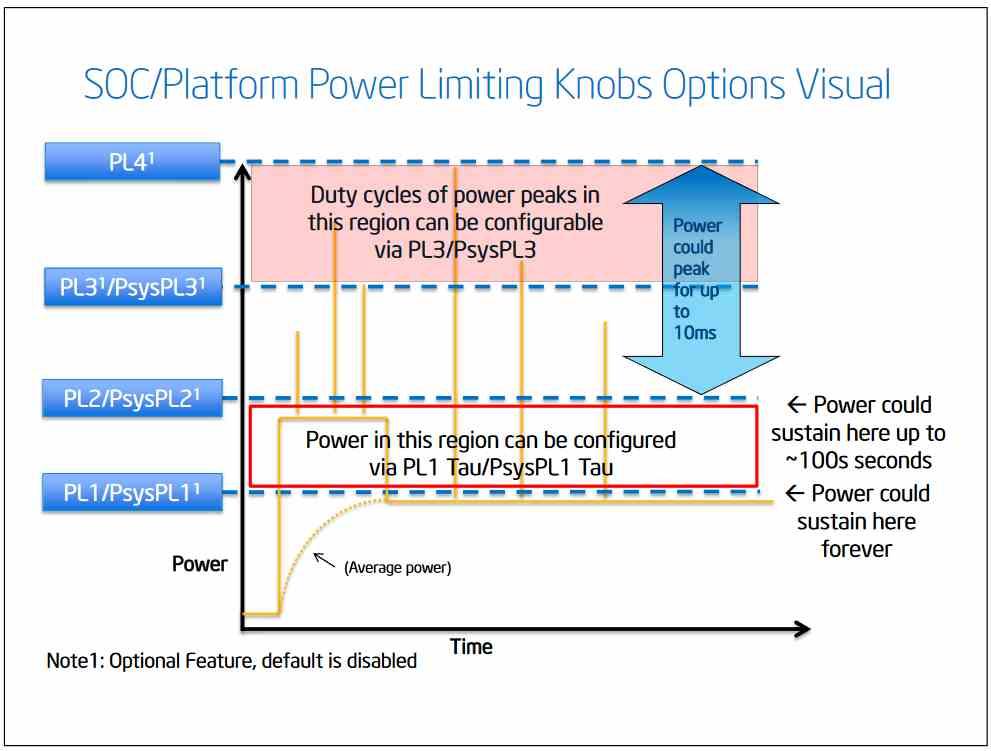
The maximum consumption of Intel processors is marked by the Power Limit constants that mark the limit in watts that a processor can consume, with PL1 being the normal limit that the CPU can reach during 100% of the time.
As for the PL2, many of you will have observed that there is a Boost frequency, which in Intel processors is called Turbo and is that basically the analogy with a super sports car is ideal to understand this, since it gives the processor a power additional time for a limited time, increasing your clock speed during the same, in total up to 100 seconds.
The PL4 mode on the other hand corresponds to a micro acceleration, of only 10 microseconds, so only for a few instructions and to reach speeds much further, which because of how high they are, are not sustainable for the processor in the long term. It is not a commonly used mode and Intel has hardly documented it.
PL1 = PL2 on Intel Core 12, how does it affect consumption?
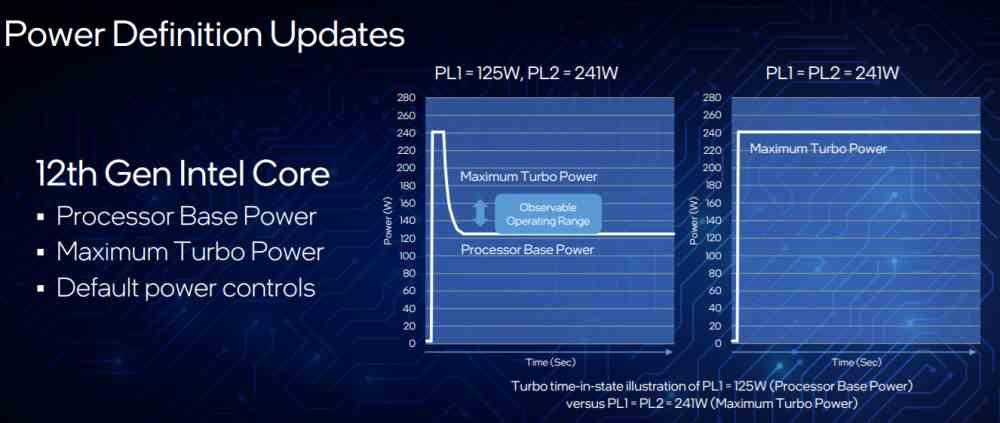
One change that Intel has made to its Alder Lake-S architecture is the fact that PL1 = PL2, a statement that has caused many confusion due to the fact that in previous CPU architectures of the company the PL2 mode lasted up to 100 seconds in which the consumption graph made a bridge in which the consumption first grew progressively, a good time was maintained in PL2 and then progressively decreased to PL1.
Let’s say that there is a possibility in CPUs with the Alder Lake-S architecture to run the processor in PL2 mode as if it were PL1 mode and that the maximum clock speeds can be reached without a time limit. Which has obvious consequences on the durability and consumption of the CPU, but that is why we have previously explained the P-States.
It must be borne in mind that regarding the consumption of Intel processors, the PL assigned to each processor are a limit and this is not always reached, so the CPU will vary its clock speed and voltage according to its needs and they will not always consume that maximum. There are even units that when not in use are turned off or their clock speed is lowered so that they consume less.