How to Get Verified on OpenSea: Step-by-Step Guide
Verifying your OpenSea account adds credibility to your NFT selling efforts and attracts more clients. That is why you need to learn how to get verified on OpenSea.
If you want a booming in your non-fungible tokens (NFTs) business in the blockchain industry, you need to get verified on OpenSea ( this could be seen as one of the major marketplaces). Verification proves the authenticity of your digital products and gives clients the confidence to trade with you because they believe you are not a scammer. In this article, we’ll go over how to get verified on OpenSea and what you’ll need to get your NFT collection verification badge.
What Is OpenSea NFT Verification?
Given the decentralized nature of NFTs, there isn’t a clear-cut way to prevent scam projects from penetrating NFT markets. Therefore, to protect clients, NFT marketplaces like OpenSea require accounts to be verified as proof of their credibility.
In the online world, where everything can be forged, buyers need proof that you are a credible source for NFTs because they don’t want to lose their money on a scam. OpenSea verification provides this much-needed proof.
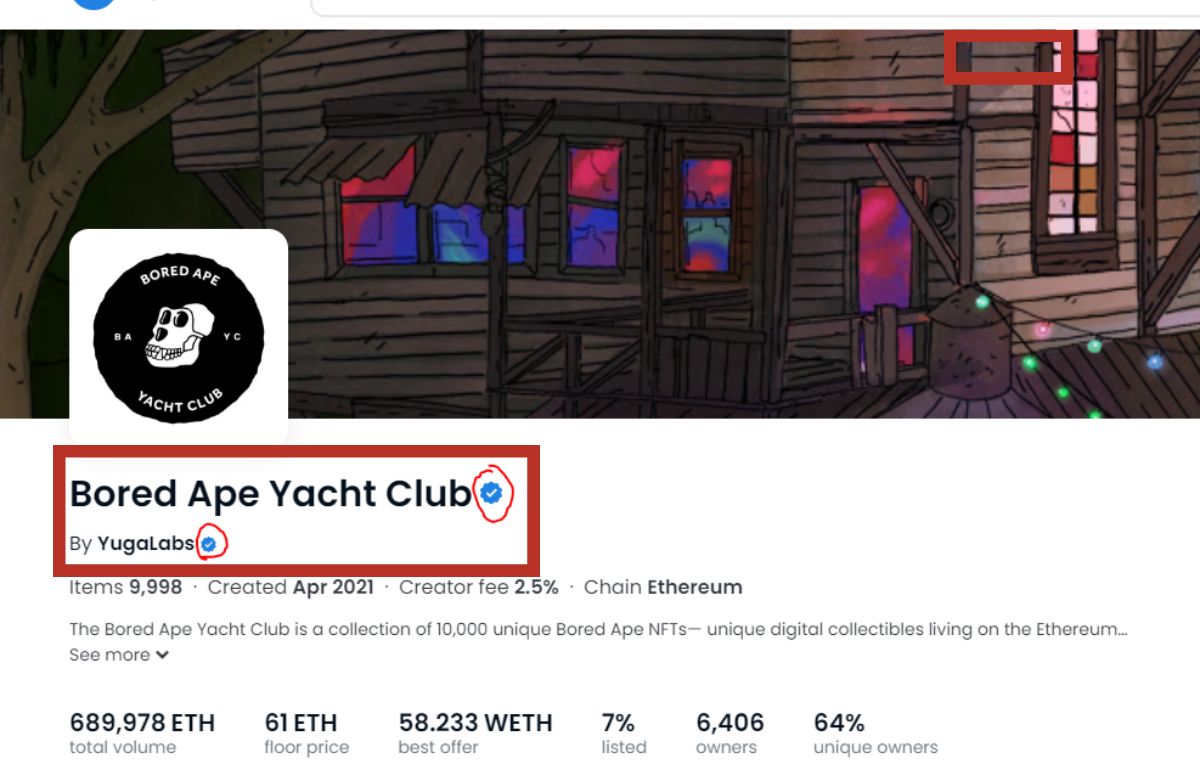
Collectors or creators on OpenSea can ask for an OpenSea NFT verification badge for a collection after their account has been verified. Like on many social media platforms, an OpenSea verification badge is a tiny blue checkmark that marks our NFT collection as legitimate.
When flipping NFTs, this level of legitimacy is essential. A verification badge from OpenSea shows that your account has a lot of trades and traffic, which can help you get more clients. This is why you need to learn how to get verified on OpenSea.

What Do I Need to Get OpenSea’s Verification?
Not all OpenSea accounts are eligible for verification. Your account needs to meet specific criteria to qualify for the verification process. The most basic step that any account needs to have before it can be considered for verification is that it must be easily identifiable.
This means the OpenSea account must be registered under a verifiable email address. It also needs to have a unique username and profile picture. Other than that, here are several other boxes that an OpenSea account needs to check before it can be eligible for verification.
- The account must have sold a collection worth at least 75 ETH or its equivalent.
- The account must be connected to a Twitter account
- The account must meet minimum activity levels on social media or community platforms like Discord
Besides these verification criteria, the account must also meet a few additional criteria to get a verification badge. Here are the requirements for OpenSea badges.
- The account must have sold a collection worth at least 100 ETH or its equivalent.
- The account must have a name for the collection requesting a badge. It must also have a logo and banner image.
- The account must be connected to the collection’s Twitter account.
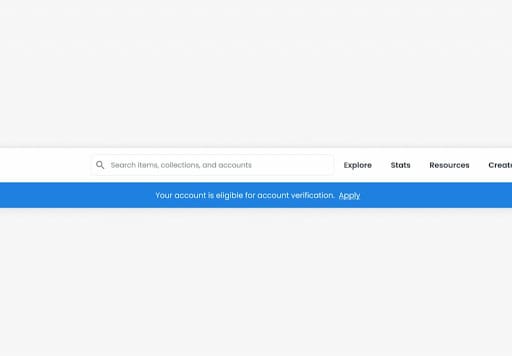
Following a 2022 update, now all accounts in Opensea that are eligible for verification will see a banner on top.
How To Get Verified on OpenSea?
If you meet the requirements for account verification, applying for the verification is easy. Here are the step-by-step instructions on how to get your account verified on OpenSea.
- Complete your profile as instructed on the Profile settings tab, then click Submit Request.
Once you submit your verification request, the customer support team will review it, and you’ll get feedback through an OpenSea verification email within seven days. Remember that once your account is verified, it becomes locked. You cannot change the account’s profile fields without involving OpenSea’s support team. The account’s profile fields include the email address, username, and social media connections.
How Do You Apply for an OpenSea Verification Badge?
You can apply for a verification badge if your account verification is successful. Verification badges are assigned to a given collection. So if you have multiple collections, you need proof to send multiple badging applications. Let’s go over the process of applying for an OpenSea verification badge.
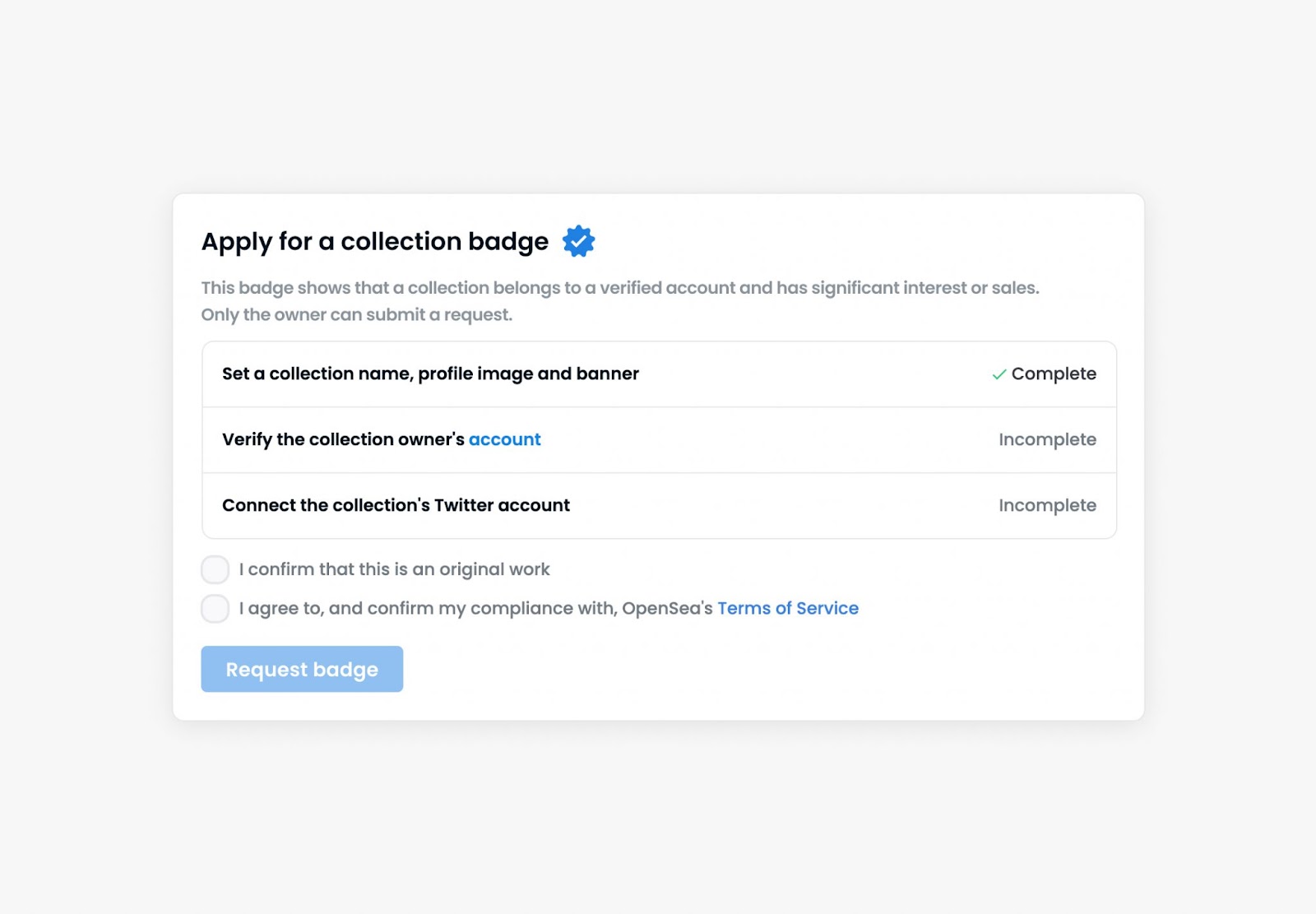
- Go to your OpenSea’s Edit My Collection page and click the Pencil icon on the top right corner of the page.
- Complete the collection’s details as instructed. This includes filling in your collection’s name, logo and banner image.
- Connect your collection’s Twitter account.
- Read and agree to OpenSea’s terms and conditions by checking the checkboxes.
- Click on the Submit request option to submit your request.
The customer support team will review our badging application and respond within a week. If our request is declined, you need to wait seven days before submitting another request.
FAQs
1. Can I lose my OpenSea verification?
Yes. You can easily lose your verified status if you violate OpenSeas’ terms of service. Similarly, OpenSea reserves the right to revoke verification if our account doesn’t meet certain standards over time. These standards can include the size of your social media following, ownership distribution for our NFTs, and sales activity for a varied collection.
2. What kind of NFTs sell best on OpenSea?
Crypto gaming NFTs are among the highest-selling NFTs in the OpenSea marketplace. The demand for these NFTs is high because of the growth of gaming finance (GameFi), where players make money off of their gaming efforts. However, the platform has multiple other NFT genres, like art, music, and PFP NFTs.
3. How do I sell NFTs?
Selling NFTs on OpenSea or any other top NFT marketplace is easy. All you need to do is create an account on the marketplace, add a collection of your NFTs to the account, create a social media fanbase for your collection, and market your NFTs to them. Then you can cash in on your efforts.
4. How to edit the OpenSea profile on mobile?
To edit your OpenSea profile on your phone, you need to download and install the OpenSea app, then log in to it. Now, click the Menu icon on the dashboard and choose the Browser option.
On the page that opens, type OpenSea into the search bar and click “search.” This will open up the browser version of OpenSea on your phone. Click the menu icon, scroll to find the account option, and select it. To reveal all profile settings, select the Profile option and then click the Settings icon in the upper right corner of the screen.
Read more about
Want to be a crypto expert? Get the best of Coinwire straight to your inbox.
Get daily crypto news updates + weekly roundups on our most important stories.
How to Get Verified on OpenSea: Accounts & NFT Collections
OpenSea verification can bring trust and recognition to you or your NFT collection. The top projects and collectors within the NFT community are all verified and easily recognizable by the infamous blue checkmark. In this guide, we’ll go over how to get your account and NFT collection verified on OpenSea.
What is OpenSea Verification?
Being verified on OpenSea means that the platforms view your account or collection as authentic and trustworthy. There are two types of verification on OpenSea; Account and Collection.
Both styles of verification are displayed by a blue checkmark badge on either the individual’s account or collections page.
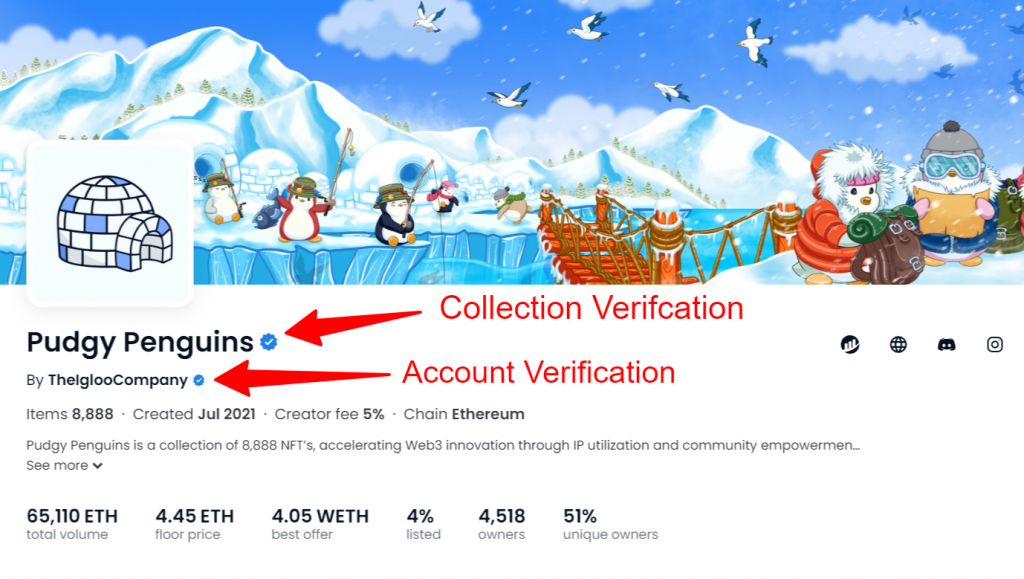
A checkmark on an account means that OpenSea has verified the authenticity of that user. Whilst a checkmark on a collection means it has a significant interest on the platform and a high volume of sales.
OpenSea Account Verification
We’ll first go over how to get verified for individual accounts.
Eligibility for Account Verification
To be eligible for account verification, you must adhere to the following:
- Own an NFT from a collection with at least 75 ETH of volume sold (or equivalent)
- A username
- A profile picture
- A verified email address
- A connected Twitter or Instagram account
If OpenSea deems you eligible, a banner will appear on your profile with instructions on how to apply.
How to Apply for Account Verification
Once you’ve completed the tasks to be eligible, you can apply for account verification by following the steps below:
- Visit your profile settings
- Find the “Apply for verification” banner
- Click on “Submit request“
Important: Once verification is complete, OpenSea will lock your profile information, and you’ll need to contact them if you want to update it.
OpenSea NFT Collection Verification
Now let’s go over how to get your NFT collection verified.
Eligibility for Collection Verification
To be eligible for collection verification, you must adhere to the following:
- A collection with at least 75 ETH of volume (or equivalent)
- A title
- A banner
- A logo
- A connected Twitter account or Discord Server
- All NFTs in the collection minted/revealed
- The NFTs in the collection are original and can be certified by the collection creator
- The collection is not significantly inspired by an existing badged collection
How to Apply for Collection Verification
Once you’ve completed the tasks to be eligible, you can apply for collection verification by following the steps below:
- Visit your collections page
- Click on the “Pencil” icon to edit your collection
- Find the “Apply for a collection badge” heading
- Click on “Request badge“
OpenSea will review your request and respond within seven days. If the application is denied, you can wait seven days and then re-apply.
OpenSea Verification FAQ
Why did I lose my verification badge on OpenSea?
Violation of OpenSea’s Terms of Service can lead to account verification being revoked. OpenSea states that they “reserve the right to decline to verify an account or remove verified status for any reason and without notice.”
I’ve completed all the steps to be eligible, why can’t I apply?
Unfortunately, not every account is eligible for verification. Whilst OpenSea provides little detail on why users may not be eligible, other criteria such as activity levels and social presence may be the reason.
How to Get Verified in OpenSea

OpenSea is the marketplace to be in if you want to sell and discover rare digital items secured by blockchain. Before you can start making real money on the platform, your account or collection will need to be recognized as trusted with a blue stamp of approval. To get that, you’ll need to apply to be verified. Verification is a stringent process, and your account will need to meet some requirements to be accepted.

Read on to learn what those requirements are, plus how to set up and sell NFTs.
OpenSea How to Get Verified
Next, we’ll discuss what will make your account eligible for a blue stamp.
Eligible Accounts
Account verification is down to OpenSea’s discretion. Before they review your account, it will need to meet the following minimum requirements:
- Be active. You should have bought or sold at least one NFT within the last three months.
- Have a profile picture, an email address, and a banner configured.
- Have no previous restrictions for infringing OpenSea’s terms of service.
According to OpenSea, review suitability is expedited for accounts in the following four categories:
- Accounts either created by or strictly involving people or businesses distinguished in:
- Entertainment
- Art
- Technology
- Sports
- Gaming
- News
- Music
- Politics
- Activism
- Accounts with unusually rare technical, artistic, or social inventions or value
- Accounts with a pressing and exceptionally severe risk of being imitated for commercial gain
- Accounts already verified via established social media platforms
Ineligible Accounts
Some accounts will be unsuitable for verification evaluation. Here are some account types that will not be considered:
- Accounts that participate in or show a willingness to engage in devious or dishonest buying, selling, bidding, buying, and offering
- Accounts that produce collections that use trademarks or copyrighted material without a license
- Accounts that use material that breaches protected rights of publicity
- Accounts that are regularly controlled by a user under 18 years old
An account might be deemed ineligible for verification despite not meeting the ineligible criteria listed above. OpenSea also reserves the right to update the ineligibility list at any time.
How to Apply for OpenSea Verification
If your collection or account meets the positive criteria detailed above, click here to submit an account verification request.
Once you’ve submitted your request you’ll need to wait at least five business days for OpenSea to review it. If successful, you’ll receive a blue checkmark beside your OpenSea collection or profile. Subject to the type of verification you’ve applied for.
How to Make Money on OpenSea
First, you’ll need to create a collection. Follow these steps to do so:
- Navigate to and sign in to your account via opensea.io.
- Click on your profile icon, then in the upper right, “Create.”

- You can upload your NFT file and add a description on the creation page. To learn about accepted NFT file formats, click here.

- Once you’ve completed the fields, you’ll have the option to customize your NFT further. For example, adding properties, stats, levels, and unlockable content. In addition, you can choose which blockchain to mint your NFT on.

- After personalizing your NFT, click “Create” to create your NFT.

How to Sell an NFT
- Go to opensea.io and sign in to your account.

- Click on your profile picture in the upper right corner, then “Profile.”

- Via your wallet, choose the NFT you want to sell.

- At the top right, click “Sell” to go to the listings. There you can select the kind of sale and price on the listing page. A “Fixed Price” sale means the charge is permanent.

- You can set a period for the trade. Select one of the default days or set a custom period via the calendar.

- You can also preserve an item for a buyer by pasting their address in the text field beneath “Reserve for a specific buyer.”

- You’ll be prompted to confirm the deal by signing a contract to complete your sale.

- If this is your first time selling on OpenSea, you must initialize your wallet first.
- If your item was not minted on OpenSea but via a routine contract, there might be additional verification and a signature needed to let OpenSea exchange the item on your behalf.
When your listing is finished, a confirmation message will display. Your new listed item will be labeled with the transaction “List.” To see your item’s listing, click on the “Activity” tab.
Finding Your Way in OpenSeas
OpenSea offers a simple way to buy and sell digital collectibles. The marketplace is robust, innovative, and fun to use, with a growing active user base of 1.8 million at the time of writing. As considerable sums of money are involved and perfect opportunities for cyber-crime, having a blue-stamped account is a great way to stand out in a sea of sellers. This proves that your account or collection is notable and legit. You can kick off the verification process with a simple click of a link. However, strict pre-requisites must be met before you can be considered.
How To Get Verified On OpenSea? 100% Working Solution
Wondering how to get verified on opensea? In order to increase trust and security on the platform, Opensea has implemented a verification process for all users. This blue checkmark shows the audience the authenticity of the account and collection to avoid fraudulent activities. This article will teach you how to get verified on Opensea and receive a blue tick next to your name. Let’s first discuss the opensea criteria of verification.
Table of Contents
What are The Criteria of Verification Eligibility on Opensea?
The criteria of verification on opensea are very simple and easy. The blue checkmarks are reserved for big organizations and big names so it may be hard to get a blue checkmark on beginners or newbies but nothing to worry about we are here to help you.
- You need is to have a verified email address.
- A phone number, and a Twitter account that is connected to your opensea account.
- Your account should have a profile picture, banner, and username.
- Your account should have sold 100 Eth volume of NFTs.
- Opensea has also an age filter to verify accounts. You must be 18 years old when you apply for opensea verification.
- Verified social media accounts also help in the process of opensea verification.
- Having a Twitter follower of more than 50,000 is plus point to getting verified.
Who is not Eligible for OpenSea Verification?
Accounts that engage in fraudulent or manipulative buying, selling, bidding and offers will not be eligible for OpenSea verification. Accounts that use copyrighted or trademarked material without a license are also ineligible. Also, you need to be 18 or older to apply for OpenSea verification. Finally, any account that violates OpenSea’s terms of service will not be accepted.
How to Get Verified on Opensea?
Now that we know the criteria of verification, let’s move on to the steps of verification.
- The first step is to log in to your opensea account and hover on your profile icon on the top tight side.
- Then, open ” settings” and go to your profile tab.
- There you will find a verification option to verify your account. Select that option.
- You will have a form to submit on the screen. Now fill out that form. You will be required to submit all the personal information that I have mentioned above. Fill out the form and submit it.
- The last step is to wait for the opensea team to review your verification request. Opensea customer support will review your application within 7 days and respond to you. Once your request has been reviewed by opensea team, you will receive a notification from opensea. If your request got approved you will receive a blue checkmark after your name.
After the account verification, you can apply for your NFTs collection verification. Collection verification requests also take 7 days to review by opensea customer support.
If successful, you’ll get a blue check mark next to your username or collection.
Here’s How To Get Verified on OpenSea:
1. Registration Verification:
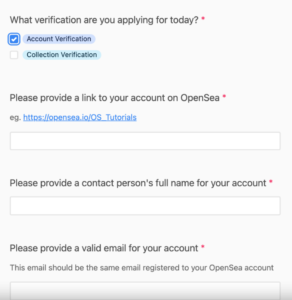
If your account meets the criteria for OpenSea verification, you can apply. Click this link: https://airtable.com/shr6kWzFZ4gWdYE6C to go to the application form. Once you are on the form, you need to select the verification you are applying for. For example, if you are applying for account verification, select “Verify account”. Next, you need to provide a link to your Opensea account and your full name. You can copy the link to your OpenSea account by navigating to your profile, clicking the share icon, and clicking “Copy”.
2. Provide Email and Proof of Identity
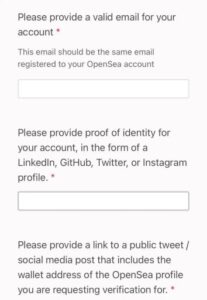
After you’ve provided your full name, you’ll need to provide a valid email for your account. The email address you are providing must be the same email registered to your Opensea account. Next, you need to provide proof of identity for your account. You can link your LinkedIn, GitHub, Twitter or Instagram profiles.
3. Post a Tweet Containing Your Wallet Address

If you’ve provided a link to your twitter account, you’ll need to provide a link to a public tweet. The tweet should say “Hello @opensea”, followed by your wallet address. Here’s an example of a tweet: Hello @opensea! [0xd1f93089d9004004f8e30c54de5a584902962ce8] After you’ve tweeted the message, you need to copy the link to it. You can do so by tapping the share icon followed by “copy link”.
4. Paste the Link to Your Tweet and Submit the Form
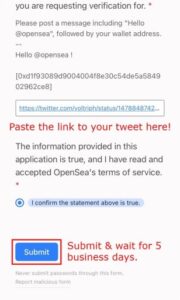
After you have copied the link to your tweet, you need to paste it in “Please provide a link to a public social media post/tweet that includes the wallet address of the OpenSea profile you are currently using.” request verification.” field. Next, you need to confirm that the information provided in the application is true and that you have accepted OpenSea’s terms of service. Finally, click “Submit” to submit your application. After submitting your application, you need to wait for OpenSea to review it. According to OpenSea, it will take at least 5 business days for them to review your request. If successful, you will get a blue check/tick next to your OpenSea profile or collection (depending on the verification you signed up for).
Final Thoughts:
There you have it! Now you know how to get verified on Opensea and receive a blue checkmark next to your name. By getting verified, you will be able to increase trust and security on the platform and avoid fraudulent activities. Thanks for reading and good luck!