What is the EATX12V connector on the motherboard
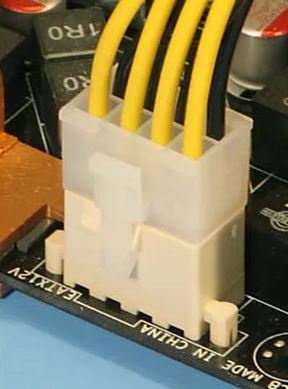
If you look closely at the PC motherboard, you can find there a connector with four to eight cells-connections and the signature “EATX12V”. Not everyone knows about its existence yet, since it appeared relatively recently. Let’s find out what and how to connect to it.
Table of Contents
What is the EATX12V connector on the motherboard
It is not by chance that the motherboard is dotted with so-called pins – notches for connecting power cables. A current is separately supplied to it, since the performance directly depends on the amount of energy received. And since computers have become more powerful lately, more and more power is required, therefore, the number of pins is also increasing.
To understand where the EATX12V came from and what kind of connector it is on the motherboard, you need to go a little into history:
- In the early 2000s, a single 20-pin socket was enough for the motherboard, where a rectangular plastic plug was connected with a stopper that secures it in place.
- Five years later, more capacious processors appeared, and another additional power connector, consisting of four cells, was brought to the board. There were two plug options: a general one, which captured two connectors at once, and separate twenty and four. They were designed for machines that require no more than 150 W.
- As soon as PCs with more than 150 W of electricity entered the market, the load on the four-pin socket increased. This often led to fire or melting of the cable. Then the output was found in the form of an eight-pin EATX12V connector.
If you bought a sufficiently powerful and modern computer , then you will definitely see just such a nest. Note, however, that there are also 4-slot EATX12V connectors for mid-range PCs.
Purpose of EATX12V and its types
The EATX12V is designed to supply an additional 12 volts of current to the board. This connector must not be left unplugged, otherwise the computer simply will not start . There are the following types:
- four-cell – for system units of medium and low power;
- eight-cell – for power-hungry PCs.
In the second case, the cable can be solid or double: four plugs at the branch of the cord. Basically, there is no significant difference between the two.
Is it obligatory to connect all 8-pins
Very often, this is the question that bothers people, because when they open the system unit, they find that half of the EATX12V connectors are closed with a cap and are not connected. If the PC was assembled by a specialist, and not by yourself, then you can leave everything as it is: most likely, there is enough power already. But in the case of overclocking the processor, replacing components (for example, a video card) with more powerful ones, it is worth using the second half of the socket in the power supply circuit.
Sometimes another problem arises: the power supply is designed for four plugs, and the board has eight. In this case, you need to be careful and correlate the actual consumption with the capabilities of the PSU. Look at the board markings and find its characteristics on the manufacturer’s official website. If you do not understand whether the unit is capable of supporting its operation, write to the support service or ask a specialist from the service center.
CPU power pinout
In the event of a critical discrepancy, you will have to buy another power supply unit – unfortunately, when you purchase an entire PC, some components can be replaced with cheaper and completely inappropriate ones.
You should also not use adapters when connecting the board to the power supply unit. The new link in the electrical circuit will add a few ohms to the existing resistance and reduce the amperage.
Now that you know about the existence of the EATX12V, see if it is in your computer, and write in the comments if it was difficult to connect it.
Related
Related Posts:
- How do I know the model of my motherboard that I…
- How to choose the right motherboard for gaming
- Z690 motherboard mayhem:Review
- Why isn’t RAM directly integrated into the motherboard?
- Motherboard ports, what connects where and for what?
- How to recognize the types of expansion slots on the…
Что за разъем eatx12v на материнской плате?

Осуществляя сборку компьютера или просто изучая маркировки на материнской плате, можно обратить внимание на разъем, подписанный как eatx12v. Возможны и другие его обозначения, например atx_12v_2x4. Обычно он находится в левой верхней части платы и может быть как 4 контактным, так и 8-ми.
В данной статье мы расскажем что это за разъем, для чего он нужен и как правильно его использовать (подключать 4 или 8 пин).
Назначение eatx12v и его виды
С ростом производительности процессоров также выросло их энергопотребление. По этой причине на материнских платах был реализован разъем с маркировкой eatx12v. Его задачей является подача дополнительного 12V питания на процессор. Он обязателен к подключению!
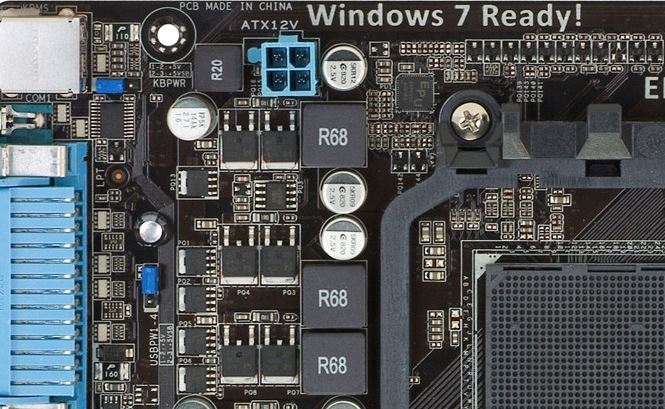
4 контактный (пиновый) разъем питания процессора
Как уже писалось выше, данный разъем бывает 4 контактным и 8ми контактным.
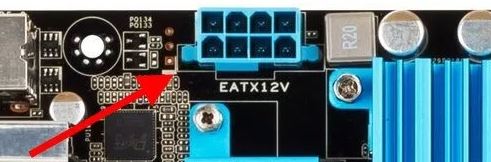
8 контактный (пиновый) разъем питания процессора
Если на вашей материнской плате он 8-ми контактный, это значит, что плата поддерживает работу мощных процессоров с высоким энергопотреблением. Также на таких платах скорее всего имеются расширенные функции разгона процессоров.
На более дешевых “материнках” разъем eatx12v обычно представлен 4-мя пинами.
Обязательно ли подключать все 8 пин?
Нет. В большинстве случаев достаточно 4 пин. А вот если же вы хотите устанавливать процессор с энергопотреблением 125W и выше, или же заниматься разгоном процесора, то подключение всех 8 пин к разъему eatx12v очень рекомендуется. На всех современных блоках питания он представлен как CPU 4+4 pin.
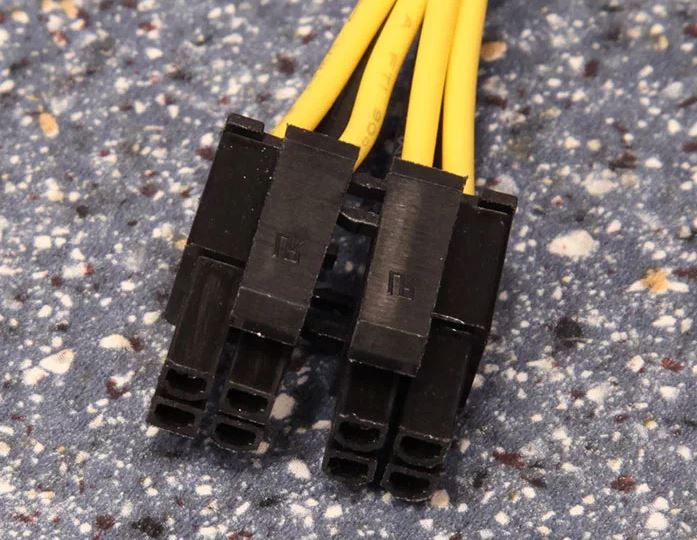
Коннектор дополнительного питания процессора на блоке питания 4+4 pin
Тем не менее, если планируется установка достаточно энергоэффективного процессора (60-70W), а на блоке питания есть все 8 пин (4+4), то подключать можно как 4 пина, так и 8-мь.
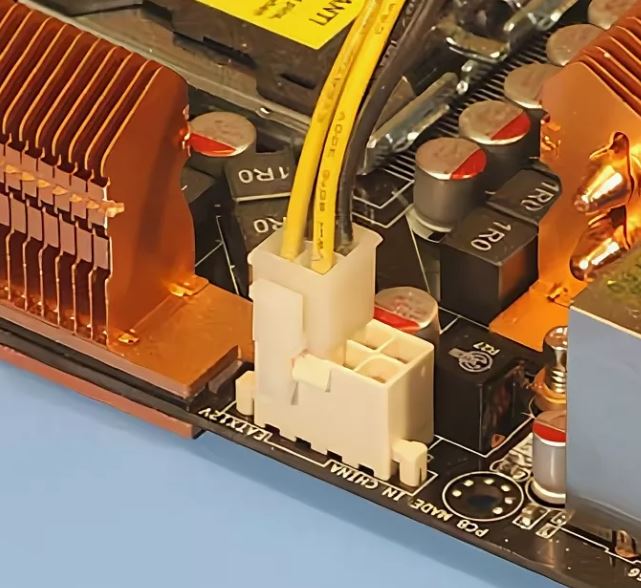
Подключение 4 pin из 8-ми
Подключение всех 8-ми pin питания процессора
Вывод
Разъем eatx12v на материнской плате предназначен для подключения дополнительного питания на 12V центральному процессору. Он может быть 4 и 8 пиновым. Для слабых и средних процессоров достаточно подключения 4 пин, а для мощных топовых процессоров с высоким энергопотреблением (выше 125W) рекомендуется подключать все 8 пин.
Лучшая благодарность автору — репост к себе на страничку:
что за разъем на материнсколй плате EATX12V для чего он и обязательно ли его подключать?
но у меня и так на процессор 2х8 пин. а этот где то в стороне. работает без него.
Droider Оракул (96083) давай скрин этого разъёма.

Похожие вопросы
Ваш браузер устарел
Мы постоянно добавляем новый функционал в основной интерфейс проекта. К сожалению, старые браузеры не в состоянии качественно работать с современными программными продуктами. Для корректной работы используйте последние версии браузеров Chrome, Mozilla Firefox, Opera, Microsoft Edge или установите браузер Atom.
на материнской плате есть разъем EATX подписан как EATX12V_1 не могу понять зачем он 6ти пиновый.
обязательно ли его подключение? на данный момент компьютер работает без него.
Кузнецов Алексей Просветленный (40416) Нет
That Power connector is supply power to extra graphic card installed only.
Похожие вопросы
Ваш браузер устарел
Мы постоянно добавляем новый функционал в основной интерфейс проекта. К сожалению, старые браузеры не в состоянии качественно работать с современными программными продуктами. Для корректной работы используйте последние версии браузеров Chrome, Mozilla Firefox, Opera, Microsoft Edge или установите браузер Atom.