PCIe Bifurcation – What is it? How to enable? Optimal Configurations and use cases for NVMe SDDs/GPUs
One of my colleagues asked me about “Bifurcation” when it came in a discussion about running multiple NVMe drives from a single PCIe slot. As I explained “what it is” and why one should consider it before making a motherboard purchase, I shared my own home lab experience – which brought me to write this blog for the wider community.
Background: I had multiple disks in my Supermicro server – three(3) NVMe SSD, two(2) SSDs and two(2) HDDs. One of my SATA HDDs (2TB in size) decided to go kaput recently. I thought of replacing it with an equivalent size internal SATA SDDs to keep the expense low. Checking pricing on Amazon, 2TB SSDs were somewhere in the range of £168 to £200 and somehow I stumbled upon the WD Blue SN550 NVMe SSD 1TB for just £95 – I remember when I bought my first Samsung EVO 960 1Tb NVMe for about £435 in September 2017 and the same brand/model for 2TBs were around a grand!
The read and write speed of 545 MB/s and 540 MB/s respectively, of the fastest 2TB SATA SSD i.e. SanDisk SSD Plus (in the price bracket mentioned above) was no comparison to the WD Blue SN550 NVMe SSD’s 2400 MB/s and 1950 MB/s respectively. As I was already using 3 NVMe SSDs, I loved my nested VMware vSphere (ESXi) home lab run “smooth as butter”, it became a no brainer for me to consider buying two(2) x 1TBs WD NVMe SSD instead. Of course, I would have to invest additional money to buy more NVMe PCIe adapters, but I would rather spend a little more money now for future proofing my home lab/server along with the additional speedbump ;).
The PCIe based peripherals in my home lab are Supermicro Quad Port NIC card, Nvidia GPU and Samsung NVMe SSDs. This blog will focus on NVMe SSDs and the GPU as an example, covering the following:
- What is PCIe Bifurcation?
- Interpretation of an example motherboard layout and its architecture
- Limitations of the example motherboard
- Understand default PCIe slot behaviour with Dual NVMe PCIe adapter
- How to enable PCIe Bifurcation?
- Optimal PCIe Bifurcation configurations – three(3) use cases
Before we begin, let’s get the dictionary definition out of the way:

What is PCIe Bifurcation?
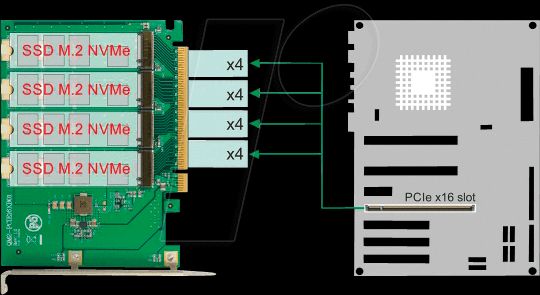
PCIe bifurcation is no different to the definition i.e. dividing the PCIe slot in smaller chunks/branches. Example, a PCIe x8 card slot could be bifurcated into two(2) x4 chunks or a PCIe x16 into four(4) x4 i.e. x4x4x4x4 OR two(2) x8 i.e. x8x8 OR one(1) x8 and two(2) x4 i.e. x8x4x4 / x4x4x8 (if it does not make sense now, it will later – keep reading )
Note: PCIe Bifurcation does not decrease speed but only splits/bifurcate lanes. In order to use bifurcation, the motherboard should support it and if it does then the BIOS should support it as well.
When I bought the Supermicro X10SRH-CLN4F motherboard in September 2017, it came with BIOS 2.0b, which did not have any “Bifurcation” options and as a result when I plugged in my a Supermicro AOC-SLG3-2M2 (Dual NVMe PCIe Adapter) in any slot, it would only detect one(1) of the two(2) NVMe SSDs installed. To get the card to detect both the NVMe SSDs, “PCIe Bifurcation” was required which was available in a later BIOS version not publicly available (at the time) but the supermicro support was great and the engineer shared it with me before it went GA.
Ok, let’s take the example of my motherboard (Supermicro X10SRH-CLN4F) layout below:

It has Six(6) physical PCIe slots – labelled as slot 2,3,4,5,6 and 7 respectively. However, the CPU socket only has three(3) PCIe 3.0 links and one(1) PCIe 2.0 via DMI2/PCH (Platform Controller Hub). They are numbered as 1, 2 or 3, followed by a letter (shown in the block diagram architecture below):

Interpretation of motherboard layout and its architecture:
- CPU/PCIe Link 1: Port 1A – used for the LSI SAS3008 I/O controller
- CPU/PCIe Link 2: Port 2A, and 2C – Link 2 is PCIe 3.0 x16 which is split between slot5 and slot6 as x8 lanes each (despite the physical slot6 of x16 size).
- CPU/PCIe Link 3: Port 3A, 3C and 3D – Link 3 is also a PCIe 3.0 x16 which is split between slot4, slot7 and LAN i350 as x8, x4 and x4 lanes respectively (despite the physical slot7 of x8 size).
- DMI2 – used for slot2 and slot3 via the PCH (platform controller hub)
PCIe 2.0 x4 for slot2 (despite physical slot size of x8)
PCIe 2.0 x2 for slot3 (despite physical slot size of x4)
I created the following table for easier understanding (you could do the same for your motherboard):
PCIe Slot Number
CPU/PCIe Port
PCIe version
PCIe Slot Size
PCIe Lanes
Рассматриваем возможность подключения двух видеокарт к одному слоту — по видеоматериалам канала TechQuickie

Бифуркация. Это причудливое слово, которое означает разделить что-то на две части, и сегодня мы поговорим о раздвоении чего-то, что не является сандвичем, спортивным событием или браком. Этот пост посвящен бифуркации PCI Express слота.
 Это именно то, на что это похоже: взять слот PCI Express и поделить его, чтобы мы могли использовать несколько устройств. Но как это работает? Я имею в виду, вы не можете просто засунуть две видеокарты в один слот.
  Чтобы ответить, мы обратились к Филиппу Махеру из TYAN,
реклама
 и мы хотели бы поблагодарить его за его вклад. Нужно найти где и как настроены линии PCI Express на современных платформах. Ваш ЦП имеет определенное количество контроллеров, и каждый из них может поддерживать только одно устройство. Например, несмотря на то, что текущий процессор Intel поддерживает 16 линий, он разделен на четыре контроллера, управляющих четырьмя линиями в каждой, что означает, что вы можете подключить максимум четыре устройства PCI Express. Конечно, вы можете подключить одну видеокарту и использовать все 16 линий и закончить на этом.
  Но допустим, что вы хотите использовать несколько устройств хранения данных на PCI Express, например твердотельные накопители NVMe. Вот тут-то и нужна бифуркация. Видите ли, одно из наиболее распространенных применений бифуркации — это когда вы хотите подключить несколько дисков M.2 к одному слоту PCI Express. Это можно сделать с помощью необычной карты,
 которая выглядит примерно так, но вот загвоздка. Если вы собираетесь разделить только один слот, вам нужно указать материнской плате внутри BIOS, как именно разделить эти линии.
  В противном случае, он просто увидит одно из этих четырех устройств, и вы пожалеете, что потратили деньги. Как именно вы разделите эти дорожки, зависит от того, какую платформу вы используете. Как уже упоминалось ранее, частое что вы можете сделать на основной платформе Intel, — это четыре устройства по четыре полосы в каждом. Но на серверной платформе, такой как AMD EPYC, вы можете получить что-то около восьми устройств, хотя бы с двумя полосами на каждой, если вы используете так много устройств. Бифуркация встречается гораздо чаще в корпоративных условиях,
  поскольку центры обработки данных, как правило, используют линии PCE Express для вещей, которых вы просто не найдете дома, таких как
  ПЛИС и ИССН, микросхемы и устройства, которые можно настроить для работы над очень специфичными операциями. Но это не значит, что у бифуркации нет варианта использования раздвоения PCI Express для дома, к примеру при запуске двух видеокарт в одном слоте. Хотя для геймеров характерно использование только одной видеокарты на скорости x16, использование карты на x8 практически не повлияет на вашу производительность, поскольку даже современные высококачественные карты не перемещают достаточно данных, чтобы действительно нуждаться в этих дополнительных дорожках. Но, если у вас есть материнская плата с двумя свободными полноразмерными слотами PCI Express, дорожки автоматически разделяются переключателем, называемым мультиплексором, так что каждая карта работает на скорости x8.
  Но на самом деле ничто не мешает вам вставить карту с двумя слотами PCI Express x16,
  подключить две видеокарты с помощью переходных кабелей и попросить BIOS разделить слот на два соединения x8. Просто подумайте, что вы можете запустить NVLink на плате Mini-ITX с одним слотом, если вы найдете способ поместить карты в вашем корпусе, так что, надеюсь, вы не против использовать клейкую ленту.
  Но если вы заинтересованы в использовании раздвоения PCI Express, независимо от того, что именно вы будете подключать, вам необходимо убедиться, что ваша материнская плата и BIOS поддерживают его.
  Не все материнские платы позволяют включать его в BIOS, и если это так, то это в значительной степени ограничивает шоу. Так что проведите своё исследование, прежде чем принимать решение о превращении своей домашней установки в какой-то сумасшедший научный эксперимент.
other_material_inline_bottom
Бифуркация (bifurcation) PCIe
Разделение (расщепление) порта PCI называют бифуркацией (bifurcation).
x1 PCI или одна линия PCI физически реализуется 4-проводным соединением (две дифференциальные пары).
Материнская плата содержит набор разъемов PCI на x4, x8, x16 и x32 линий. Процессор обменивается данными и посылает команды управления устройству, подключенному в порт (все линии PCI, объединенные в одном разъеме) одновременно по всем линиям асинхронно — то есть независимо друг от друга.
Если в один порт подключены несколько устройств, центральному процессору это надо объяснить, то есть — разделить, например, общую шину x16 на две по x8 или четыре по x4. В таком случае, ЦП точно знает — по каким линиям с каким из устройств он соединен.
Управление бифуркацией каждого из портов PCI производится в BIOS, разделе Advanced (расширенный) / Chipset Configuration (конфигурация чипсета) / CPU Configuration (конфигурация ЦП). В двухпроцессорной системе — для каждого из портов каждого процессора.
Например, x16 порт может быть сконфигурирован как: x4x4x4x4, x4x4x8, x8x4x4, x8x8, x16, или Auto.
Бифуркация используется, в частности, при подключении адаптера с двумя NVMe SSD M.2 в PCIe порт.
PCIe Bifurcation: A Basic Guide to Understanding
Pop quiz! Which section of the PCI Express Base Specification covers bifurcation? Here, I’ll even wait while you look….
Did you give up yet? Good. First of all, you won’t find the word “bifurcation” in the spec at all! The term is commonly understood to mean splitting a set of PCI Express lanes into multiple links – and it’s most common on Root Complexes. So for example, our friendly neighborhood Root Complex (RC) vendor builds an RC with 16 lanes – but he knows that in some uses the RC will connect to a single x16 link, while in others his customers only want x4 links. Rather than waste the 12 now unused lanes, wouldn’t it be nice to instead be able to configure those 16 total lanes as 4 links each of x4 width?
Since I sent you on a bit of a wild goose chase earlier, I’ll suggest you check section 4.2.4.12 of the PCIe 3.1 Base spec for what little is covered around “bifurcation” – it’s all of about 12 lines and I can sum up what you need to know in two quotes as follows:
- “a separate LTSSM is needed for each separate Link”
- “…to configure … is implementation specific”
Bifurcation Is a Configuration Choice
So you see, as far as the PCIe spec is concerned, this process is really an implementation decision regarding allocating PHY lanes to controller(s). Notice that the spec is very clear here that these are each completely independent links since it calls out that they have separate LTSSMs. That means of course that each link negotiates its own independent width, data rate, credits, etc. The other key point is that there’s no negotiation for bifurcation, it’s a configuration choice made at power-up time. (Usually it’s system-configuration-specific, so a board designer externally configures the SoC to provide the number and width of links desired for that particular implementation.)
Consider our earlier example of a x16 RC – let’s assume that’s a Synopsys customer so he already has Gen4. When the RC is configured as 4 links of Gen4 x4 width (call them A, B, C, D) – link A might be connected to another Synopsys customer’s Gen4 x4 SSD and so negotiates Gen4 x4, link B and link C might connect to some older Gen3 x4 devices, and link D might connect to a slow Gen1 x1 device. Now we can see our RC designer has four different streams of data to deal with at some very different bandwidths. Where should he find a PCIe controller which support bifurcation into 4 links like this?
Answer: he shouldn’t! He should use four separate controllers each incorporating their separate configuration space, LTSSM, buffering and credit logic, etc. We just established that bifurcation results in separate independent links, so why would our RC designer try to force them together? If he did manage to share those four links through a single application interface he would find that his high-speed Gen4 x4 SSD (on link A) was being throttled waiting for packets to trickle in and out from that Gen1 x1 device on link D.
What Does Bifurcation Support Mean?
Wait then Richard, so what does it mean to have a PCIe controller “support bifurcation”?
Well, honestly – not much. Partitioning the lanes of a PHY into one or more links is pretty much invisible to the controller – it just sees a PHY interface of some width. So *ANY* controller can “support bifurcation” in that sense. I suppose a controller might claim to “support bifurcation” through a single application interface, but as we established above that wouldn’t be a good idea due to the bandwidth variations. Since each link needs an entire PCIe protocol stack, you wouldn’t save very much (if any) area over simply using multiple controllers – and you’d be stuck with only the configuration(s) designed in to that controller. (I had a customer recently who wanted 8 lanes of PCIe “bifurcatable” into 1ea x8 or 1ea x4 or 2ea x2s, so would he even have found that exact configuration available?)
Perhaps now you can see why the PCIe spec doesn’t say much about bifurcation!