THE ULTIMATE GUIDE TO TRANSFER FROM BINANCE TO METAMASK (TOKENS)
You may have bought some cryptocurrencies on Binance, and you may be looking to send them to your Metamask wallet .
However, there are quite a few networks you can choose when withdrawing, so which ones should you use ?
Here’s a complete guide on how you can transfer tokens from Binance to Metamask:
How to transfer from Binance to Metamask
Here are 5 steps to transfer cryptocurrencies from Binance to your Metamask wallet:
- Select the appropriate network on your Metamask wallet
- Copy the wallet address from your Metamask wallet
- Select the cryptocurrency that you wish to withdraw from Binance
- Enter the transaction details and withdraw the cryptocurrency using your preferred network
- Receive the cryptocurrency in your Metamask wallet
In this example, I will be sending ETH from Binance to Metamask , but the same steps can be applied to other cryptocurrencies.
Select the appropriate network on your Metamask wallet

The first thing you’ll need to do is to ensure that you’ve selected the appropriate network on Metamask.
The default network for all Metamask wallets is the Ethereum Mainnet. However, you are also able to connect Metamask to other blockchain networks , such as:
- Polygon
- Fantom
- Binance Smart Chain
- Avalanche
- Arbitrum
- Cronos
- Harmony ONE
- Velas
- HECO
- xDAI
Copy the wallet address from your Metamask wallet
Once you have selected the appropriate network on your Metamask wallet, you will need to copy the deposit address from your Metamask wallet .

The deposit address for any of these networks will be the same, as they are all EVM-compatible networks.
However, to view your cryptocurrencies on a certain network, you will still need to add that network to your Metamask wallet.
If you are finding it hard to remember all of these long deposit addresses , you may want to consider simplifying them using Unstoppable Domains.
This allows you to send crypto to a .crypto or .wallet address , which makes it much easier to transfer cryptocurrencies between platforms!
Select the cryptocurrency that you wish to withdraw from Binance

Once you have copied the address from Metamask, you will need to go to Wallet ‘, and then ‘ Fiat/Spot ‘ on Binance’s platform.
Once you’re there, you can search for the cryptocurrency and then select ‘ Withdraw ‘.

You may want to note that you won’t be able to send BTC to your Metamask wallet.
Enter the transaction details and withdraw the cryptocurrency using your preferred network
The next step will be to enter the transaction details.
After pasting the deposit address from Metamask, Binance will show you the possible networks that you can use to withdraw to your wallet:
- BNB Smart Chain (BEP20)
- Ethereum (ERC20)
- Arbitrum

You may want to note that you aren’t able to send ETH via the BNB Beacon Chain (BEP2), as this network is not supported on Metamask.
Since the deposit address is the same for all 3 networks, you will need to select the correct network to send your tokens with .
If you want ETH on the Ethereum Mainnet, you will need to select ‘ ERC20 ‘.
However, if you want ETH on the BNB Smart Chain, you will need to select ‘ BSC ‘, and the same will apply for Arbitrum.
The BEP20 version of Ethereum is also known as Binance-Peg Ethereum, and you can find out more about this here.
Receive the cryptocurrency in your Metamask wallet
After the transfer has been initiated, you will receive ETH in your Metamask Wallet.
The time taken to send ETH over will heavily depend on the congestion of the network that you used .
These are the general steps for how to send Binance to your Metamask wallet. For steps that are specific to the cryptocurrency that you wish to withdraw , you can check out the guides below:
How to transfer USDT from Binance to Metamask

To send USDT from Binance to Metamask, you can do so using the ERC20 or the BEP20 networks .
Here are the networks that you can use to send USDT from Binance to Metamask:
You may want to note that you cannot send USDT via the Solana, BEP2 or TRC20 networks as Metamask does not support these networks.
To view the USDT balance on your Metamask wallet, you can check out my guide here for more information.
I believe you find this guide helpful ��
Follow me for more crypto guides, news, and updates, and don’t forget to share with your friends and family ��
See you in the next guides, take care ��
Что такое Metamask и как он работает: Пошаговая инструкция
Metamask — это криптовалютный кошелек стандарта ERC-20 поддерживаемый на iOS и Android платформах. Также может использоваться как браузерный плагин. После установки как браузерное расширение он позволяет пользователям хранить и совершать транзакции с любой криптовалютой стандарта ERC-20. Однако в Metamask есть возможность интеграции других блокчейн сетей, таких как BEP-20. Подключаясь к приложениям на базе Ethereum, пользователи могут тратить свои монеты в играх, ставить токены в азартных приложениях и торговать ими на децентрализованных биржах. Также метамаск предоставляет пользователям точку входа в развивающийся мир децентрализованных финансов, или DeFi, предоставляя способ доступа к приложениям DeFi, таким как Compound и PoolTogether. Формально это выглядит как обычная авторизация через социальные сети на любом сайте интернета.
Как установить и использовать Метамаск
Самое распространенное использование метасмаск — в виде браузерного расширения. В таком случае удобно взимодействовать с Defi платформами.
- Скачаем Metamask на русском с официального сайта. Доступны следующие браузеры и платформы: Chrome, iOS, Android.

- После перехода по кнопке Install MetaMask for Chrome, мы попадаем в официальное хранилище расширений Google Chrome. Устанавливаем расширение.
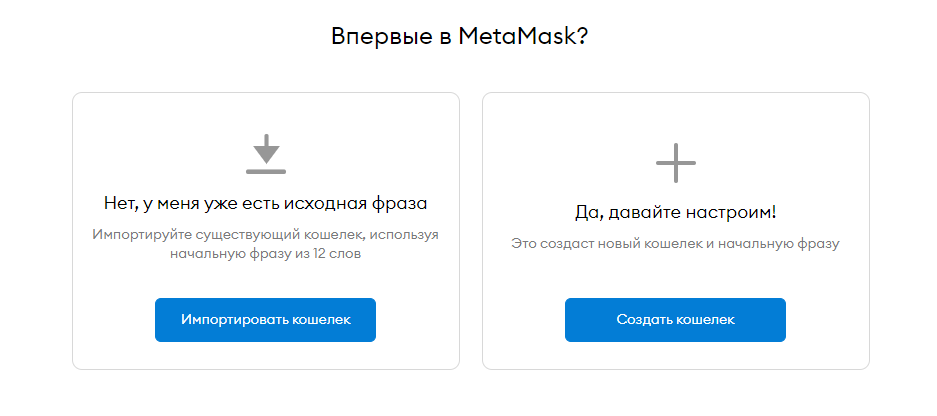
- Если у вас уже есть кошелек, можно его испортировать используя секретную фразу которую вам дали при его регистрации. Если нет — создаем новый. Нажимаем Создать кошелек.
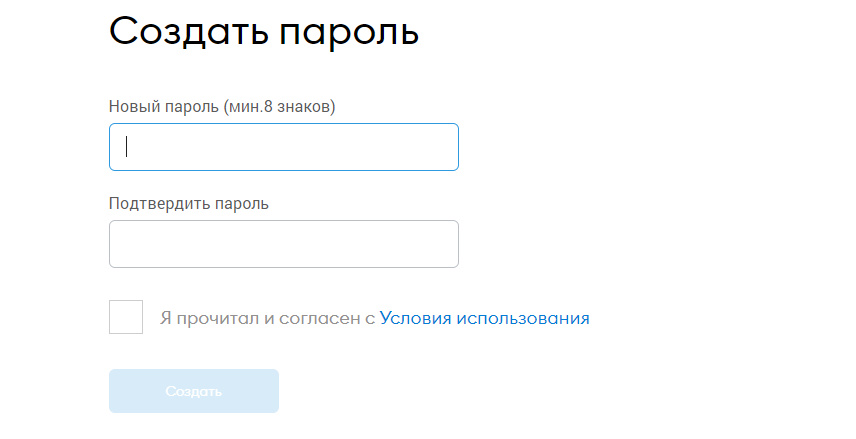
- Соглашаемся с условиями, и создаем пароль. В дальнейшем он понадобится для авторизации на сайтах.
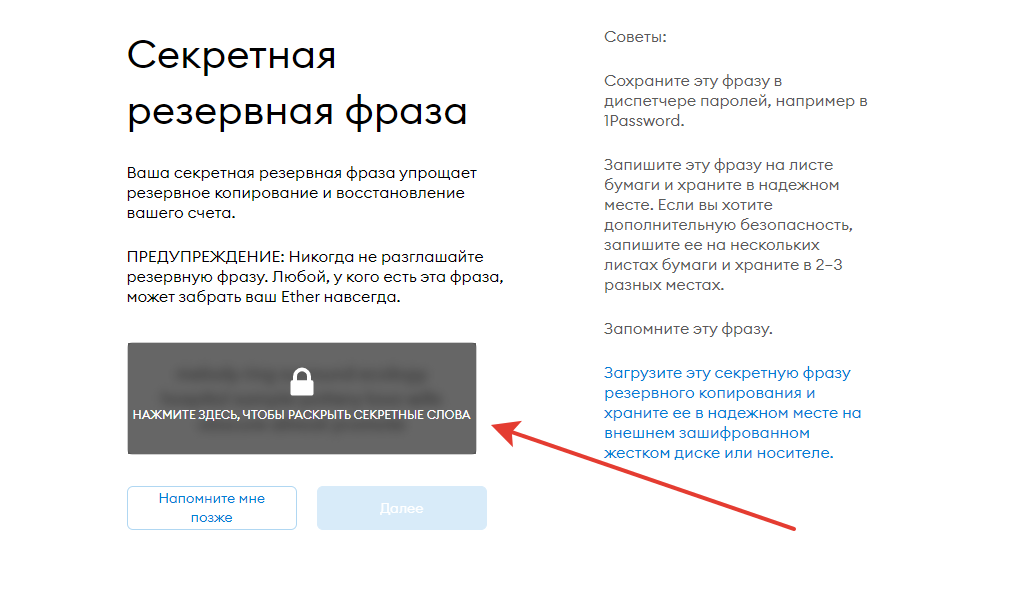
- Далее, что бы была возможность восстановить доступ к кошельку будет предоставлена секретная фраза из 12 слов. Это и есть ключ к вашему хранилищу. Любой кто завладеет фразой — будет новым хозяином кошелька. Постарайтесь сохранить текст в надежном месте.
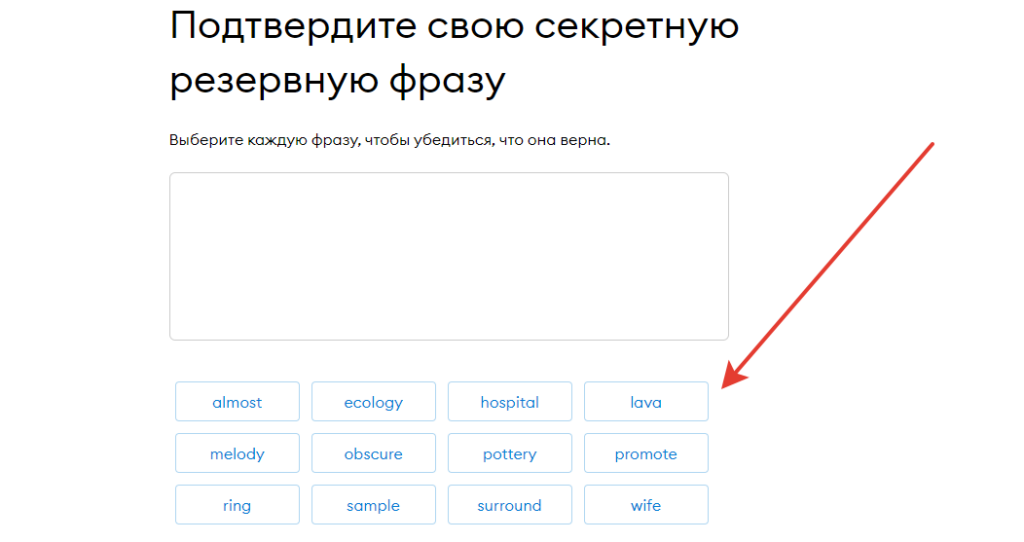
- Следующим этапом Metamask попросит подтвердить сохранность вашей фразы. Нужно выбрать те слова, что вы видели до этого.
- На следующей странице принимаем поздравления от команды Metamask за проявленную внимательность к собственной безопасности.
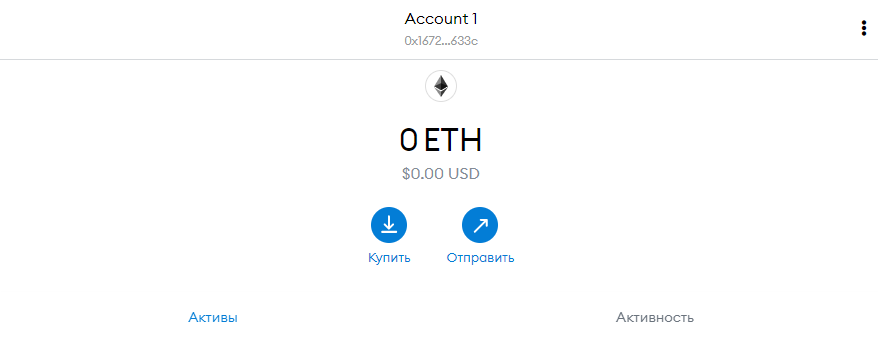
Как пополнить кошелек Metamask с Binance
Так как метамаск считается криптовалютным кошельком, вы можете внести на него цифровую валюту. Рассмотрим как пополнить кошелек на примере биржи Binance. Как и для пополнения своей банковской карты, для этого достаточно знать лишь ваш адрес кошелька.
- Скопируем наш адрес
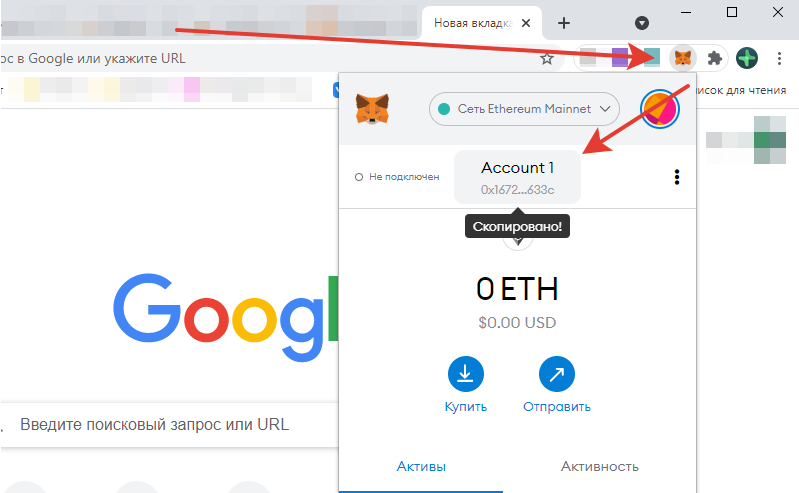
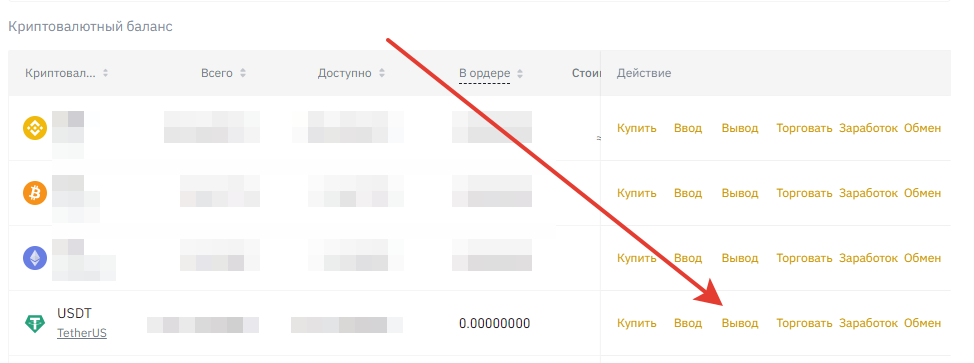
- Рассмотрим пополнение кошелька криптовалютой USDT. Будучи авторизованным на Binance.com на странице кошельков напротив TetherUS выбираем «Вывод»
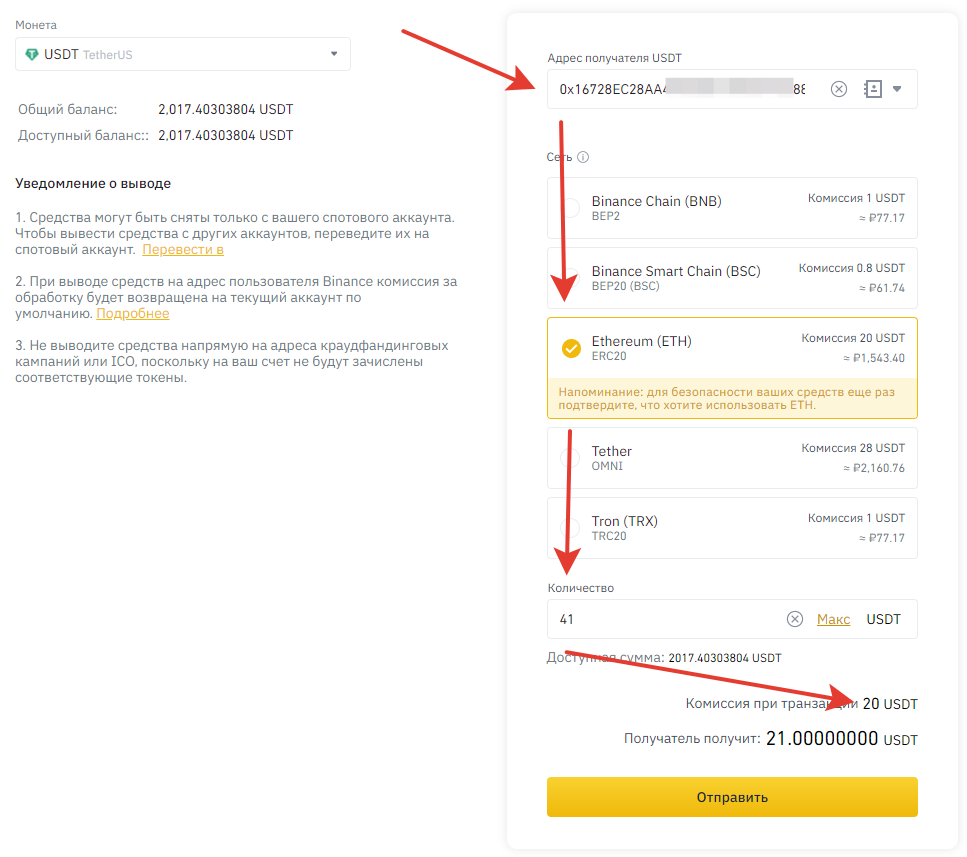
- В следующем окне вставляем скопированный нами адрес, выбираем сеть Ethereum, количество отправляемой криптовалюты. Обращаем внимание на комиссию. Нажимаем отправить.
- На следующем этапе классика. Подтверждение транзакции путем ввода кода высланного на почту. Также на скриншоте видно что нужно ввести код двухфакторной авторизации. Для этого существуют специальные приложения по типу Authy.
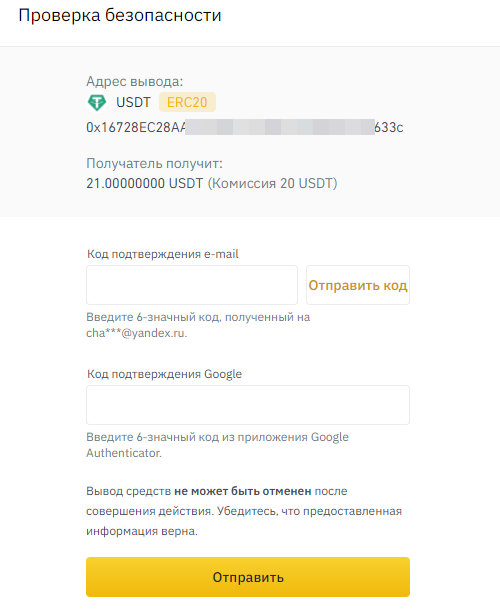
Все. Отправленная вами криптовалюта отобразится на вашем балансе кошелька Metamask. Задержки при отправке могут достигать нескольких минут. Это зависит от загруженности сети блокчейн.
Полученный адрес вашего кошелька можно использовать для переводов в другой криптовалюте и других типах переводов. Например при покупке токенов через обменники или при переводе с других бирж. Главное следите за тем, что бы стандарт при переводе оставался ERC-20.
После перевода средств на скопированный адрес баланс обновится. Во вкладке Активы будет отображаться криптовалюта отправленная вами из другого источника.
Как вывести токены с Metamask
Процесс вывода криптовалюты с кошелька Metamask также элементарна как и процедура пополнения.
В кошельке два типа вывода средств:
- Автоматический. Подразумевается как оплата услуг или покупка товаров на сайтах. Происходит автоматически, нужно только подтвердить транзакцию.
- Ручной. Вывод криптовалюты на другой адрес.
Рассмотрим как работает отправка криптовалюты другому лицу или вывод на другой кошелек в ручном режиме:
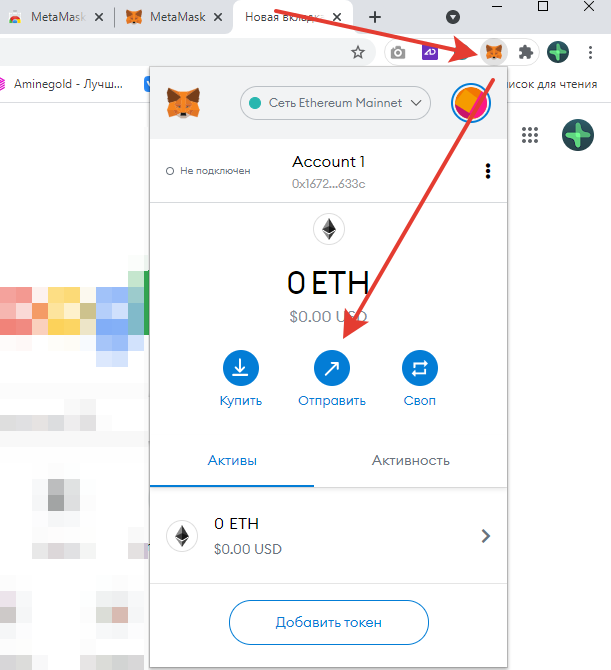
- Что бы вывести достаточно знать адрес кошелька куда отправляются средства. Нажимаем на кнопку отправить
2. Далее просто вводим адрес получателя. Metamask попросит подтвердить транзакцию, и возможно ввести пароль:
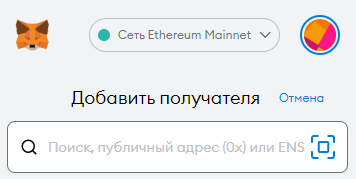
Как подключить Metamask к Binance Smart Chain
Как мы описали выше Metamask поддерживает не только сеть Ethereum, но еще и BSC. Binance Smart Chain — собственный блокчейн биржи Binance. Начинает активнее использоваться в разработке Defi приложений. Работает на стандарте BEP-20.
Что бы подключить блокчейн Binance:
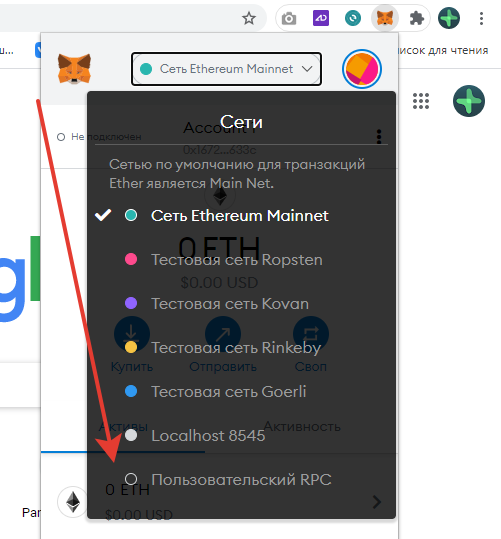
- Выбираем Пользовательский RPC как показано на скриншоте
2. В следующей форме вводим данные:
- Имя сети: BSC Mainnet
- Новый URL-адрес RPC https://bsc-dataseed1.binance.org/
- Идентификатор цепи: 56
- Символ валюты: BNB
- Адрес проводника блока: https://bscscan.com/
3. Нажимаем кнопку сохранить. Готово, теперь у вас появилась возможность получать криптовалюты стандарта BEP-20 в свой Metamask.
Также у вас появилась возможность работать с Defi приложениями и децентрализованными биржами используя Metamask кошелек для авторизации. На сам же кошелек можно переводить средства. Более того скачав приложение Metamask для своего смартфона, можно отслеживать состояние своего кошелька с андроид или айфона.
О проекте
- �� Паблик в телеграм
- �� Мы в твиттере
- О Нас
- Вакансии
- Обратная связь
- Карта сайта
- Политика конфиденциальности
- Пользовательское Соглашение
- Отзывы
ТОП Криптовалют
- Токены криптобирж
- Токены крипто кошельков
- Анонимные криптовалюты
- DeFi Токены
- Криптовалюты NFT
- Стейблкоины
- Токены метавселенных
- Фан токены
THE ULTIMATE GUIDE TO TRANSFER FROM BINANCE TO METAMASK (TOKENS)
You may have bought some cryptocurrencies on Binance, and you may be looking to send them to your Metamask wallet .
However, there are quite a few networks you can choose when withdrawing, so which ones should you use ?
Here’s a complete guide on how you can transfer tokens from Binance to Metamask:
How to transfer from Binance to Metamask
Here are 5 steps to transfer cryptocurrencies from Binance to your Metamask wallet:
- Select the appropriate network on your Metamask wallet
- Copy the wallet address from your Metamask wallet
- Select the cryptocurrency that you wish to withdraw from Binance
- Enter the transaction details and withdraw the cryptocurrency using your preferred network
- Receive the cryptocurrency in your Metamask wallet
In this example, I will be sending ETH from Binance to Metamask , but the same steps can be applied to other cryptocurrencies.
Select the appropriate network on your Metamask wallet
The first thing you’ll need to do is to ensure that you’ve selected the appropriate network on Metamask.
The default network for all Metamask wallets is the Ethereum Mainnet. However, you are also able to connect Metamask to other blockchain networks , such as:
- Polygon
- Fantom
- Binance Smart Chain
- Avalanche
- Arbitrum
- Cronos
- Harmony ONE
- Velas
- HECO
- xDAI
Copy the wallet address from your Metamask wallet
Once you have selected the appropriate network on your Metamask wallet, you will need to copy the deposit address from your Metamask wallet .
The deposit address for any of these networks will be the same, as they are all EVM-compatible networks.
However, to view your cryptocurrencies on a certain network, you will still need to add that network to your Metamask wallet.
If you are finding it hard to remember all of these long deposit addresses , you may want to consider simplifying them using Unstoppable Domains.
This allows you to send crypto to a .crypto or .wallet address , which makes it much easier to transfer cryptocurrencies between platforms!
Select the cryptocurrency that you wish to withdraw from Binance
Once you have copied the address from Metamask, you will need to go to Wallet ‘, and then ‘ Fiat/Spot ‘ on Binance’s platform.
Once you’re there, you can search for the cryptocurrency and then select ‘ Withdraw ‘.
You may want to note that you won’t be able to send BTC to your Metamask wallet.
Enter the transaction details and withdraw the cryptocurrency using your preferred network
The next step will be to enter the transaction details.
After pasting the deposit address from Metamask, Binance will show you the possible networks that you can use to withdraw to your wallet:
- BNB Smart Chain (BEP20)
- Ethereum (ERC20)
- Arbitrum
You may want to note that you aren’t able to send ETH via the BNB Beacon Chain (BEP2), as this network is not supported on Metamask.
Since the deposit address is the same for all 3 networks, you will need to select the correct network to send your tokens with .
If you want ETH on the Ethereum Mainnet, you will need to select ‘ ERC20 ‘.
However, if you want ETH on the BNB Smart Chain, you will need to select ‘ BSC ‘, and the same will apply for Arbitrum.
The BEP20 version of Ethereum is also known as Binance-Peg Ethereum, and you can find out more about this here.
Receive the cryptocurrency in your Metamask wallet
After the transfer has been initiated, you will receive ETH in your Metamask Wallet.
The time taken to send ETH over will heavily depend on the congestion of the network that you used .
These are the general steps for how to send Binance to your Metamask wallet. For steps that are specific to the cryptocurrency that you wish to withdraw , you can check out the guides below:
How to transfer USDT from Binance to Metamask
To send USDT from Binance to Metamask, you can do so using the ERC20 or the BEP20 networks .
Here are the networks that you can use to send USDT from Binance to Metamask:
You may want to note that you cannot send USDT via the Solana, BEP2 or TRC20 networks as Metamask does not support these networks.
To view the USDT balance on your Metamask wallet, you can check out my guide here for more information.
I believe you find this guide helpful ��
Follow me for more crypto guides, news, and updates, and don’t forget to share with your friends and family ��
See you in the next guides, take care ��
Отказ от ответственности: на платформе опубликованы материалы и мнения третьих лиц. Не является финансовой рекомендацией. См. Правила и условия.
THE ULTIMATE GUIDE TO TRANSFER FROM BINANCE TO METAMASK (TOKENS)
You may have bought some cryptocurrencies on Binance, and you may be looking to send them to your Metamask wallet .
However, there are quite a few networks you can choose when withdrawing, so which ones should you use ?
Here’s a complete guide on how you can transfer tokens from Binance to Metamask:
How to transfer from Binance to Metamask
Here are 5 steps to transfer cryptocurrencies from Binance to your Metamask wallet:
- Select the appropriate network on your Metamask wallet
- Copy the wallet address from your Metamask wallet
- Select the cryptocurrency that you wish to withdraw from Binance
- Enter the transaction details and withdraw the cryptocurrency using your preferred network
- Receive the cryptocurrency in your Metamask wallet
In this example, I will be sending ETH from Binance to Metamask , but the same steps can be applied to other cryptocurrencies.
Select the appropriate network on your Metamask wallet
The first thing you’ll need to do is to ensure that you’ve selected the appropriate network on Metamask.
The default network for all Metamask wallets is the Ethereum Mainnet. However, you are also able to connect Metamask to other blockchain networks , such as:
- Polygon
- Fantom
- Binance Smart Chain
- Avalanche
- Arbitrum
- Cronos
- Harmony ONE
- Velas
- HECO
- xDAI
Copy the wallet address from your Metamask wallet
Once you have selected the appropriate network on your Metamask wallet, you will need to copy the deposit address from your Metamask wallet .
The deposit address for any of these networks will be the same, as they are all EVM-compatible networks.
However, to view your cryptocurrencies on a certain network, you will still need to add that network to your Metamask wallet.
If you are finding it hard to remember all of these long deposit addresses , you may want to consider simplifying them using Unstoppable Domains.
This allows you to send crypto to a .crypto or .wallet address , which makes it much easier to transfer cryptocurrencies between platforms!
Select the cryptocurrency that you wish to withdraw from Binance
Once you have copied the address from Metamask, you will need to go to Wallet ‘, and then ‘ Fiat/Spot ‘ on Binance’s platform.
Once you’re there, you can search for the cryptocurrency and then select ‘ Withdraw ‘.
You may want to note that you won’t be able to send BTC to your Metamask wallet.
Enter the transaction details and withdraw the cryptocurrency using your preferred network
The next step will be to enter the transaction details.
After pasting the deposit address from Metamask, Binance will show you the possible networks that you can use to withdraw to your wallet:
- BNB Smart Chain (BEP20)
- Ethereum (ERC20)
- Arbitrum
You may want to note that you aren’t able to send ETH via the BNB Beacon Chain (BEP2), as this network is not supported on Metamask.
Since the deposit address is the same for all 3 networks, you will need to select the correct network to send your tokens with .
If you want ETH on the Ethereum Mainnet, you will need to select ‘ ERC20 ‘.
However, if you want ETH on the BNB Smart Chain, you will need to select ‘ BSC ‘, and the same will apply for Arbitrum.
The BEP20 version of Ethereum is also known as Binance-Peg Ethereum, and you can find out more about this here.
Receive the cryptocurrency in your Metamask wallet
After the transfer has been initiated, you will receive ETH in your Metamask Wallet.
The time taken to send ETH over will heavily depend on the congestion of the network that you used .
These are the general steps for how to send Binance to your Metamask wallet. For steps that are specific to the cryptocurrency that you wish to withdraw , you can check out the guides below:
How to transfer USDT from Binance to Metamask
To send USDT from Binance to Metamask, you can do so using the ERC20 or the BEP20 networks .
Here are the networks that you can use to send USDT from Binance to Metamask:
You may want to note that you cannot send USDT via the Solana, BEP2 or TRC20 networks as Metamask does not support these networks.
To view the USDT balance on your Metamask wallet, you can check out my guide here for more information.
I believe you find this guide helpful ��
Follow me for more crypto guides, news, and updates, and don’t forget to share with your friends and family ��
See you in the next guides, take care ��